Some links spread across the internet may compromise the calendar application, here is the solution to the problem

So that you understand the problem of hacking the calendar application, you have the message that was sent to us from an iPhone friend, Islam “Mahmoud” ...

I was downloading videos from one of the sites and it used to open many sites, then I clicked by mistake on one of these sites and then something happened and these things began to appear in the picture in the calendar program every day and I do not know how to cancel them. Has the calendar app been hacked and can you help me?
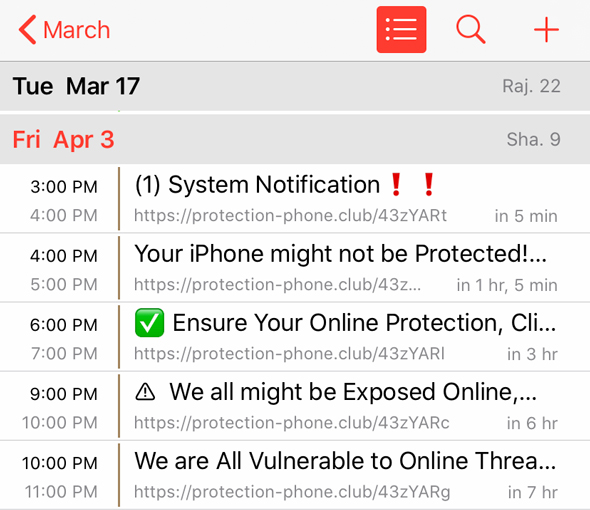
Some links spread across the internet may compromise the calendar application, here is the solution to the problem


Was it really done breakthrough Calendar app?

In fact, no, the calendar application was not hacked, and what happened is that you clicked on a link that subscribes to an automatic calendar, and this service is known. For example, you can subscribe to a calendar that includes national holidays for your country and thus put all national holidays in the calendar application, and this subscription feature is really useful, But it seems that the hackers exploited this feature to place ads inside your calendar application, and also put links that may lead to the penetration of your device already if you do not notice.

The solution?

The solution is simple, simply cancel this subscription, and these are the steps ...
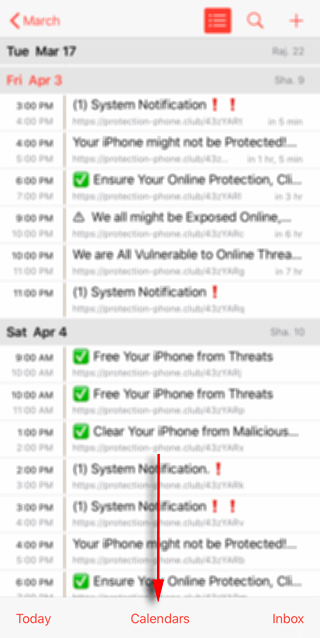
Calendar app hack

● Open the "Calendar" application.

● Click on the "Calendars" button at the bottom

● Go to subscriptions that you do not recognize and add yourself

● Click on the info button

● Choose "Delete Calendar"


If there is no option to delete and only you can hide this calendar from appearing, try these steps ...

● Open the phone settings

● Click on the Accounts and Passwords option
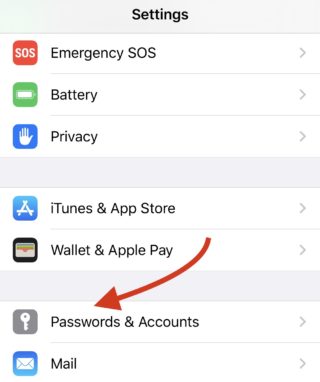
Calendar app hack

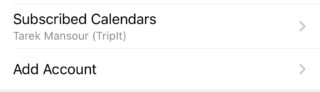
● Open Calendar subscriptions

● Click on the subscription you want to delete and click Delete Account
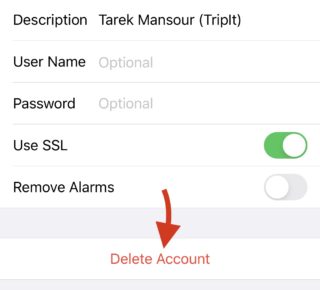
Calendar app hack


Tips

Very clear, do not click on an anonymous link, do not click on links that come to you in messages, and also when the system asks you to give permission for anything, make sure that you trust this site and this application before agreeing ...

We think that these things are self-evident, but sometimes the error occurs even with professional followers of the iPhone Islam site, but I must be reminded.

Has this situation happened to you before and clicked on a link that led to problems with your device? Are you attentive to these matters?

Source:

apple

22 comment

comments user
000

Saleh Amin Ghasram Mobile: 8 plus

comments user
Acid

The two solutions did not work for me
I can't find subscribing to calendars or passwords

comments user
Nye

Please, I followed all the steps, but in the first I did not find deleting the calendar, and only in the second it appeared in my passwords list
I never found a calendar
what is the solution?
Thank you

comments user
Yasser Hussain

May God reward you for the useful information you provide to all users 🌹🌹🌹

comments user
ipower_man

Thank you

comments user
Ali Hussein Salem Saleh Al-Mirfadi

Yes, I personally faced this problem four days ago. I don’t know how to delete the calendar. He always told me every time I cleaned the iPhone with viruses until the calendar notifications stopped

comments user
Mohammad Anis

Thank you for the useful information

comments user
Islamawe

Mother

comments user
iMuflh

God bless you, thank you

comments user
Abdullah

May Allah reward you
Finally the problem is solved

comments user
Moe

May Allah reward you

comments user
Muhammad Alhumaid

Peace be upon you. It actually happened to me, and after I clicked on the iPhone link, it started commenting and taking me out of Safari or any other program automatically. What is the solution?

comments user
Ashrafelsawi

Peace, mercy and blessings of God be upon you. IPhone Islam. May God reward you for the article. It actually happened to me, and that was after downloading the Zoom app, and at a rate of every ten minutes, a very annoying message comes up saying that I am a hacker and I have to download a specific virus protection program. Please help as I tried After reading the article to no avail

comments user
Rakha jihad

May Allah reward you with wonderful good

comments user
Mohamed Bouyaoumad

The same thing happened to me about more than a month ago, and I was able to overcome the problem in the same way. I found an explanation for it by searching the Internet
God bless you and may God reward you with the best reward

comments user
Shrief Shokdef

Wonderful information

comments user
Khaled Sherif

Great article Thank you very much

comments user
Abdullah Abu Radwan

May Allah reward you. I had the problem and it was distressing

comments user
Khaled Abdel-Azeem

I actually got to me on the EGBEST website and by mistake I clicked Subscribe and every bit of notifications with ads
thank you so much

comments user
HANY ALNADY

Thank you very much for the clarification

comments user
Hado55o Ali

Thanks

comments user
Dred Lindbergh

Thank you

Leave a response

We are not responsible for any misuse of the information mentioned above. IPhone Islam is neither affiliated nor represented by Apple. IPhone, Apple and any other product name, service names or logos referenced herein are trademarks or registered trademarks of Apple Computer.

العربية简体中文NederlandsEnglishFilipinoFrançaisDeutschΕλληνικάहिन्दीBahasa IndonesiaItaliano日本語한국어كوردی‎فارسیPolskiPortuguêsРусскийEspañolTürkçeУкраїнськаاردوTiếng Việt