Apple knows very well how to attract us with its stunning device screens, but in our daily battle with “Screen Time,” parents need a quick, secret weapon. Yes, we are all guilty of spending too much time in front of iPhone and iPad screens. And if it is difficult for us as adults who use these devices for work, what about the “doomscrolling” that swallows our children’s minds? Managing this requires great effort and patience, but what if I told you there is a simple solution that takes no more than 30 seconds to make your child’s device instantly less attractive?
The screen battle: When the iPad becomes the virtual babysitter
According to the American Academy of Child and Adolescent Psychiatry (AACAP), children aged 8 to 18 spend up to 7.5 hours a day in front of screens. Although medical recommendations warn against exceeding one hour per day of high-quality content for children aged 2 to 5, the actual average is closer to two to three and a half hours per day! Even more shocking is that 40% of two-year-olds already own their own tablets.

We know that parents today face immense pressure and increasing financial burdens, making the screen the easiest option as a temporary “babysitter” that gives them some peace. While Apple’s parental control features offer various options, setting them up and monitoring them requires constant time and planning that exhausted parents may not have. And despite leaks suggesting that child safety features will become much easier in the upcoming iOS 27, we are still months away from that. So, here is this quick trick.
The Grayscale trick: Why does it work?
Have you ever wondered why slot machines are filled with bright lights and flashy colors? The answer lies in dopamine. App and game designers are well aware of this psychological trick; they design their products with vibrant, hot colors to keep our minds and our children’s minds in a state of constant stimulation. Colors are the primary visual reward the brain expects as soon as it unlocks an iPhone or iPad.
When you strip the screen of these bright colors and turn it black and white, you remove the “instant visual pleasure” from the game or app. This simple trick will make the screen look “boring” and unattractive to children, making it easier for them to put the device down voluntarily without much fuss.
Step by step: How to turn your iPhone or iPad screen to grayscale?
The process is very simple and only takes half a minute of your time to set up your child’s device. Follow these steps:
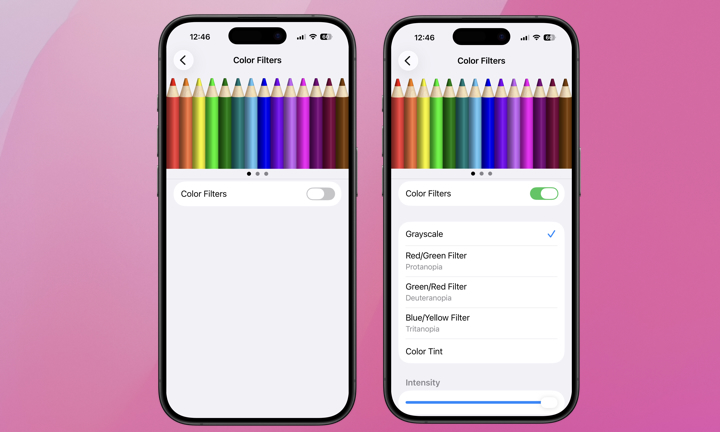
- Go to the Settings app on your iPhone or iPad.
- Scroll down and tap Accessibility.
- Select Display & Text Size.
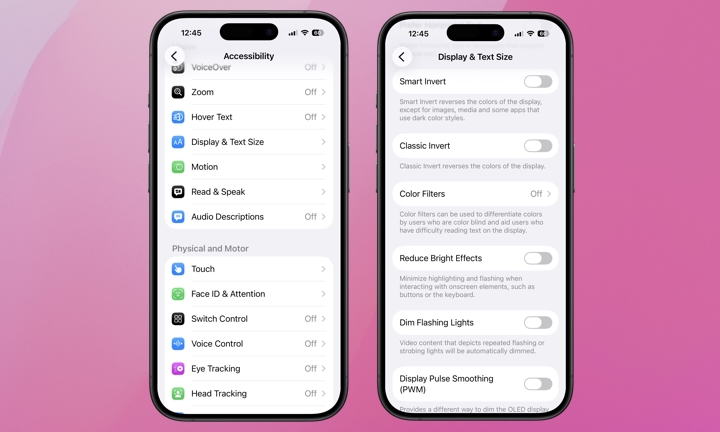
- Tap Color Filters.
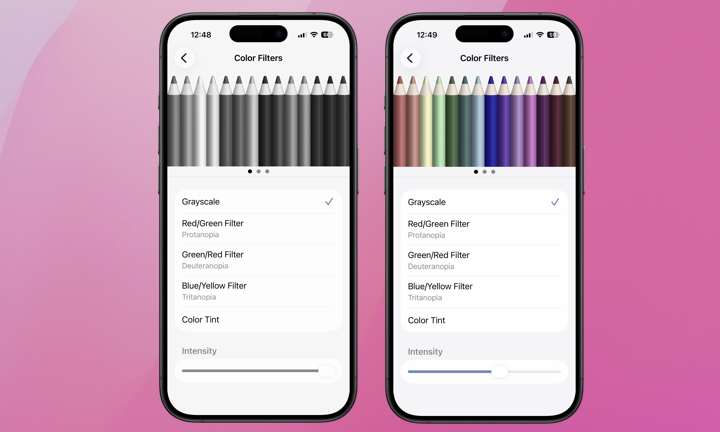
Toggle the “Color Filters” button on, then select the “Grayscale” option. You can also use the “Intensity” slider at the bottom of the screen to reduce color vibrancy completely or adjust it to a level you find appropriate as a middle ground.
This trick may not completely prevent tantrums when it’s time for bed or studying, but it will certainly reduce the screen’s appeal over time and make your child get bored of it quickly. Always remember that this is just a helpful trick and will not affect the type of content your child can access, so it is essential to continue using the parental control tools provided by Apple to ensure your child’s digital safety.
Source:

Leave a Reply