Safari tricks you may not know

Web browsers filled the software store and many of them are of high quality, but the vast majority of iOS device users use the Safari browser that Apple puts with the system, whether for its speed, simplicity of use or battery saving, all has its reason, but not everyone who uses the browser is fully aware of its advantages, so it is presented to you today. Tricks you may not know in Safari.
Safari tricks you may not know


Open a new window or close all windows
safari-screenshot1

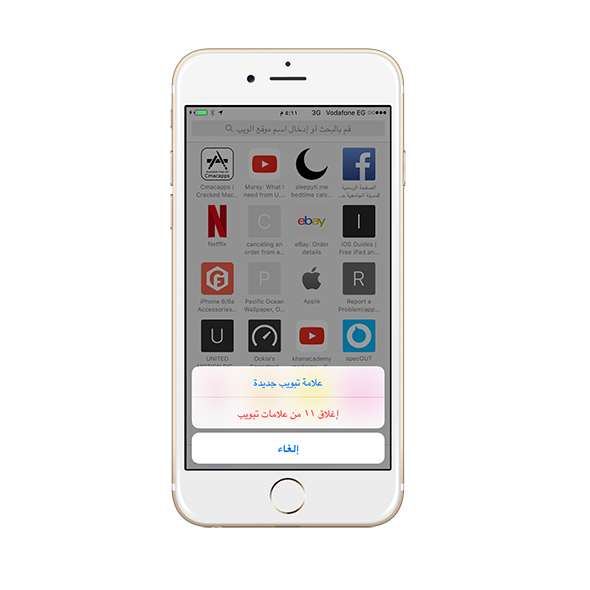
Instead of the usual ways to do these things, you can press and hold the switch windows button, and you will see two options, one to open a new window and the other to close all windows.


Access to recently closed windows
safari-screenshot4

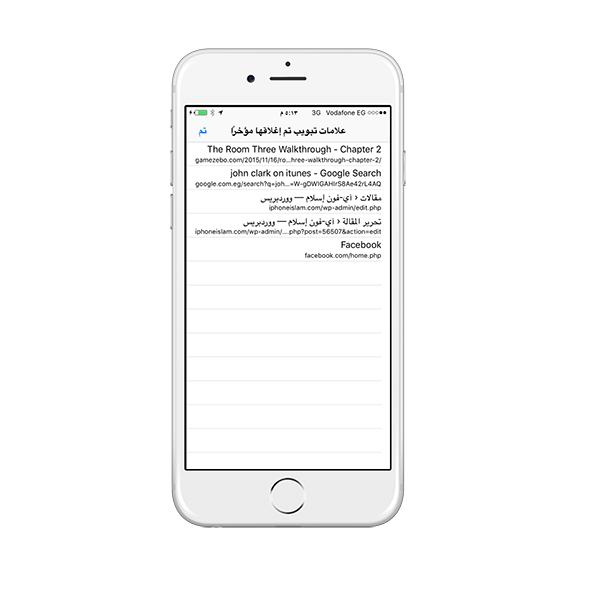
Have you ever wanted to return to a window that you closed to lose something, or even close a window by mistake and want to return to it quickly? You can return to the windows you closed soon by pressing the switch windows button and then long pressing the (+) sign for adding a new window.


Access to forward or backward browsing history
safari-screenshot2

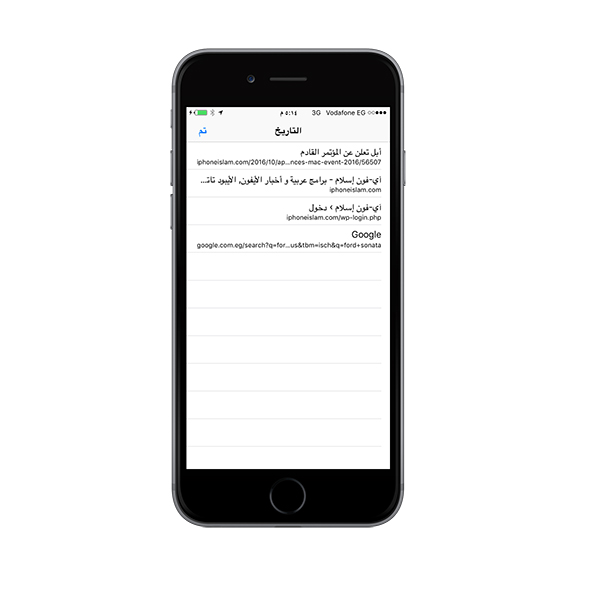
You opened several pages in a row, and you want to return to a specific page? You can do this by long pressing the back button in the browser, and it will display all the previous pages. You can also do that with the “forward” button, and the pages you returned from will appear for you.


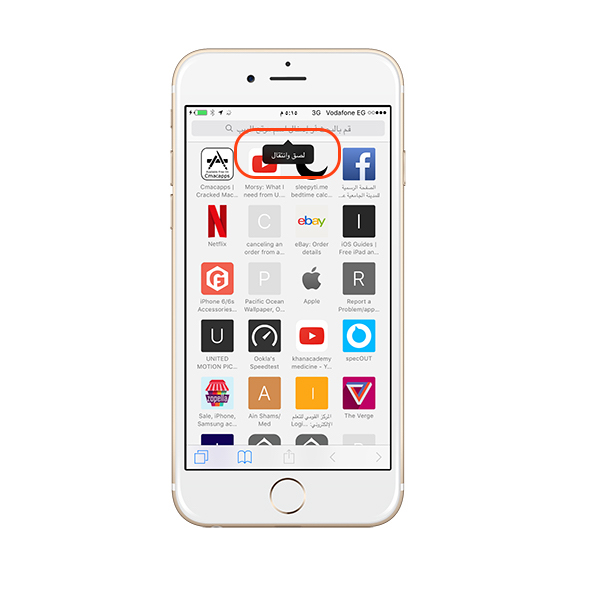
Quickly go to copied links
safari-screenshot3

If you have copied a link to a specific site you want to go, you can long press on the search bar, and it will give you the option to go to the copied link directly.


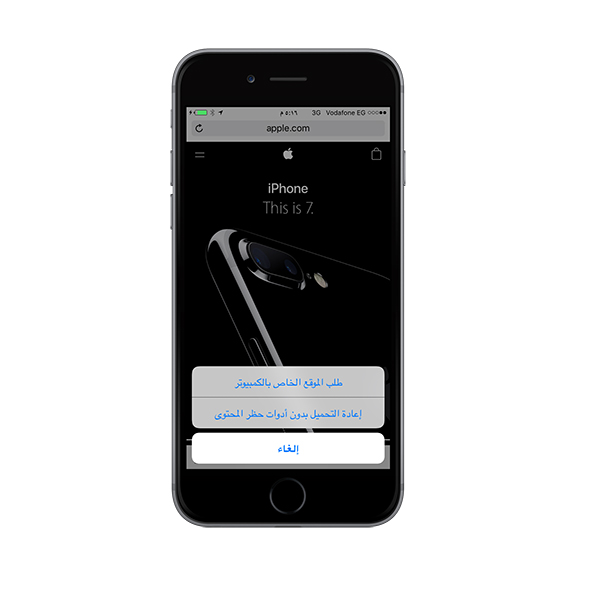
Request to release the computer from the pages
safari-screenshot5

You can long press the “Refresh” button and you will be able to choose to go to the full computer version of the site or even download the page without blocking ads (if you are using an ad-blocking program).


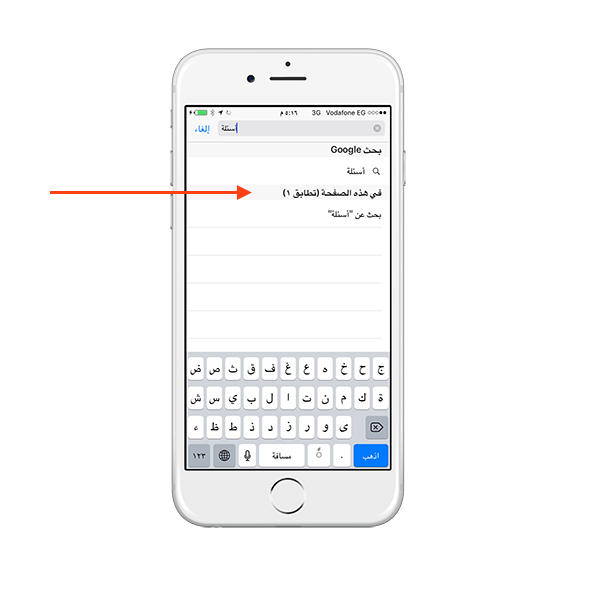
Find items on the page
safari-screenshot6

You may know that you can search for a specific word on any page by selecting it in the sharing options, but what is new here is that you can also do this quickly by typing what you are looking for in the Safari search bar and choosing from the search results within the page.


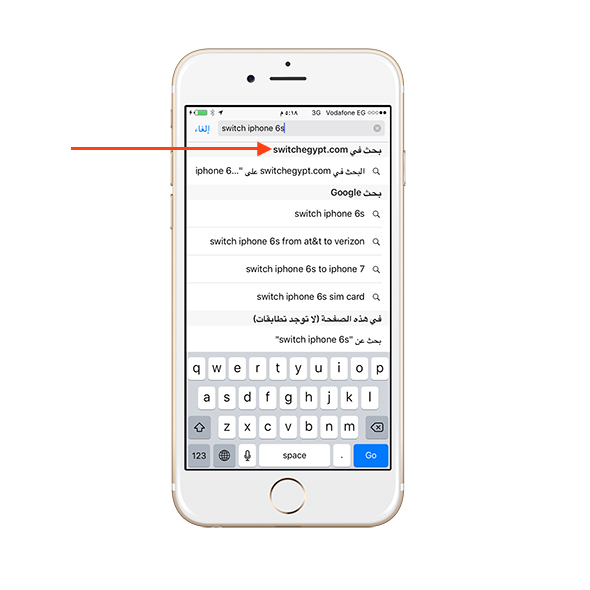
Fast search within sites
safari-screenshot7

Lots of websites offer internal searches to find whoever is in them. For example, the iPhone Islam site allows you to search for articles and the Amazon site where you search for products. If you used the internal search for a site once, you can do so again by typing the name of the site in the search bar of Safari and then typing what you want to search for. To make sure the feature works for you, go to Settings -> Safari -> Quick Website Search.


Quickly add sites to your reading list or bookmarks
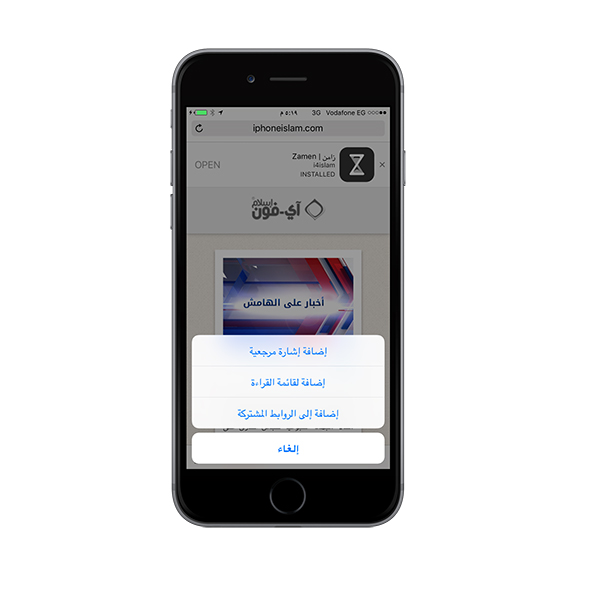
safari-screenshot8

If you press and hold the Bookmarks button in Safari, the browser will give you options to add the site to your bookmarks, reading list or even shared links.


Post links
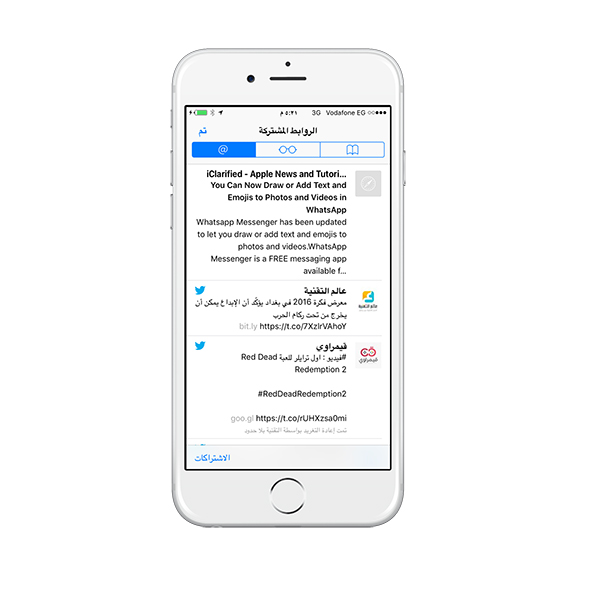
safari-screenshot9

Perhaps this feature is the least known of all the Safari features, as it is similar to an RSS feed for gathering news, articles, or anything new. You can add any website to the shared links by clicking on Share and then clicking on the Share Links button. You can then access what is new from this site by clicking on the Bookmarks button, then clicking on the "Shared Links" tab, which resembles the "@" sign.



Do you use Safari? What do you think of these tricks? Share with us any tricks you may know

37 comment

comments user
waterghazal

valuable information

comments user
Aisha

The article is excellent for information I did not know thank you

comments user
Radwan al-Maghribi

If you synchronize with you, this will make us lose the desire to follow you, for Calitones has become useless ...
I comment, I regret that I commented because I can no longer track my comments and I cannot find them quickly, which makes me lose the desire to comment.
I was very happy when I found interest in my comments, but now I do not find my comments, which are lost in the corridors of Zamen, who swallowed the most wonderful Arabic application called iPhone Islam.
It would have been better to let iPhone Islam walk on its path to glory and launch this time as a new application. But unfortunately, those in charge of the application do not care about our opinions. Thank you.
Be democratic, accept criticism and publish it publicly. I can someday find my comment on this and see what others think of it.
I have a suggestion for the developers of Sync: Can't you, when I go to the comments and click on my comments, to appear to me, regardless of their location ... and not that I have to find the topic on which I commented to find my comments. Thank you.
God is the helper.
Radwan al-Maghribi.

    comments user
    Mansour Al-Salami

    If he doesn't like you, he doesn't like it

    comments user
    Amr Yousry

    Well

comments user
maj3d. s

I like the small hidden features. Honestly, I did not know how to close all pages and some second features. This is what is distinguished in the iOS system. Small things, but if the user knew it and discovered it, he would use it a lot. Thank you for this article. Honestly, it helped me a lot.

comments user
iMrRise

Safari I deleted it because it failed, and the best is Chrome

    comments user
    Bin Rajab

    Safari does not delete it and it is better than Chrome

comments user
amer

I didn't know this before

comments user
Youssef Al-Fifi

Thank

comments user
Patron

Safari is bad and it never deserves to be the default browser
Also, Google, for example
But there is a really old application that is supposed to be the default browser for all devices because of its quality, smoothness, all the features, and cloud storage. It is UC Browser, which is available on iOS and Android.
I have been using the app since the Nokia N95 was released.
I am that time, this link is on the Apple Store
UC Browser - fast browsing, powerful ad-block by UC Callmaster Mobile Co., Ltd
Https://appsto.re/us/a_XF-.i

comments user
Despair

Thank you iPhone Islam and special thanks to 9to5mac and jeff benjamin

    comments user
    crcking

    👍🏻👍🏻

    comments user
    Bin Rajab

    Strong strong strong __9 to 5 mac and jeff benjamin

comments user
Al Omari

A special article and I gave it my favorite ... Thank you for your efforts, Yvon Aslam. Continue. We listen to you and learn from you

comments user
HaMeD AlKaZaZ

The article is useful and wonderful, but unfortunately it was transferred from a foreign website, and I have no problem with that if you mentioned that it was transferred and you mentioned the source.
The paradox here is that you instilled in us the idea of ​​appreciating the effort of others by repeatedly talking about the importance of buying applications and ..
Please any justification, such as that they are pre-existing things and do not object to displaying them with their presence on other sites that will put you with those who justify hacking applications
Please apologize to your fans and followers and mention the source without justifications
Also, please do not delete my comment 😄

    comments user
    yaser

    My brother, I thank their efforts in translation ... Not everyone is fluent in the English language ...

    comments user
    HaMeD AlKaZaZ

    Their efforts are grateful, brother
    But that does not prevent him from attributing the credit to his family
    I mentioned that I have no problem
    The problem is that they do not refer to the source
    I follow the Technology World website, for example, and they transmit many articles from foreign websites, but the truth is always mentioned in the end of the source article, but they often put the link

    comments user
    Bin Rajab

    Your words, yes, speak

comments user
Zoom

More than great information, thank you

comments user
alessaa66

Thanks for your efforts

comments user
ehabdawoud

May Allah reward you
I have a problem with safari
It is at any site that it converts to other sites and ads (ad pages)
I tried ad-lock programs, and no program worked for me
This is true with many, very many sites
Please inform him what is the solution and what is the cause of the problem
May Allah reward you all the best

comments user
Dr.. Ahmed Mahmoud Abdel Salam

If Apple does not announce these benefits, how can you know about it? !!
A distinguished article, frankly, and thank you very much for the great effort

    comments user
    Beauty

    https://youtu.be/n4MmGNFf7q0

    This is the video from which the entire article is derived

    comments user
    Bin Rajab

    Great oh i4
    But this is not their habit, as they have taken a lot of articles from this source and pointed to it at the bottom of the article, and this mistake may have been made by the publisher of the article.
    In general, Al-Shater's mistake is said to a thousand

comments user
Nasser Al-Ziyadi

Soooooooooooooooooooooooooooooo

comments user
Mohammed Jassim

thank you. A trick I discovered myself!> When you open more than one page in Safari, you can arrange them according to what you like by pressing the switch windows button, then all pages will appear by long pressing on any page and then moving them (above) or (under) that you can arrange the pages as you want. This is useful for arranging the pages in order of importance!

comments user
Mohamed Imbe

Beautiful .. Thank you 👍

comments user
Al-Mahlhal Ibn Rabih

Is there a jailbreak Ipad 4 or ios10.0.2 will be released soon

comments user
alfarsi99

Best Browser ... Always forward, Apple

comments user
M.n980

One of the tricks I used is to delete all links from Safari

comments user
Ali Hussein Salem Saleh Al-Mirfadi

I have a question: why the voice over reads in the second sources the full story. On the iPhone, Islam does not read the full news. I know what is the reason for the Afoun Salam page and not the application

    comments user
    Ibrahim

    Hatta me, but I am in all articles

    comments user
    Bin Rajab

    Hey Alaa, when you use the dictation feature, correct the mistakes so that the comment appears well.
    In general, there is a problem in the application with some articles, which is often due to the large images inside the article, so the voice is more difficult to skip it and jumps to the buttons below.

    comments user
    Bin Rajab

    Update application and small font size from system settings

comments user
Ahmed

Nice article thanks
And also when you press and hold the back button. Date appears

    comments user
    Bin Rajab

    These others are mentioned in the article

Leave a response

We are not responsible for any misuse of the information mentioned above. IPhone Islam is neither affiliated nor represented by Apple. IPhone, Apple and any other product name, service names or logos referenced herein are trademarks or registered trademarks of Apple Computer.

العربية简体中文NederlandsEnglishFilipinoFrançaisDeutschΕλληνικάहिन्दीBahasa IndonesiaItaliano日本語한국어كوردی‎فارسیPolskiPortuguêsРусскийEspañolTürkçeУкраїнськаاردوTiếng Việt