We all know that the FaceTime service is prohibited in a number of Arab countries, especially the Gulf, for various reasons (which many do not know), and this ban is from the governments of these countries and not from Apple. Which makes many people wonder about how to activate it and whether this blocking can be removed. And the answer was always "no", but now we can say that the answer has become "yes". You can activate the FaceTime service in the Arab Gulf states and Saudi Arabia through the jailbreak. Find out how.

When the traditional methods are unable to provide a solution here, the role of the jailbreak and the world of cydia comes in. Despite their many risks to the security of devices, they still have a benefit, such as in our case, activating FaceTime.
Apple devices around the world are the same and there are no changes in them, but at the request of some countries, Apple stops some services, as it gives an order to the system that if it finds the country / network with the model number of certain devices, then turn off the FaceTime feature. But with this method you will be able to add the service activation command inside the system files.
The method is exclusive for jailbreak users only on iOS 8
If you want to jailbreak, check this link
1
Open Cydia, then go to the Sources section and add the following source
http://apt.chinasnow.net

2
Find and download the following tools
- iFile
- CommCenter Patch for iOS 7
- TetherMe for iOS 8
3
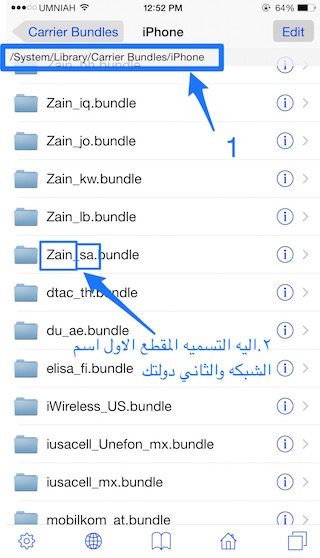
Open iFile and go to the next directory
/ system / library / carrier bundles / iphone
4
You will find a list of iPhone operators around the world
Find the network that you use your device on.
5
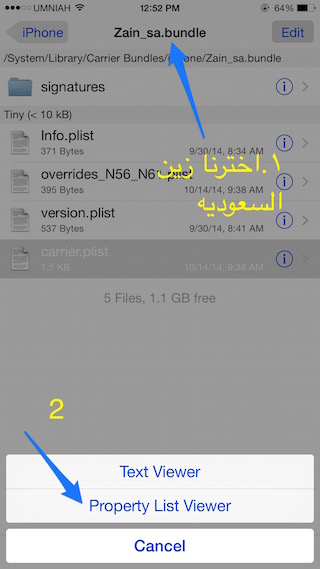
Open the folder for your network that you found in the previous step
And look for the Carrier.plist file, and this file contains the phone commands that it executes in this network
6
Open the previous file and choose Property List Viewer from the options that appear.
7
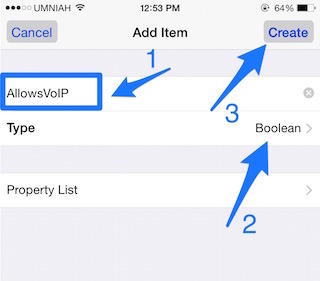
Click on the add button (+) which is located in the lower left, and it will show you the ability to enter new data. Record the name “AllowsVoIP” in the first box, then from the second box “Type” choose the Boolean type as it appears in the following picture and after you finish writing press Create
8
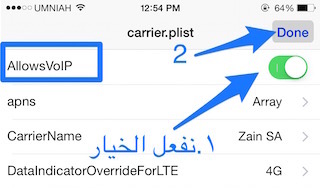
It will return you to the first page, and you will find the option that you added, a box to activate it appears in front of you, so activate the option.
9
Turn off the device by long pressing the power button, then open the device again and repeat the command until you find the FaceTime application appears in front of you, then open it and enter the data for your account.
Congratulations, you now have FaceTime on your device :)
Information: There is news that the official unblocking of FaceTime is coming soon, but we do not know the extent of this news, so if you want to wait and not do a jailbreak, the decision is up to you.
Did you try the method and it worked for you? Do you think that activating FaceTime may push you to jailbreak? Share your opinion
Article transported (with permission) for the benefit of the exclusive source:





178 comment