One of the major drawbacks of the iPhone as a result of the restrictions imposed on it is the inability to roam in its files, review them, convert them into a storage device, transfer files or review what is inside it, including pictures and audio, because the process of exchanging files in it is subject to synchronization only with iTunes and its audio libraries and other types of files, and this Of course, it does not apply to devices that have jailbreak, as it is outside this description.
But a program iPhoneExplorer It came to solve this problem and to allow you the freedom to roam the iPhone, transfer files of various kinds from it and to it, and even do some other operations even if you were not from whom you did a jailbreak to a certain extent as this program gives better features for jailbreak devices such as the possibility of access to the real root of the device And then access to emails, contact addresses, SMS and voicemail.

The program is easy to operate and use, with a nice interface, and a small size of only 1.7 MB, and among the other features of the program:
- Work with all generations for all Apple devices, iPhone, iPod touch and iPad.
- Complimentary.
- No need for a jailbreak to work.
- Compatible with Windows and Mac systems.
- Transferring the iPhone to a flash disk to transfer files to and from it via USB
- The ability to create folders in it and modify or delete files and folders on it.
- The ability to review files and watch before transferring them.
- It contains an internal image browser to view it without the need for any external program.
- The ability to copy files from and to the iPhone using Drag & Drop
- The ability to access emails, SMS and voice messages and save them in case of jailbreaking the iPhone.
- Automatic software update in case of new versions.
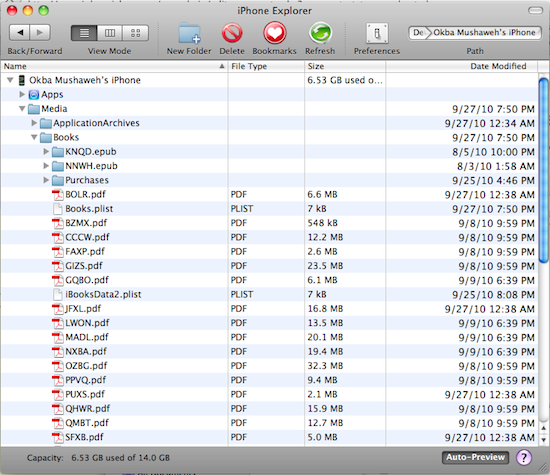
Our experience with this program was great, as it was easily and without any problems. Once you connect the iPhone to the computer and run the program, a list of its internal folders will appear immediately, where you can browse and navigate between them.
There are several types of folders and files, as some of them prefer not to tamper with it or change anything with it, and in general there are two main types of folders that will appear to you (in our experience this used iPhone did not have a jailbreak so the appearance may differ with the jailbreak) There is a folder Apps, which contains the programs and applications in your device and what is related to them, and there is a Media folder, which may be your most work on it, as it contains pictures, videos, books and other types of files used in the iPhone.
For example, you will find the photos stored in the iPhone at the following path: iPhone Name> Media> DCIM> 100Apple
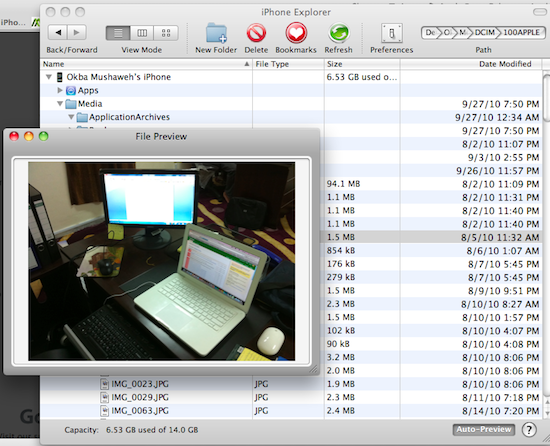
By simply clicking on the image, you can view it in an internal browser integrated with the program.
But we could not see the content of a MOV video file, but an MP4 video file was able to review it. We also did not have access to the podcast files, for example, and we do not know whether the commanding person needs a jailbreak or not!
The program specifies for you ways to display files within the three known patterns in Mac, and it also shows you the total capacity of the iPhone and the remaining capacity as well.
The program may be subject to your creativity and do it by browsing through folders and files, but the main and major benefit of this program remains in your creation of your own folder and uploading whatever files you want to it to turn into a useful storage method for you and whoever you want.
The program works on PC and MAC devices
It can be downloaded from here



155 comment