Control your phone from Windows (veency)

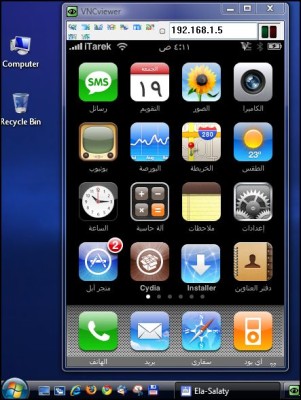
I could not resist sharing this wonderful program with all the visitors of the iPhone site Islam, the program "Veency" is from the same program programmer Video recording For iPhone, he is also the programmer for the Cydia program  Jay Freeman. This time he did J- By creating a program that we really needed, through this program, you can control the iPhone from any operating system, whether Windows, Mac or Linux, using a VNC program such as RealVNC or any other VNC program. Then you can fully control the iPhone through the VNC, and imagine what you can do with me .. You can write messages via the large computer keyboard and send them via your phone, you can use Notes on the iPhone and write also via the keyboard. The truth is not limited to what can be done with this wonderful tool. It is enough that you can easily take a screenshot of the LOCK screen : )
 

How to use the program

* Install Veency on your phone via Cydia
* Download a program like RealVNC Or for Mac Cotvnc Or any program that displays the VNC
* Launch RealVNC Viewer and put your phone's IP address, which you can find through Wi-Fi settings
* Now, a message will appear on your phone screen asking if you want to share your phone with the computer, press Accept


27 comment

comments user
Hillall

Thank you, Ayo, Technologists

comments user
Rioni

My version is 5.0.1 and I can't download it to Cydia. Give me a solution.

comments user
lolo

Should the computer and iPhone be on the same wireless?
For example, if someone knows my right IP, he can enter from his device on my iPhone even though it is not the same wireless network?

    comments user
    Blog administrator

    This will be difficult, because your router will have a firewall for any external IP connection

comments user
meso

Thank you for the program

But, unfortunately, it did not work, I applied the method, but when I put the IP and work as a connection, a message appears saying "No line", I can call

It is possible to inform you in detail if possible

Thank you

comments user
Basel

What a case the whole program

comments user
Jihad Abu Omar

Dear brother, may Allah's peace, mercy and blessings be upon you, and every year and all Muslims are well.
My question: It was very useful to use isms on old firmware 1.1.4, and I have upgraded to the new firmware, but is there a way to download it? I hope you can clarify the answer because I am not experienced enough to work with installer or Cydia.
You also mentioned about Veency, but I never knew how to download it from Cydia. Please advise and thank you very much.
Your brother, Jihad Abu Omar

comments user
Mohammed

Thank you, may Allah bless you

comments user
anasfarraj

can you give the source for the app. to add it to mu cydia sources

comments user
Zeyad

Thanks for the program, but how can I download Veency version 1.1.4 on my phone

? I don't have cydia and I can't see it from the installer? Please reply and thank you

comments user
Abu Nawaf

quotation:
* Launch RealVNC Viewer and put your phone's IP address, which you can find through Wi-Fi settings
-----------------

Q/ How do I get my device's IP address?

I wish you could disconnect my brother, how by using the Wi-Fi settings?

And a thousand thanks for your tangible efforts.

    comments user
    Blog administrator

    You can get the IP address by going to Settings
    Then tap on WiFi
    Click the blue arrow next to the Wi-Fi network your phone is connected to.

comments user
Abo Al-Ezz

What God does not force only in God.

Wonderful .. but more than wonderful ... May God reward you with all the best ..

comments user
Abu Osama A.

Thank you .. a program worth trying and revealing its features and mysteries, and thanks to the creator j

comments user
Muhammad to Radhi

Thank you my teacher for this program

I had been searching for a while for such a program

thanks a lot

comments user
view

God willing, may God bless you, our brother Tariq. You are always distinguished in what you present to your brothers.

comments user
unknown

When I saw the program at the top of the page, I thought it was Arabization.

Sorry for going off topic, but I hope that the translation will be available even before it is completed in the form of a "beta" that is not technically supported, and when purchasing it, the buyer gets a free upgrade to the final version.

In this way, you can quickly find out the defects and we can use our new devices that we have developed to 2.1

Peaceful

comments user
Abu Ryan

God bless beautiful

The problem in the case of writing an Arabic message from the computer keyboard, unknown characters appear

Praise be to Allaah

God bless you

comments user
Akram Alharbi

Nice program thanks

comments user
unknown

I like to add information that you can return to the iPhone home page through the program by pressing the right mouse button in the program
I mean, if you opened the messages and wanted to return to the home page, just right-click anywhere on the screen of the program and you will return to the home page

comments user
unknown

Thank you, brother, Tariq, for the wonderful program

But the question is, can I transfer files between the two devices?

comments user
unknown

Peace, mercy and blessings of God

Welcome, brother Tariq, and whoever is with you

Our program is very wonderful and includes many wonderful services

Thank you, brother Tariq, and thank you for the group and thanks to the programmer

comments user
x

Excellent and useful program

I have been hoping for such a program for a while

But there is a version dedicated to Mac

Because I use Mac

Record my thanks to you for bringing this special program

comments user
sultan

I went to the site several times a day because of Arabization, and in the end I thought that it was Arabization, but by God.

Ok, is there a program that works on Mac

comments user
Abdulrahman

Thank you, but where did the localization update?

comments user
Abdullatif A Alnaim

Thank you, my dear brother. I clicked on the link and it did not work for me. Do you have a link for the Mac or does it also work on the Mac? May God reward you.

Leave a response

We are not responsible for any misuse of the information mentioned above. IPhone Islam is neither affiliated nor represented by Apple. IPhone, Apple and any other product name, service names or logos referenced herein are trademarks or registered trademarks of Apple Computer.

العربية简体中文NederlandsEnglishFilipinoFrançaisDeutschΕλληνικάहिन्दीBahasa IndonesiaItaliano日本語한국어كوردی‎فارسیPolskiPortuguêsРусскийEspañolTürkçeУкраїнськаاردوTiếng Việt
