How to transfer applications from the iPhone to the iTunes?

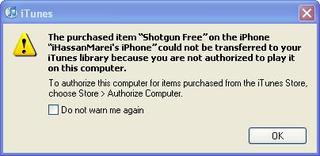
Many ask: I downloaded many free applications from the software store on my phone and bought some applications, but I cannot transfer them to the computer to keep them and install them again easily in case the phone restorer works, knowing that whenever I connect the phone to iTunes and I sync the applications a message appears From iTunes, choose between two, either transfer or not, and if you choose not to transfer, the applications are deleted from the iPhone and if you choose to move, this message appears:
 
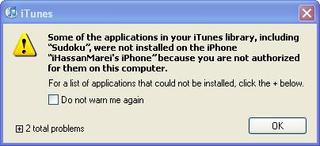
Another question when downloading applications to iTunes, and when trying to synchronize them with the iPhone, the process fails and this message appears.
 
What is the solution?

Before starting to explain the solution, we clarify an important point, which is that the software store applications have protection and you can not transfer them from the phone or to the phone except after taking a permit from the account holder with which these applications were downloaded.
Here are the steps in detail:
Before starting to sync, you must Authorize your computer with the account that you used to download the applications to your phone.
Open iTunes, go to Store. Top - click on Authorize computer.
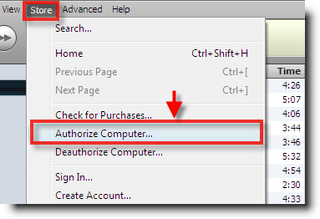
 
 
Then enter your account information and click Authorize.
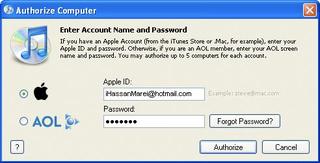


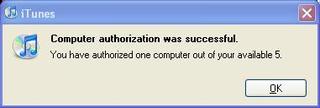
The entered data will be verified and a message will be displayed stating the success of the operation.
 
 
Now you can safely synchronize the iPhone with iTunes, and a message will appear stating that there are applications on the iPhone. Do you want to transfer them to iTunes? Choose Transfer. All your applications will be transferred from iPhone to iTunes.
 
NB :
 You can authorize up to five computers only as shown in the previous message.
 
The question that arises here: Is there a solution if I run out of authorization times for my account?
 
Answer: You can Deauthorize any computer and prevent it from using your account with the following steps:
Open iTunes - Go to the Store above - Click on Deauthorize Computer.
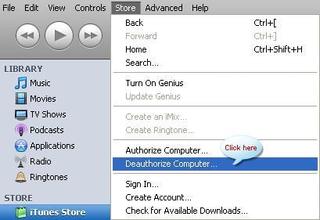
 
 
Then enter your account information and click Deauthorize.
The entered data will be verified and a message will be displayed stating the success of the operation.
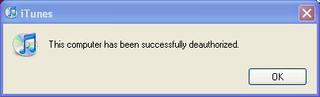
 
 
There is another way for you to work Deauthorize ِ ll computer  In one step However, this method is only valid in one case, which is when all five permissions are executed only.
 
 If you have Authorize all 5 computers and you are still unable to Authorize, carry out the following steps to Deauthorize all computers.
Open iTunes - Go to the Store - Click View My Account - if you don't find it, sign in with your account and you will find it
 When you click on View My Account, enter your account information and then click on View My Account, your account information will appear, then click on Deauthorize all computer.

 
 A message will be displayed stating that all previous permits have been scanned.
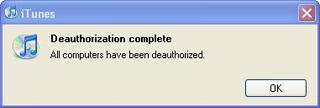
 
 
And it will appear to you that it is a zero Authorization balance.



Important note:

 We recommend transferring any applications you have purchased to iTunes so that you can install them again if your phone malfunctions and you create a restore, and here is the path in which these applications are kept on the computer:

My Documents \ My Music \ iTunes \ Mobile Applications
And we also advise you to make five backups for these applications.
45 comment

comments user
Ahmed Musa

Excellent topic gives you wellness
Unfortunately, I tried an iPad XNUMX and the process did not work
I want a solution, please, because I have a used iPad and used up all the free accounts
Note that the seller gave me a working iCloud, but after a while, he changed my password

comments user
immortal

My dear brother, I wanted help from you
You have run out of XNUMX times the computer. What is the solution? Do not restore authorization for the computer

comments user
Hossam Mohammed

My dear brother, I have a problem, and when I make a backup for the iPhone, it does not transfer applications from the iPhone to iTunes, knowing that I am on the latest version of iTunes and the iPhone system. Previously, when I was taking a backup, it transferred everything, even the applications, now. No, what is the solution?

comments user
Measure

Dear brother ,, .. even if the account is a new iTunes right] [Apple ID] [and I want to make a link to the programs ..?
It does not mean the same account. To me, work on it from the beginning .. What is the solution?

comments user
Abdel Azeez

Peace, mercy and blessings of God
Please, I made a backup for the iPhone 4s in iTunes and forgot the password. What is the solution? Please advise me. May God reward you with good.

comments user
Yasser apoalfdl

Thanks for the nice benefit

comments user
Dr. Adel Hashem Ali

Let these efforts be one of the ways to advance the Islamic community

comments user
nk

Thank you, God, a thousand good. This is what I was wondering about.

comments user
the artist

I have a problem and I want a solution. How do I delete groups from the iPhone? Thank you.

comments user
mimi

May God release all your worries

And I easily found a solution to the problem of Fort Demi

More than once, I carry the iPod, then I put it on, and everything goes

May God reward you well, O Lord

comments user
Mustafa

Hi

May God bless this site, its staff, and everyone who helped strengthen it

Honestly, I want a light request

If I bought a new phone, but I could not download Islamic applications and others, please help me, because I miss your programs so much.

May God bless you and reward you with all the best

Hi

comments user
Khalil

I welcome everyone

I have a question, can I use after transferring the applications to the computer on more than one iPhone or iPod touch?

comments user
Assem

By God the same problem. I downloaded the i tunes program for the first time, and I downloaded the Fring program and Camera Plus, but the problem is that when I do my sync, I get the same message shown at the top of the topic, which is transferring applications to iTunes. Transferred to the computer

Please solve, I just want to download a movie or audio clip or an application only on the iPhone, but a message appears to transfer all the files on the iPhone and I do not want that, so what is the solution?

Please help me with the solution

comments user
BIDO

I have a problem that I did DEUTHORIZE ALL times, and it does not work more than once a year, and I now have 5 AUTHORISE and entered because I cancel the account, I am not satisfied
What should I do, I do a lot like this, please help?

    comments user
    Blog administrator

    Perhaps Apple believes that a person cannot change five devices every year.
    Anyway, I do not know a solution to your problem, you should search the Internet, and if you find a solution, share with us so that everyone can benefit.

    comments user
    Mohammed Lubbad

    The same situation happened to me several times during the past year because of the formatting for the computer without deauthorized work, and the solution is to write to technical support through .
    And a job request to deauthorize all, will be answered within XNUMX hours.
    I tried it 3 times using the support form shown above and once using chat with technical support, but it is not available anymore

comments user
BIDO

I have a problem. I did DEUTHORIZE ALL once and it only works once a year. Now I have 5 AUTHORISE and I entered to cancel my account. I am not satisfied.

what should I do

I do it a lot like that

Please advise?

comments user
Ticks

God bless you

comments user
Female friend

Important information for iTunes users:

If you have apps pre-installed via other methods and sync it with iTunes

It will delete those apps because they are illegal and unauthorized by Apple.

comments user
Female friend

The same problem happened to me and some programs were deleted automatically

Brother iTunes is a bit complicated and the user finds it difficult to deal with

Is there a program that creates iTunes that is easier and more reliable?

    comments user
    Salman Alkhulif

    There is nothing more reliable than the company's own program :)

    As for ease, I don't find it difficult. Probably the first period of use after I got used to it. Just give it a try and test its properties and you will find it easy, God willing

    comments user
    waleed

    Yes, brother, actually iTunes is quite complicated.

comments user
Noir is a father daughter

Brothers, I have a problem. When I collect applications and games and synchronize them, it deletes them twice. The problem happened to me and it went to programs, most of which I bought and they were very valuable. I tried to avoid the problem by making copies of the files, but the problem is that I selected all and installed all the programs for two hours continuously while I was downloading them. A few days passed and I liked a program and wanted to add it to the iPhone, and suddenly it makes a backup and remove even though I selected one application. I immediately canceled the synchronization and deleted two applications. Please help me. How do I add an application every time without deleting the applications on the iPhone? Frankly, it complicated me 🙁

    comments user
    Salman Alkhulif

    Frankly, I didn't understand the exact problem, but after Authorize the device (as explained in this topic), it is usual for your phone to be linked to a computer. If you downloaded a program on the iPhone itself, and you made your age, the program will be downloaded to iTunes. And vice versa, if you download a program from iTunes itself, it will be loaded into the iPhone after your age. As well as in the deletion process.

    Changing some properties may cause your problem to appear ..!

comments user
unknown

My brothers, I cannot transfer files or applications from the CD to the iPhone, thanks

comments user
Budoor

Thanks for the explanation

But I have a similar problem, but in another place ..
My problem is that I use an iMac, and when I try to synchronize the iPhone and info, I mean contacts and
The ical and the favorite .. rejects it .. and a message appears saying that it failed and the problem has been fixed, but synchronization can only be done next time .. and every time I equal synchronize .. the same message appears ..
I have the latest version of iTunes ..

I hope to find a solution with you. May Allah reward you with goodness :)

comments user
snake

Peace be upon you…….

I want to ask the honorable brothers

When I select the iTunes and re-install, do I find the same programs that I downloaded before?

comments user
Mapcenter

May God bless you for the wonderful explanation, I am working with two addresses, one in Saudi Arabia and the other in America, and he tells me that you have more than 5 counties, but praise be to God, with your wonderful explanation, a problem has been solved

greetings to you all

Good luck

comments user
Ahmad

Thank you very very very very much

Really amazing information

I needed it two months ago, and my condition was cramped and confused with the iPhone

comments user
Omar

Very valuable and useful topic
Thank you, brother Hassan

comments user
habash1986

Brother, thank you, but the method did not work for me, after following all the steps that I mentioned, I synchronized the device without problems, but I did not find the applications loaded on the iPod are in iTunes

Could you please give me the address of the folder where you download the IPA files?

Of course I mean the iPod, not the computer

Praise be to God a thousand good

comments user
Sharafeldin

Thank you, but when I sync contacts or back up the device, unfortunately I don't know where to find this data on my computer ……. ????????

    comments user
    Samer Hinnawi

    Hi
    Find it in the next track
    C: \ users \ your acount name \ contacts

comments user
Mahmoud Abdo

If the opposite is required, i.e. transferring some of the games and programs that are in the application in iTunes and do not transfer to the iPhone during synchronization, thank you in advance

comments user
Bafqih

May God reward you, a good engineer

I fulfilled this information.

comments user
ammar

May God reward you with a really good information. I have been searching for a long time

Thank God for your pursuit

comments user
Tariq

God bless you brother Hassan

I am the reason for raising the topic because I asked you about this topic and you settled an explanation for it

Thank you violently

comments user
Ahmed Toledo

Thank you, brother
My friend has this problem, and, God willing, how can he solve it?

comments user
M / Hassan Marei

Thank God my dear brothers
Oh God, bring us together in goodness and goodness always
We invite you to visit Arab iPhone community

comments user
علم

God bless you brother Hassan for this professional explanation

comments user
al z3eem

A thousand thanks, by God, our engineer is always creative

comments user
Ibrahim Ramada

Explanation or the most wonderful God bless you

comments user
i Sosa

May Allah reward you

comments user
Abdel Azeez .

Thank you and may Allah reward you. Honestly, this is important information and a wonderful explanation.

I wish everyone success and in the safety of God

comments user
Salman Al Khalil

Thank you very much, Engineer Hassan :)

Leave a response

We are not responsible for any misuse of the information mentioned above. IPhone Islam is neither affiliated nor represented by Apple. IPhone, Apple and any other product name, service names or logos referenced herein are trademarks or registered trademarks of Apple Computer.

العربية简体中文NederlandsEnglishFilipinoFrançaisDeutschΕλληνικάहिन्दीBahasa IndonesiaItaliano日本語한국어كوردی‎فارسیPolskiPortuguêsРусскийEspañolTürkçeУкраїнськаاردوTiếng Việt