The word firmware means firmware and of course there is An explanation of this definition and why it is called so But we are not going to complicate the matter for the novice user, and it is sufficient to know that the firmware for the iPhone and iPod touch devices is the phone operating system that has the user interface that does all the tasks and it is very important to know the operating version of your device and the reason is that some programs are not installed on me Old versions and some versions have defects and must be upgraded to the best ones, and there are new versions that cannot be upgraded if your phone is locked to a single network.
Once again, without the complexity of the firmware, it is the operating system installed on the device, and Apple is used to releasing a new firmware every period to solve the problems that users face. In this article, we will explain to you how to know the version of the firmware installed on the phone, and is it the last firmware issued by Apple or not? How do you download the latest firmware to your device?
There are two ways to find out the firmware version number
1- Via the phone itself
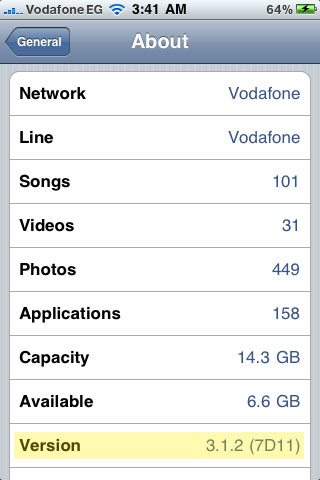
Click on the Settings icon, then click on General, then click on About, and read the firmware version in the Version line
2- Via iTunes
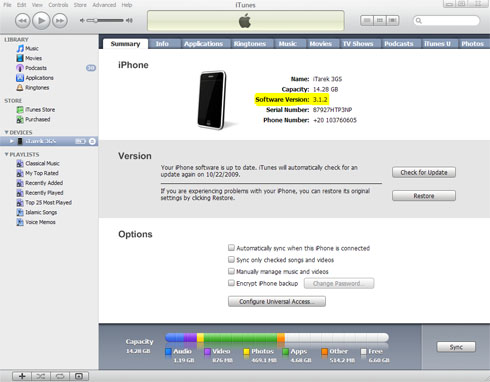
Connect your device to the computer, then open the iTunes program, and then click on your phone in the menu on the left, you will find a Summary screen with information about your device, including the Software Version and this is the current firmware version of your phone.
Now that you know the version number of the firmware on your phone, you can return to me This Apple website, To find out the version number of the latest main firmware and its features, and there Another unofficial site It has the latest versions of the firmware and its installation links, of course every device has its own firmware and it is installed by the iTunes program.


30 comment