Download WhatsApp on iPad and iPod without jailbreak

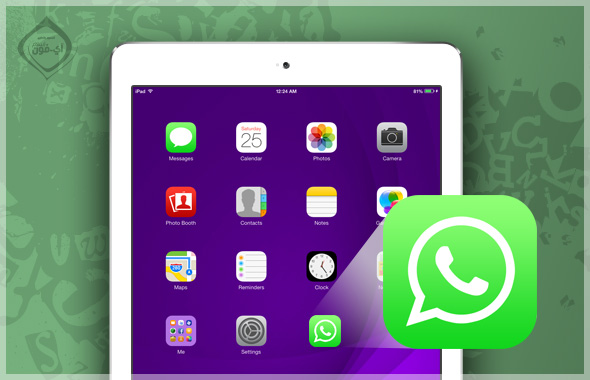
Without clear reasons, WhatsApp refuses to have its application available on the iPad. There are many competing applications such as "Viber" that allow downloading and running the application on devices that are not connected (iPod and iPad). Because of this application of great importance, there are many people looking for a solution that makes the application work. Of course, the jailbreak here solves the problem, but what if I don't want to jailbreak my device is there no way to get WhatsApp? Yes, there is a way in less than 10 minutes that enables you to have WhatsApp on iPad and iPod touch without jailbreak.

The business idea is twofold:

  1. Using an alternative program for iTunes to download WhatsApp on the iPad, as Apple's iTunes will refuse to download it.
  2. With this alternative program, we will trick WhatsApp into thinking that the iPad or iPod touch is an iPhone.

Required to make the method:

  • You have an iPhone that has Whatsapp and is activated, it does not matter whether it is jailbroken or not.
  • You have a computer, either Windows or Apple Macintosh, and it has iTunes.
  • Download an alternative program for iTunes to browse device files, such as iTools Or a program iFunBoxOr any other application you prefer to use. (Of course, you download the previous programs to your computer, not the phone).

WhatsApp steps for downloading:

1

From iTunes, download WhatsApp from the store if it is not already installed.

2

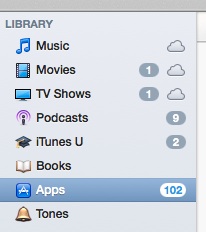
Select "Apps" from the left (if the bar on the left does not appear, choose View, then Show SideBar).
3

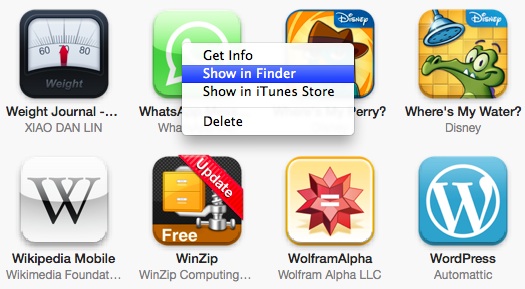
After selecting Apps, all the applications installed on iTunes will appear for you, search for the "WhatsApp" application, then right-click and choose "Show in Finder" if you are using Mac or "Show in Explorer" for Windows.
4

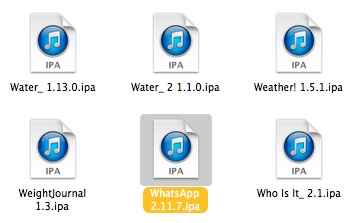
You will see where the applications are located on your computer, copy WhatsApp and move it to the screen.
5

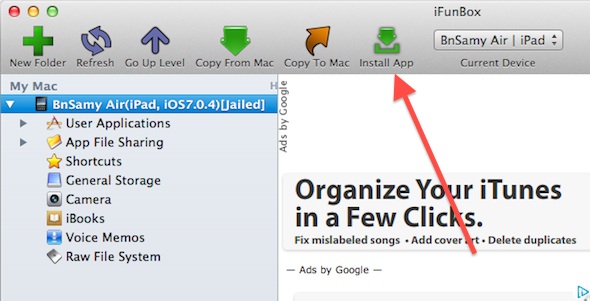
Open the iTunes alternative program, here iFunbox, connect your device (iPad or iPod touch), then choose "install Apps" from the top:
6

Choose the "WhatsApp" file that we got in step # 4 and wait, and the application will download WhatsApp to the iPad - the iPod - and its icon will appear on the screen.
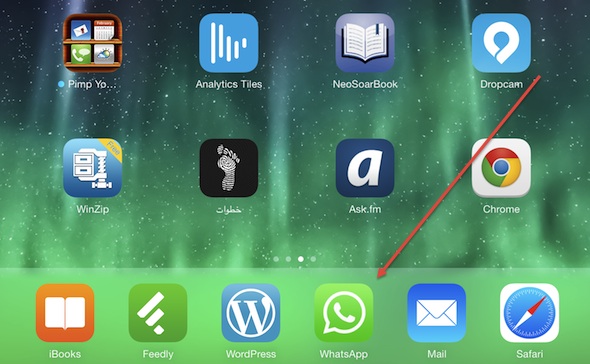
So far, we have downloaded the application on the iPad, but if we open the application it will tell us that the device is not supported, because it is seeing it - an iPad or an iPod - and not an iPhone as it is supposed to be. So we have to cheat WhatsApp.

WhatsApp spoof

7

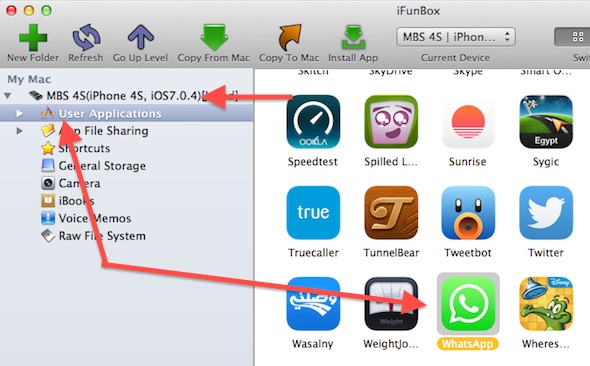
Open the alternative program "here iFunbox" and connect your WhatsApp phone and choose from the left "User Applications" and all the applications on your device will appear, search for WhatsApp
x

8

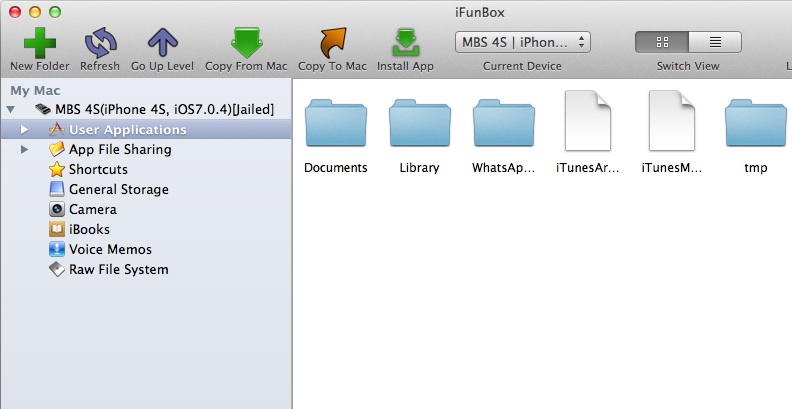
Double click on it to open it, or right click and choose "Open" and the WhatsApp files will appear for you as follows
9

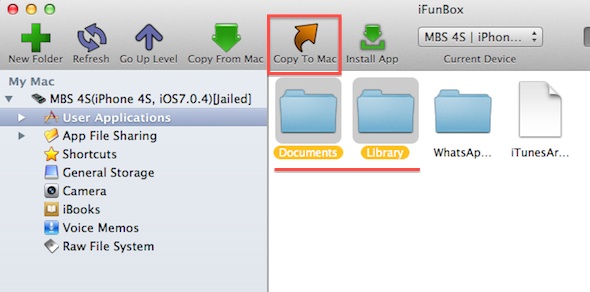
Copy the “Documents and Library” folders to your device (Click the “Copy To Mac” button at the top or “Copy To Windows” if you are using Windows.
10

Disconnect the iPhone, then connect the device on which you want to download WhatsApp, let it be the iPad, and repeat steps 7-8 to access the WhatsApp folder on the device - the iPad -, but this time we will copy the files that we got in step 9 and put them on the iPad (We'll be using Copy From this time.) That is, we will take the iPhone files that we got and put them in the iPad.


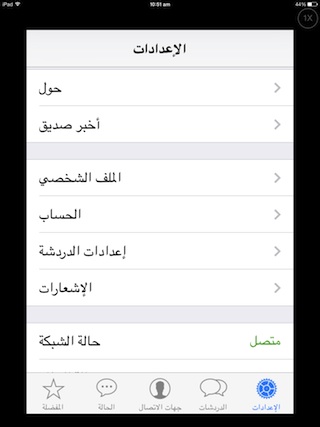
Congratulations, WhatsApp has become on your device without jailbreak, but it should be noted that your other device - iPad or iPod - has become a copy of the iPhone with the same conversations and even the same activated number on the iPhone. So you have to change the number used in WhatsApp on the iPad (or iPhone), or remove it from the iPhone and use it only on the iPad. You can change the number and activate the new one, as we always do, from the WhatsApp settings and choose “Account”.

* You cannot use the same number on iPhone and iPad at the same time, if you do it on one device it will be canceled on the other.
Are you a WhatsApp user? Do you need to be on the iPod or iPad? Share your experience with us

193 comment

comments user
Emirates girl

I tried the method and it worked, but when I reached step 7, it didn’t work. I didn’t know how to do it. I connected the iPhone to the computer to implement step 7, but the iPhone programs didn’t appear on the computer in the Ifunbox program that I connected the iPhone to. What is the solution????

comments user
To color

I don’t have Yvonne in a second way

comments user
Rockins

May God’s peace, mercy, and blessings be upon you. May God grant you well-being. ”̮🖖🏿💕
I completely settled all the steps and transferred the WhatsApp files to the computer, but when I connected the iPad to transfer the files in it, if I tried to open it, the connection failed in two dimensions, strange words - unlike when I tried to open on the iPhone all the time, the folders opened “̯ 💔✨
If you open user applications, there are three sections, the first is tools or something like that, the second is ITUNES applications, and the third is all applications .. If you decide to open any program in the ITUNES applications category, it opens immediately, but if you decide to open any program in the category of all applications, the connection will fail .. even though that All my apps are from ITUNES, but I don't know the aforementioned “̯💧🍂

comments user
Day

How to download WhatsApp on iPad mini 3 without jailbreak

comments user
Maha

Peace be upon you. I have an iPad Air XNUMX for a month. I want to download WhatsApp, it is downloading, but it does not work. It does not require an update or it says it is not supported. What is the solution? Please advise me.

comments user
goodoooooooooooooooooooo much

Found and WhatsApp on iPad Air and I don't

comments user
Mjuahed

Yvonne Islam please help
I have an iPad 4, and I do not have an iPhone or a jailbreak, and I want whatsapp on the iPad

comments user
Jana Al Qasim

Myself on Whatsapp

comments user
Jana Al Qasim

I want Whatsapp

comments user
Aimen

Is it possible to transfer WhatsApp from an iPod that has the program to another iPod in the same way?

comments user
Soha

With your permission, I have tried the method, but I am issuing an updated program, but I want the old version

comments user
Abujaad Al-Ansari

Peace, mercy and blessings of God be upon you, my brothers, I have an iPad Air and it has ios8.1.3. I tried to install WhatsApp on it more than once, but it did not succeed, because after installing it, a message appears and says your current device is not supported! Please advise me, God bless you

comments user
Soso

I have a Galaxy and an iPod, and I can transfer it from Galaxy to iPod

comments user
Omar

I love WT SAP

comments user
Rima

Brothers, this method did not work for me in installing WhatsApp on iPad 4. I followed all the steps using the itools program because the ifunbox program did not appear to me in the same form that was explained, so I used itools and the transfer process was completed successfully except for the installation, as I was not able to transfer the documents and library to WhatsApp and an error always appears... So what should I do? Please help?

comments user
Monael

I am an iPad Air XNUMX, and I don’t know what WhatsApp has downloaded on it

comments user
Ahmed Mesbah

Is there an alternative method after the 8.1 ISO update

God reward you for this tremendous effort

comments user
Happy

Do not tire yourself out if we tried all the methods published on the sites
And don't engage us in a conversation with any colleague when it is empty or write I am open, no problem
But when the colleague writes, when the conversation opens, the program closes

comments user
Mohammed Saleh

Good programs

comments user
tameem

IPad mini did not accept this method
After iOS 8-0-2 update
Is there another way?
Thank you very much

comments user
Alrdah

Hi
After updating WhatsApp with the number 2.11.9 and later, this method for running WhatsApp on the iPad did not work.
Is there an alternative vinegar to solve this problem
Thankful and appreciative for your great effort on our behalf

comments user
Alaa damascene

Does it work on ios8

comments user
Amr

Basically, the program is not satisfied to recognize that the device is connected to the computer

comments user
ryan

Ok, with regard to the iPhone that you used in the installation, can he restore his WhatsApp without changing the data, because I am not working, and I do not want to work for the owner of a problem with WhatsApp

comments user
A gift

Guys, I am going to have a heart attack. I downloaded this method and it worked. I have been using WhatsApp on my iPad using this method for a long time. Thank you very much. But yesterday, unfortunately, I did an update, and since when I did the update, I wish you had not done it. WhatsApp stopped working. I mean, the WhatsApp icon is there, but it doesn’t work. But if someone sends me a message, it gives me a warning that there is a message you received on WhatsApp, and it gives me the name of the person and the beginning of the message, but when I open the message, it gives me your device is not supported. I wish I had not updated it or known about the update, then I deleted WhatsApp again and did this method again. It didn’t work. What is the solution??? ?

comments user
immortal

I have a problem with the Even S5 functions

comments user
Ahmed

It was working perfectly for me on the iPad, then I wanted to download the latest version of WhatsApp so I deleted it, and when I tried to reinstall it, it wouldn't accept it!! 🙁

The latest update is the problem, in your opinion.?

    comments user
    Asthma

    Its form is from the update because I have a mini iPad with the latest version and tried the method written above that was set with me ..!

comments user
Asumha Al-Mutairi

It cannot be downloaded on WhatsApp ipad

comments user
Totah

I downloaded the program on the iPad without the jailbreak.. Write on Google to download the WhatsApp without the jailbreak

The name of the program is itoose

comments user
Ahmad Alzoubi

Possible setting method with itools

comments user
Turki Al-Otaibi

By God, the program is sweet and beautiful, but how do I carry it?

comments user
Morning breeze

He benefited a lot

comments user
Gori

I want Watts and without the trouble of Shawn

comments user
Fufu

I can download it without any program and without the computer, it will not be what I know of the store

comments user
Reemas

Can I download WhatsApp without a computer and update to version 7 without jailbreaking on an iPad mini?

comments user
Memo

First of all, thank you for your explanation and effort, but it is very difficult. We need an easier way. I really need WhatsApp and I go to every site looking for it. My version is 7 and there is no jailbreak. It requires a difficult way. Is there an easier way to install it?

    comments user
    Yousuf

    Peace be upon you, brother. I have downloaded a new jailbreak on version 7.1.4 on the iPhone 5s. How come there is no jailbreak, and I have done the jailbreak program for version 7?

comments user
Reemas

I want to participate in Whatsapp

comments user
Abdul Rahman Hariri

I want it on iPod without any program

comments user
Lulu

They taught me how to download WhatsApp on the iPod

comments user
Faiali

I didn't know the way, and it was hard

comments user
I'm fine

I can carry WhatsApp without a laptop with an iPad mini

comments user
Messi

Peace be upon you, guys. Thank you for the wonderful method and the tremendous efforts made for the public interest. But I have a question. Is there an easy and short way to download programs on the iPad without the App Store, because I am not able to download anything through it? Thank you.

comments user
AlRaqiQ8

Peace be upon you, may God grant you wellness, brothers

.. Is it possible to repeat the method for copying WhatsApp to iPhone? And open more than one copy on one device (iPhone) or (iPad)?

Thank you .

comments user
Download the WhatsApp program

Thank you

comments user
Rawnc

I love WhatsApp

comments user
Hamdy Mansour

Okay, can you send us the Folder for Documentary and Library, because I don't have another iPhone device to answer them from

comments user
Find it

Thank you, my brother ... But when I opened WhatsApp on the iPad, you would see a message * Sorry, the program is not supported on this device *
ارجو الرد ..

comments user
Sami

Unfortunately, the new update for WhatsApp XNUMX rejects what happens, and previous updates are updated easily from the iPad

comments user
joker

Does this method work just for ios7? Because I tried it on iOS6, it doesn't work
Ask me for a camel id

comments user
Mohammed

I think this method does not work with the latest update 2.11.8?

Am I right?

comments user
Hills

Can anyone help me get WhatsApp? I don’t have an iPhone or anything. My device is an iPad mini. How do I want to download and download from Ettolls to appear on a computer and hidden with an iPad. Please help sisters

comments user
Rami

The method worked, but after I settled the iTunes, I would not like it. Sync works for new programs with the iPad and it always asks to authorize the computer and do not set it with me. what is the solution ?

comments user
Mahmoud Fouad

WhatsApp works for me after updating the iPad to 7.1 without jailbreaking, and there is no jailbreak for 7.1

comments user
range

Peace be upon you, I have an iPad Air and I wanted to download WhatsApp on it, I have an iPhone, just the number on the iPhone, what does it father, then download WhatsApp with the iPhone number and then take the number and place a second number ??? Thank

comments user
Raℛ that ყყᵃɴ

I am considered a beginner in programming
However, I was able to download WhatsApp for iPad after several attempts for two hours
But now I could not download it for my brother's iPad!
The program is downloaded to the iPad, but when you try to run it, the application crashes and exits after a black screen appears for a second
Knowing that his device is the first time I know him on a laptop, does this have an effect !?
What is the solution in your opinion, thank you

comments user
Asim al-Yamani

Hi
I tried the same method on an iPad 5, but in the end, after doing all the details, I turn it on and then immediately stop and discover that the device does not support the program !!

Is there a solution to this problem?
May Allah reward you.

comments user
:

I took the same steps, but I don’t want to work. I tried without any help. Can someone help me

comments user
Jory

What comes down to the iPad without the Evooooooooooooooool

comments user
Dr. Fadi

Hi
Thanks for the method, but I had a problem when I got to transfer iPhone files (Library/Document) to iPad from the computer. They were not transferred, and what became the Library folder, for example, opened and other files appeared in it. Even though I followed you step by step. Please help. Thank you.

comments user
Suhma Al-Asla

Do not go down with me, can someone help me

comments user
Oday

The operation was successful, but the problem with synchronization. I can no longer sync to iPad without deleting WhatsApp! Is there a solution? Thanks

comments user
successor

I can't download any fun box or tools on Mac! any help?

comments user
Abu Yaseen

Ok, now when I tried to do Sync in iTunes, I wiped the program from my iPad
In a solution to this topic?

comments user
Ayman

I am doing this method, and then I went to gold for the iPad, and by clicking on the WhatsApp icon, he told me that it was not supported.

comments user
Mohammed

Hi
Can I transfer my Galaxy account, transfer it to the iPad?

We take advantage of you

comments user
LA02

How can I delete programs that were previously downloaded and removed from the screen??
How do I remove it from the downloads list. Canceled ??.

How do I change the filter content to low reach?

I wish you could inform me. Thank you…;

comments user
Forwards

Unfortunately, what happened to me, everything was settled, and when I got inside, he asked for camels for hands and clothes and flowers.

comments user
A gift

I really tried it, by God, it is wonderful, it gives you a thousand wellness, and what is old is for you.

comments user
Tune

Hi
My apps do not appear even if I activate them from view !!!!
How do I solve this problem ??????

    comments user
    Bin Sami (Editor in Chief)

    Go to settings and make sure that Apps is enabled

comments user
Crescent (💙)

By the way, you see a program in which you will receive it on the Father Store, which is Telegram, which is sweet once, and it also resembles a lot of WhatsApp on WhatsApp 😽

comments user
Crescent (💙)

The method is what it is, but I download the program from a correspondence store, I mean, why don't I bother myself

comments user
Mohammed

Possible details of the last step when I want to transfer files to the iPad, copy from I stood here and do not do WhatsApp

comments user
Majid Baslama

Hi
I thank everyone based on this forum, the most wonderful
As for downloading WhatsApp on the iPad or iPod Touch without jailbreaking, you don’t need these long steps. We can shorten the path. All we have to do is run WhatsApp on the iPhone, then back up WhatsApp using the iTunes program. Then download WhatsApp to the iPad or iPod. After downloading, write the email on WhatsApp on the iPad and the code will work immediately.

comments user
mmm

Enquiry

All steps worked but same idea Device is not supported ??? What is the solution?

comments user
yazed's father

I tried the method, but I was not disappointed
The app is not supported

comments user
Khaled Al-Otaibi

May God give you wellness
May God reward you with good for us and for what you offer to the whole world
I would like to tell you to keep going forward
The frustrated people do not affect you
I wish all of the brothers first of all thanks to Yvonne Islam for what they offer
Then start your opinion and notes
And I hope not to underestimate any topic, whatever it is

comments user
q8racing94

I would like to share it with itools. Thanks

comments user
Abu Rima

One of the main reasons that prevented me from buying an iPad from me
Is the absence of the WhatsApp application in its programs
So I decided to buy a Galaxy tablet

comments user
Mohammed

I performed the entire operation on the iPad and iPod ,, so he opened the program for a period of seconds and then showed me a message that the device is not supported and I repeated it several times and the same result. Why?

comments user
Marwan

The method works because you cannot take a backup copy from the device and if you can take a backup copy, iTunes will delete WhatsApp from the device.
Is there a way to solve this problem ???

comments user
Mashhour Al-Harbi

It is not true that we cannot activate the same number on iPad and iPhone
We can even
I have had an iPad mini and iPhone on the same number a long time ago
This applies to other programs other than WhatsApp

comments user
Abdullah Al-Jouei

There is an easier way

Download the WhatsApp on the iPhone and do it, then drag it through the iTunes to the desktop of the computer, it has two copy options, choose the second one with the documents, then transfer it via iTunes to the iPad and turn it on, put the account and the password.
Note will move all conversations

This method I worked on for a long time

comments user
Mohammed Mustafa

After performing the steps on iPad Air when opening WhatsApp
Error message appears (sorry, your device is currently not supported)

comments user
Fati17h

If this method works for an iPhone iOS 7 or an iPod iOS 6 device?

comments user
Owl

Thank you, Iphone, Islam, but what about jailbreak 6.1.3? Please answer

comments user
alanoud

I don't know why I feel a difficult way to pass. May God give you my brother. He made a way easier than this 😔😞 .. !!

comments user
Oman

Peace be upon you ,
In step # XNUMX, after we (copy from) what do we do ??

comments user
Rayan

The new daily

comments user
Majestic

One of the easiest ways to download it on the iPad
The ITOLS program is highly recommended
XNUMX- Download the WhatsApp program on the iPhone
* It is inactive and inactive, and you do not open WhatsApp on the device
XNUMX- Transfer the program to the computer through the iTunes program
XNUMX- Place your iPad and drag the WhatsApp application to your iPad via iTunes
XNUMX- Wipe WhatsApp from the iPhone and do not turn it on, so the transfer is correct
I hope to clarify the gossip to you

comments user
Question

Question. Does it only support logos or disables?

comments user
sojum

Exactly the one I settled about six months ago ~ and I walk with me well, praise be to God ~ But two days ago I open WhatsApp saying (Your device is not supported error), what is the solution, please! Note that I have an iPad XNUMX, and I have locked the device and opened it, and I am willing to go, and my father will not delete it because I am in very important conversations. What is the solution, may God be pleased with you!

comments user
Marzouq

Peace, mercy and blessings of God,
I have a question. When I reached the step of downloading WhatsApp on iTunes and right-clicking, all I saw was “open or copy link” and “open in browser” did not appear. Please advise.

comments user
haitham

Ok, if my Samsung phone is on the way to run WhatsApp on the iPad?

comments user
Adibarafeh

Dear loved ones, I have a problem that I have literally tried your method on
IPod touch XNUMXG
Unfortunately, I did not control it and he kept telling me that the device was not configured
So what to do ??
Thank you

comments user
Turkish

Shui strange

comments user
Rami

Can I have a simple question? Does this method work with the regular iPad without 3G or does it have to be 3G?

comments user
Abu Walid

Thanks! The method is excellent

comments user
immortal

It never worked for me with trying so many times

comments user
betty

Can I change the mobile number from the iPad? I do not have to change it from the iPhone with two dimensions, move it to the iPad ??
Ziyin, if you delete the WhatsApp from the iPhone and upload it to a second ID account, and the same phone number was the same before the groups, it will be deleted ??
Pleas daddy help>.

comments user
Mishary

Please, feed me when I enter the photo album, it comes out to home, please, feed me

comments user
Lover

The installation was completed successfully. Thank you for the explanation, but it made me tired, but thank God, the method succeeded

comments user
Omar

Ok, I use WhatsApp on the iPhone and iPad at the same time, why nothing happened? I used the iTools method, not your method

comments user
Omar

Not successful because WhatsApp on iPhone is running
After doing your method, which is correct, and running WhatsApp on the iPad

When I go to my iPhone and check my WhatsApp, it tells me that the iPhone is not supported now.
Although I put two different numbers

comments user
Omar Ibn Abi Rabeaa

It worked exactly as per the explanation, but I still get the message that says: Sorry, but your device does not support this program at this time! Please Help ..!!

comments user
Mohammed

Peace, mercy and blessings of God
Thank you, but you have explained to us in detail the iTunes program before. Please repeat the explanation with any fun box. Thank you

comments user
no0ony

Thank you for the information and we needed it before. I have tried this method for a long time, as well as a device for the family

comments user
Nabil

For more than a year I have used the method and it is 100% effective

comments user
Abu Shanab

Hi

After completing the installation of WhatsApp on the iPad with a new number, is it possible to re-activate WhatsApp on the iPhone with my primary number without affecting the iPad ??

comments user
Alazzi

I installed it in the same old way and on iOS7
By installing whatspad from Cydia
Then download it via appaddict and install it
And he works for me without problems ,, I expect this way
Much easier ... try it

comments user
.

Hi

I applied the above speech and it was correct with me, but the second step “WhatsApp cheating” was not correct. It is possible if you explain a more detailed explanation.

comments user
OMAR

God bless you, the method is tried and successful
But among its shortcomings, WhatsApp cannot be updated in the event of an update for it, and the method must be fully restored for those who wanted to update the program.

    comments user
    Abu Omar Hebron

    I tried it and updated whatsapp from ipad automatically from the store
    System XNUMX

comments user
Ibrahim Youssef

Peace, mercy and blessings of God
I offer you my sincere thanks and appreciation for your wonderful and very useful efforts, may God reward you well and grant you what he loves and satisfies, and I am very happy with your weekly choices that you present to us from the applications, and we are waiting for them every week.

comments user
zanitty

The steps were followed verbatim and nothing happened
The WhatsApp icon appears only in the program and does not appear on the iPad
Please direct

    comments user
    zanitty

    Sorry, the method worked, but the iPad did not show the icon until after it was restarted
    May Allah reward you

comments user
manfosha

The code has increased a little, a device number + Udid + mobile number has been added to it, and the WhatsApp server generates the keys in the file pw.dat

comments user
ibrahimghost

God bless you, may God give you wellness

comments user
Ahmed Al-Otaibi

Although this method is old and tried for a long time .. But thank you iPhone Islam for your efforts

comments user
Mohamed Mahmoud

Unfortunately it didn't work

comments user
sheikha

Some people do not have an iPhone or a jailbreak in the way, please allow, without a jailbreak or an iPhone

comments user
sheikhapp

There is a way through the iPhone, but this is not prophet, because some people do not have an iPhone Prophet. The easiest way to respond to me is not like how many times

comments user
سيف

It gives you wellness on these efforts

However, this method did not work for me

comments user
Abdallah

Is there any other way than using an iPhone because I don’t have an iPhone, but I have an iPad XNUMX and I have Android. Is there a way to solve this case or one of the distinguished members uploading files to any download link and we use it and thank you for your effort

comments user
Abu Saleh

Yes, you can download WhatsApp on two devices with one number

comments user
Assuhmh

Ok, so I appreciate the best update of WhatsApp on the iPad, and what is missing from WhatsApp ????

comments user
Nassima

The method is useful for me who have an iPhone, but who do not have what is the solution ???

comments user
Adiy Al-Nakhal

This method does not work. I have tried it previously and it did not work because when it starts operating on the iPad, it begins to check the settings and connectivity, and immediately it detects that it works on an iPad, and a message appears that the program does not support the iPad

comments user
Muhammad al-Shallal

Is it possible to update it in the future if needed?

comments user
Jodie ♡♡

Adorable adorable 😻👏👏👏
- I always wished that my iPad had WhatsApp so I could communicate with my friends who have iPhones and Galaxys 😪💙.

comments user
SnToR

A question, please answer it quickly

I appreciate the latest WhatsApp on the iPad

    comments user
    Abu Omar al-Khalil

    You estimate if your system is 7 or above

comments user
Hussain

Question ..:

I must have an iPhone? Ashan carry WhatsApp on the iPad?

comments user
Abu Bakr Al-Hamidi

An other way

Download the program on the iPhone, then activate it with the number that will be activated on the iPad, then connect the iPhone to the computer, open the iPhone applications, click on WhatsApp, and make a full backup copy of it on the computer using the iTunes program. Then connect the iPad to the computer and add the program to the iPad using the iTunes program and add the copy that you pulled from the iPhone to the iPad, disconnect the iPad, connect the iPad to the Internet, and open WhatsApp on the iPad. It will ask you for the account from which you downloaded WhatsApp on the iPhone, and create your account. After that, the program will work normally, and delete it from the iPhone.

Thus, you will have downloaded WhatsApp without the Break Gel on the iPad, without the Break Gel
Congratulations

comments user
Mohammed

Is this not a fraud and a breach of the subscriber’s trust in WhatsApp?

comments user
AL FARES

A lengthy, difficult and useless method
It only needs itools program> Connect the iPhone, then take a copy of the program with the documents, then disconnect the iPhone, connect the iPad, and give it an installation only ... without getting tired, moving and modifying

comments user
Reem

When the program is copied to the iPhone WhatsApp files on the iPad, does it record the exit of the father's iPhone on the iPhone and its data is deleted automatically, and I need to re-enter the number again? or not

comments user
Sarah

But as such, all that is on the iPhone will be on the iPad, it will not be on a second number, or it will be on a second number. I tried it. Here the system is not walking with me

comments user
Mohsen Al-Harithi

I am his house in the same way and working, and the one who wants to make sure responds to the article and I am ready to prove it and I will add you after you updated to the new version as well

    comments user
    the official

    I downloaded it at a store, and apparently it was the same way to the top. It was printed with a different number and a new slide I bought from him. What is important has a problem
    Enter someone's number and save it in the name list and go to WhatsApp in order to send the owner of the number and it appears to me that the owner of the number does not have and asked, and he has, I know him. I don’t know what is the solution to this problem

    comments user
    Abu Omar al-Khalil

    The solution is to add the country code before the number, such as
    +966
    And the numbers must be in English.

comments user
Mohsen Al-Harithi

Very old I'm now over three or four months old. It's the same way. It's not a normal iPad on an iPad mini. It's harder

The method is found on YouTube, and if they searched, they would be found

comments user
immortal

But after this method, if you sync with iTunes for any reason, will you delete WhatsApp? Or will it remain on the iPad?
The jailbreak method works, but once you connect iTunes and sync it, WhatsApp is removed

    comments user
    Abu Fares

    Synchronizing applications will not cancel WhatsApp on the iPad

comments user
Abdullah Al-Naqib

What prevents some people from downloading the jailbreak to their device and downloading WhatsApp only, so as not to be slow

    comments user
    Unknown

    I do not advise anyone to install the jailbreak on iOS 7, unless my device is iPhone 5 and above, because jazz becomes slow and stuck, and its problems are many, of course, I knock it down, and while my device is stuck and slow and ruins, I find it and I thank you

comments user
Faisal Banan Al-Zahrani

Unfortunately, this method did not work for me, but I succeeded through iTools and was done by the grace of God Almighty.

comments user
Borached

Thank you very much for WhatsApp for iPad

comments user
Authorize him

Peace be upon you. I don’t have an iPhone that can be downloaded from Samsung ??

    comments user
    Mohsen Al-Harithi

    May God make you happy

    comments user
    Abu Fares

    Benefit
    Use any iPhone even if it is not yours, and let's say it is your friend. Because the goal is to go around WhatsApp, in order to imagine that the new device is an iPhone. After completing all the download steps, you can change your WhatsApp number instead of your friend’s number.

comments user
How old are you

Guys, iPhone Islam, what is the latest news about the jailbreak? Update us to the latest version, and the jailbreak does not work completely on old sources. When will the jailbreak be finally updated and we will finish the long issue? Can you help us? May Allah reward you with good. We want the answer, maybe it is long or will it be released soon, or what is the solution? Guys, help us, maybe it is, and thank you, iPhone Islam

comments user
Break

Thank you very much for the benefit and effort
But after your permission, I had a question
Why do I come to download any app from the App Store using the data chip?
And it will be more than 100 MB, you will not be allowed to download it
And in any way that is possible, I can download any application that exceeds this limit .. Thank you very much

    comments user
    Hatem

    The way you carry

    3g unrestrictor 5 tool (ios7)

    $ XNUMX worth of Cydia

    comments user
    Unknown

    It is necessary to jailbreak in order to be able to download more than the allowed limit using a data chip

comments user
Hatem

It cannot be imagined (for me) that WhatsApp is on the iPad even though I own two iPads and I don't see a good reason for that except for someone who has an iPad and does not have an iPhone

comments user
Hassan Ajlan

By God, frankly, I do not have a benefit on this as long as I want to go to the first Apple I held it frankly from here in the direction of Galaxy repented in which the program is downloaded without problems.

    comments user
    realistic

    Certainly, one of Apple's problems is that it complicates the system and constrains the user, so that it has something called jailbreak in Arabic (jailbreak), unlike Android like the Galaxy Tab, which gives the user openness in the system and high freedom of customization.

comments user
the friend

Thank you, Yvonne Islam
God bless you
Always ahead

comments user
Atawi

Thank you Yvonne Islam

comments user
Valid

Thank you, Yvonne Islam
I needed to learn how to transfer WhatsApp without forcing and you helped me.

Always creative
☺️

comments user
zitta

But with this movement, the definition of the iPhone will be on the iPad or the iPod (Profile manipulation)

Wouldn't it hurt to search in Father Store? That is, when I search on the iPad for some programs, it will appear to me in the iPhone version, especially the one that is multiple versions (although I said it is there)

Note: Software with a (+) sign is compatible with all devices

Also, will this affect the device's warranty ??

Thank you

comments user
Yahya Al-Shehri

Anyone who wants to jailbreak download whatspad from Cydia
Then load WhatsApp and install it normal
Congratulations WhatsApp

comments user
Ahmed

Old this movement and other things, but unfortunately the iPad, a mighty Air Force, slaughtered me, every barbecue hunted this movement

comments user
fares

Thank you, Alamal El-Helou, but for me whatsapp, they don't need an iPad

comments user
ios ?? !!

Q / Is fiberglass blocked after it in Saudi Arabia for iPods and iPads?

    comments user
    Crescent (💙)

    Yes, the Viber is blocked from Saudi Arabia and from all devices, but in the same programs, Awooo, sweeter than Tango and Free Baby, of course I write it in English. Thank you.

comments user
Atheer Mazin

This method is not correct. The program is not downloaded unless the App Sy program is downloaded from the jailbreak and according to the Virgin of the software with thanks

    comments user
    Deserts

    God guides you, I mean, you are the genius, and others do not know

    And whoever tells you that I tried it and its home in the same way that was downloaded by Yvonne Islam

    Sharrah says ???

    comments user
    Hire

    The way the tunes are very old

    comments user
    OMAR

    Brother, the method is working and tried and without jailbreak and without appsync

    comments user
    Bassam

    Well, I downloaded it and I did not work with I tools .. Why did you work? Why is it left?

    comments user
    Majid Baslama

    Delete WhatsApp and download it again
    If it doesn't work, delete WhatsApp from the computer and make a copy of WhatsApp from the iPhone again. It will work a million percent.

    comments user
    conspiracy

    I am an iPhone programmer and I have a mobile shop and I tried the method for a long time and it worked with me on all devices without jailbreak and on any software

    comments user
    Zainab

    Apple iPad and you don't know whatsapp, sad

    comments user
    Ahmad Mahmoud

    Peace, mercy, and blessings of God be upon you..this method by which I downloaded the WhatsApp program on the iPad XNUMX since last March ... and I used the i tools program .. Not only that, I downloaded the BlackBerry Messenger program on the iPad when the program was only running on the iPhone Only at the beginning by the same method as well.

    comments user
    zanitty

    The method is 100% correct and I tried it and downloaded the program on my iPad without the program that you mentioned

    comments user
    Lion

    How did you do it again? Can you tell me? Please reply

comments user
ZeZo

Peace be upon you .. Thank you for your efforts .. something very useful and its explanation is clear and easy .. We hope they appreciate what you did .. but I would like to inform you .. that I discovered a very important security vulnerability in the Apple system .. and I hope you say to me .. Can I benefit from it or not! !

    comments user
    Mohammed

    Russell Apple can give you a lot of money

    comments user
    Omar

    What is the security breach, Abu Al-Arif?

comments user
follower

Will it support the iPad screen size? Or will it be magnified x2? I know it's an iPhone app but I just wanted to make sure.

comments user
Abu Razan

May God give you wellness

But you did not touch the iPad mini, because it is not included in this feature

Or you mean iPad devices in general

    comments user
    Osama x Gamer

    They don't mean iPads in general. I tried it and it worked

comments user
Saleh Al-Bayhani

It has an easier way than how to transfer the program from the iPhone together with its data. This option is available in ITOLS.

comments user
Ahmed El-Sherbiny

Who got it this way?
The view is great

comments user
Mahmoud Hegazy

Medicine question remains:
Isn't there a way to let WhatsApp work with the same number on two different devices ?!

    comments user
    sheikha

    No what works for me. For example: You have an iPhone and iPad. You have WhatsApp and you have registered it with your number. My trip to the iPad, and you have registered the same number in it. It shows you from WhatsApp to the iPhone. I hope you understand

comments user
traveler without address

You are a disaster
God does not deprive us of you

comments user
Ahmad

Is there a way without jailbreak and iPhone?

    comments user
    Mujahid

    There is a method that I have tried, that is, after he settles the steps above, he works with him on the iPad to backup the program and saves it and uploads it to any site and you only download it, but in his work his data is present in the program like his mobile number, so he deletes the data file he had before Only lift it

Leave a response

We are not responsible for any misuse of the information mentioned above. IPhone Islam is neither affiliated nor represented by Apple. IPhone, Apple and any other product name, service names or logos referenced herein are trademarks or registered trademarks of Apple Computer.

العربية简体中文NederlandsEnglishFilipinoFrançaisDeutschΕλληνικάहिन्दीBahasa IndonesiaItaliano日本語한국어كوردی‎فارسیPolskiPortuguêsРусскийEspañolTürkçeУкраїнськаاردوTiếng Việt