One of the old and wonderful features of the Safari application is the post-reading, or as Apple calls it a "reading list". This feature enables you to save articles for later reading without an internet connection. But reading enthusiasts are surprised that the space on their device is rapidly decreasing, and the reason is how many old articles are saved for later reading. In this article, you will learn how to delete these files.

For those who do not know the "Reading List" feature, which, as we explained, saves articles for browsing without the Internet. Simply from within the Safari application open any article and then press the share button and you will find the option appears in front of you
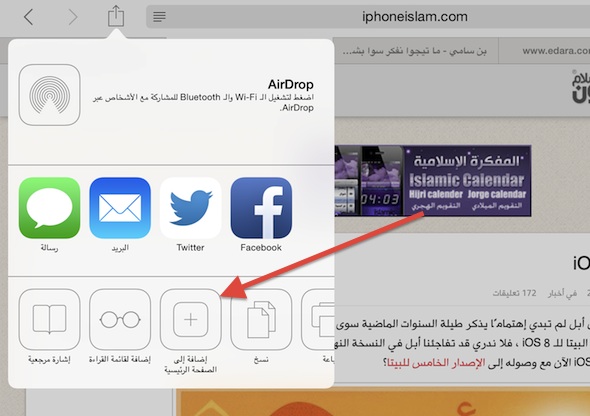
And if you find a Safari application that uses a large storage capacity, take the following steps:
1
Go to Settings> General> Use and wait a while for your phone to download the applications on your device
2
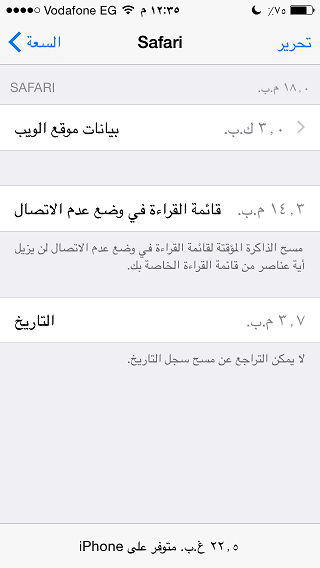
You will see a list of applications arranged according to their storage space consumption for your device, so search for Safari in it and it will appear as follows:
3
As we can see above, the data and the storage consumption of Safari for your device appeared. There is an option called Reading List that shows you the storage capacity of Reading Lists.
4
If you find this list is consuming a large amount of memory, then click on the button in the top right of "Edit" and you will find a red mark next to the list. Click on it to remove the data.
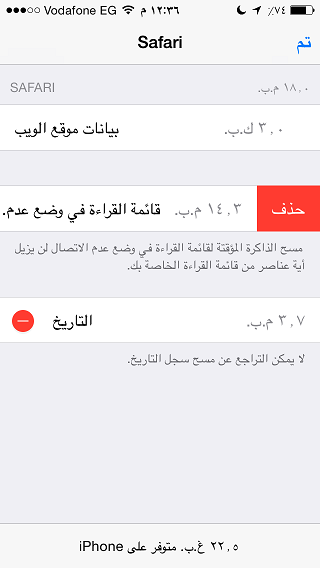
Do not worry about losing any files or sites that you have visited before, this process only deletes the extra files that are of no use and if you want to remove all cache files inside your phone from all applications, see This article.


28 comment