Sometimes you play an audio or video clip or listen to something and you want to stop it after a specified time. For example, you will go to sleep and want to play the Holy Quran in your device or listen to anything until you fall asleep, but at the same time you do not want it to continue working until the morning. How can you stop it after a specified period?

Apple has donated an important thing, which is how to put advantages in its system, but do not tell anyone about it, and this feature is added to these advantages as well, as Apple concealed it within the "timer" application.
1
Open the timer application, either by going to it from the device or through the control center.
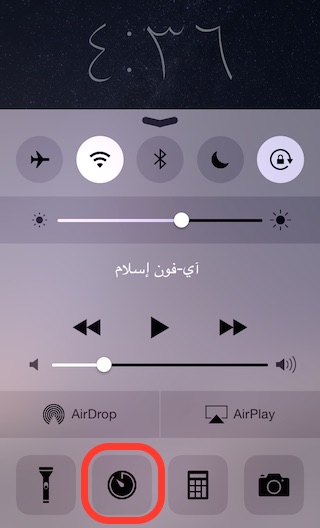
2
Go to the "Timer" tab and click on the "When the timer ends" option, as in the following picture
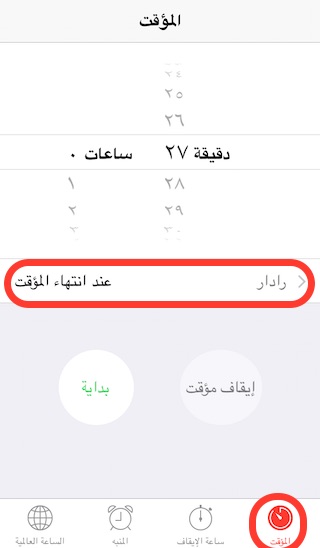
3
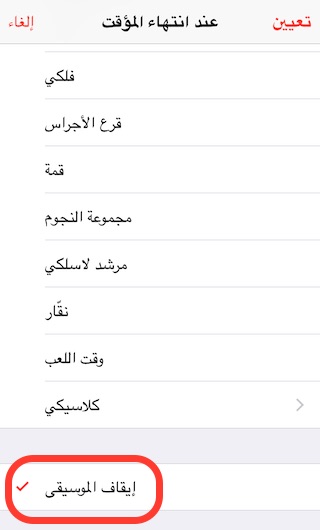
Go to the bottom of the list and you will find the option to "pause the music", so choose it and then set the timer at any time you want and turn it on and when the time expires, the device will perform the action that you have chosen, which is to stop any audio clips that work.
The previous method is suitable for any audio or video clip you are playing where the device stops the "thing" that is working. Even if you use any application that supports working in the background and you can control and stop it from the Control Center, the previous method will work with it.
What do you think of this trick to stop media playback in your device? And do you know any other hidden feature that we didn't touch on before?
Source:


112 comment