Apple updated its watch system to OS 2.1

In conjunction with the launch of iOS 9.2 yesterday, which came to support Siri Arabic and various features -this link-. Apple released update 2.1 for the watch system. The update came with intense interest in the Arabic user, as it came to add Arabic Siri, Arabic language, Arabic numerals, and the Arabic calendar. So what's new in the latest watch update?

Apple updated its watch system to OS 2.0

Before we get acquainted with the new features, update the watch system by opening the "Watch" application, then choose General, then update the program. The update and its size will appear for you, as well as a quick review of the features.
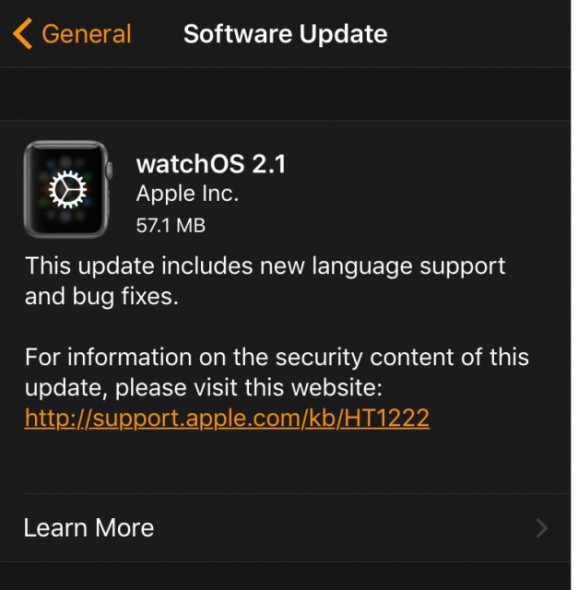
Watch 2.1-06


What's new in OS 2.1

1

Arabic Language: Added support for the system language in Arabic, Czech, Greek, Hebrew, Hungarian, Portuguese (Portugal), and Vietnamese.

Watch 2.1-05

2

New dictation support: Added dictation support in English (Malaysia), Czech, Greek, Hebrew, Hungarian, Portuguese (Portugal) and Vietnamese.

3

Calendar fixes: Resolves an issue that could prevent events from updating in Calendar Extensions.

4

from right to left: Added support for right-to-left user interface.
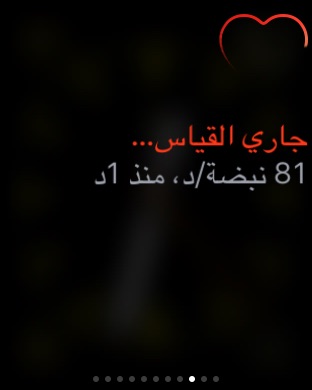
Watch 2.1-01

5

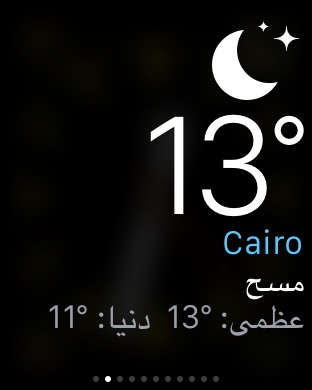
Arabic and Hindi numbers: Adding the ability to switch between Arabic and Hindi numbers for the Arabic language.
Watch 2.1-04

6

Increase friendsFaster access: Increased the number of friends that you can add per hour to 12.

7

Siri Arabic: Added support for Siri and dictation in Arabic (Saudi Arabia and United Arab Emirates).

8

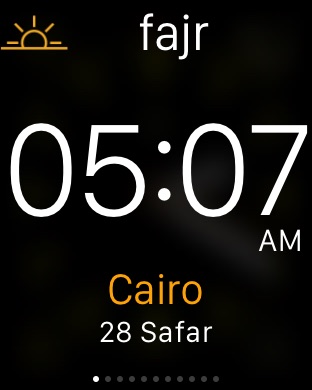
Islamic calendar: Provide a new addition to the Islamic and Hebrew calendars.
SO 2.1-01

9

Time problem fix: Fixes an issue that could prevent the time from showing in Power Save mode.

10

Various fixes: Addresses issues that may have prevented third-party applications from starting.

11

Icons: Resolves an issue that could prevent third-party app icons from displaying correctly.

12

More stability: Resolved an issue that was causing instability when changing the system language.


Ela_Salaty_Watch2

Do not forget to update an application to the latest Salati that supports the Apple Watch, the second version, full support, and you can know prayer times immediately from the watch face without opening the application, and there are many great features in the application To Salati to support the Apple Watch.


ElaSalaty: PrayerTimes & Qibla
Developer
Pregnancy


Have you bought an Apple Watch? Do you see it widespread in your country, such as the iPhone or the iPad?

51 comment

comments user
Ibrahim Al-Deeb

My comment is how I look at this time and where

comments user
Libya

Thank you iPhone Islam

comments user
Ahmed Badr

Hi
My iPhone 6 Plus has made the latest update and noticed that the battery is draining very quickly, unusually
Kindly inform

comments user
Khalil

Hi
Enquiry
FaceTime has no connection in version 9.1
Is version 9.2
The problem is solved

comments user
Mahmoud

My iPhone 4s and the update did not arrive, How do I have a problem with the device?

comments user
gzaal

Thanks for the constant updates 👍🏼

comments user
tomoy88

I mean, new updates for Arab eyes Apple loves you

comments user
Fahad's mother

Peace be upon you. I wanted to inquire after the last update. My sire disappeared. What is the solution? Please advise me, may God reward you all the best

comments user
mohammed gh

Your news is very late. There are other applications that are free and their news is issued XNUMX to XNUMX hours before we tell you !!
And you apply you with money and the news is late!

Why this neglect ?!

comments user
Happy

Thank you for updating the prayer program. It is a wonderful and useful addition, especially when I am outside the country. I benefit from it a lot.

comments user
Sumar

How much storage capacity the new software needs to download

comments user
Alaa El Wardani

I opened the settings and see, and the Arabic language is not there, what is the solution?

    comments user
    Happy

    I am looking for the Arabic language for sure is there

comments user
Abdallah

Inquiries for those knowledgeable:
By raising the watch and bringing it closer to the art, can Siri be given instructions, without having to press a specific button, as is the case with the iPhone?

    comments user
    Sami Effendi Sarhan

    Yes, with the Apple Watch, there is no need to press any buttons to talk to Siri

    comments user
    Happy

    If you just exert yourself a little and go to the settings of the watch and choose Siri, you will find the answer clearer about the sun disk!!!

    Yes, it does

    comments user
    Abdallah

    Long life, I don't have the watch and intend to buy it.
    If I had what you asked, and your safety.

comments user
Abdel Fattah

Hi
Thank you, Yvonne Islam
Please prepare an article as soon as the new version 9.2 jailbreak is supported

comments user
conspiracy

Of course not until I did not see her originally
Please, the next topic is dedicated to Siri, explaining how to take advantage of the personal assistant, Siri

comments user
Hotifa

Hi
We want the iPhone Islam, after the release of Siri in Arabic, to dedicate an article to explain Siri and its tasks

    comments user
    Happy

    Siri is just a change of language only, not a major add-on to the system! ! ! ! !

comments user
Bender

For those who ask about Siri support for the Arabic language
Apple reported that Siri supports Arabic for Saudi Arabia and the UAE.
You may need to change the region.
I don’t know .. perhaps.

    comments user
    amr

    No
    I am from the Sultanate of Oman and my telephone is English, but an Arabic-language siri operator

    comments user
    samer-NANO

    Peace, mercy and blessings of God
    I am talking to Sari in the Jordanian accent and it works with me, thank God, there is no power except with God, 100%
    Thank you

comments user
Karim Taha

I was a trial update, how do I update the final version, knowing that I went to the settings and found that your device is up-to-date

    comments user
    Abdel Fattah

    You should run Restore

comments user
M Wafi

Thank you iPhone Islam, thank God the iPhone and watch have been updated 📱⌚️👍🏼😘 😘😘😘

comments user
❤️🌹

I wish the watch supported the iPad to buy it

comments user
❤️🌹

In fact ... neither nor 😁

comments user
Abu Ali

Siri is not in Arabic at the hour

comments user
Abdullah Obaid

The calendar on the watch does not display the Hijri calendar even though the iPhone has the Hijri calendar

    comments user
    Happy

    You can choose a field for the Hijri calendar once you have assigned the fields to the watch face, such as the battery field, calendar, temperature, etc.

    Including the Hijri calendar

comments user
Hamza Saadi

Thank you, no, as I did not find the Islamic calendar on the watch

comments user
Liked you

The most beautiful news that I heard, the rest of the news is published by a store owned by the Arab countries 😍

comments user
Mohammed

Thank you, not thank you

comments user
Ahmed Al Hassan

The watch was bought a while ago. The watch has been successfully updated, and the watch has a more than wonderful experience, but I have fear and obsession. All that I come to do ablution, remove the watch from my hand. Water resistant and gives you wellness

    comments user
    Osama Ahmed Meera

    I've got the watch and wash it off

    comments user
    Youssef Al-Fahd

    My brother Ahmed, do you recommend it? What is the biggest benefit from it ???

    comments user
    Sami Effendi Sarhan

    Do not perform ablution in the watch because it is not waterproof, rather it is water resistant to a small extent

    comments user
    Happy

    Warding off suspicion is more important than bringing benefit. Basically, ablution has no meaning in a watch. A watch is a test and is completely against light water. If the band is made of leather, it will definitely be affected over time. As for a watch, you can swim in it normally.

comments user
Mahmoud Ezzat

I am in the UAE, and my phone I talked to is not quite an Arabic language, knowing that my phone is iPhone XNUMXS

    comments user
    samer-NANO

    Peace, mercy and blessings of God
    Brother, I will ask you to update the ios9.2
    On iPhone 4s ???
    Thank you

    comments user
    Mahmoud

    I have not received the update, is there a problem with me?

comments user
kamal

Thanks

comments user
Love Al-Dossary

Thank you Yvonne Islam

comments user
Faraj Al Mesbahi

Thank you iPhone Islam

comments user
Samer

I am from Palestine and I did the new Althaditat, but Siri does not support Arabic

    comments user
    ❤️🌹

    Perhaps you did not change the language from the settings, go to Settings> General> Siri> Language and choose the language you want, and you will see it in Arabic

    comments user
    Ahmed Naguib

    For those who want Siri in Arabic, go to Settings, then General, then Siri, enter the language, and activate Arabic from the table of languages.

    comments user
    Abu Bakr

    Turn on all Siri icons, and they will appear, God willing

    comments user
    samer-NANO

    Peace, mercy and blessings of God
    Brother, enter the settings General Siri and then the language and then choose the Arabic language and your safety

Leave a response

We are not responsible for any misuse of the information mentioned above. IPhone Islam is neither affiliated nor represented by Apple. IPhone, Apple and any other product name, service names or logos referenced herein are trademarks or registered trademarks of Apple Computer.

العربية简体中文NederlandsEnglishFilipinoFrançaisDeutschΕλληνικάहिन्दीBahasa IndonesiaItaliano日本語한국어كوردی‎فارسیPolskiPortuguêsРусскийEspañolTürkçeУкраїнськаاردوTiếng Việt