One of the articles that I love writing in person the most are the small and immersive features in the systems. Every so often I stand with myself and think: Are there features that I do not know about iOS? Then I start searching and every time I find either new features or others that I have forgotten. In this article, we review 5 secrets that most users may not experience.
1
Selfie PsiriWe know that you can open any application with Siri, and of course, the camera. But the wonderful thing is that Apple enabled Siri to determine which camera to open with voice commands. If you ask Siri to open the camera, it will open his background as usual. But if you want to open the foreground directly, say "Hey Siri, take a selfie" or "Take a selfie." In English, "Take Selfie" and you will find Siri open the camera application and go to the front camera directly.
2
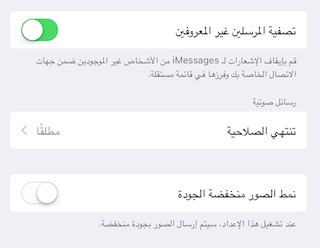
Lower image quality: IMessage is great, and Apple has made a huge number of changes in it, and you can review it Our narrative article For advantages as well Experience essay. One of the great and old things about iMassage is that it sends pictures with high quality, unlike many chat applications, including WhatsApp, which reduces the quality of the images and thus their size. IMassage makes you see the images in high quality. But this will be on your internet package account. So, Apple added the ability to reduce quality and thus save data consumed. Go to Settings> Messages and you'll find the option at the bottom.
3
Delete site data: It is known that when you visit any site, data and cookies are recorded on your device so that the site will recognize you again when you open it again, and sometimes to show you advertisements based on previous views. Many of us used to delete data in general. However, this means that you will have to re-log in to all sites.
In iOS 10, Apple added a feature to Safari that enables you to delete only the files of a specific site. Open Settings, then Safari, and at the bottom you will find an Advanced option, choose it
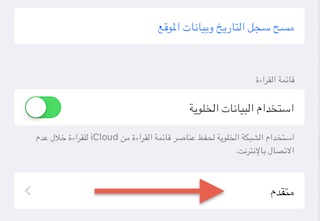
After that, several options will appear for you. Choose "website data" by clicking on it and choose the sites in detail. To appear as follows:
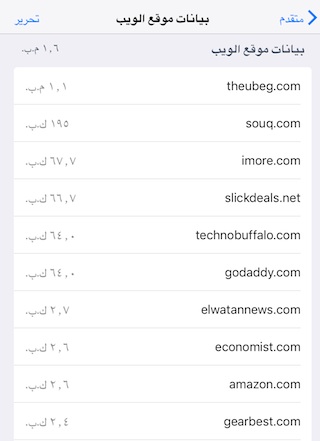
Now click on Edit at the top and delete whatever you want.
4
Download priority: A tragedy when you do a restore for your device and you find that your device will re-download hundreds of applications and that this will take long hours and sometimes days, depending on the speed of the Internet. What if you want a specific application to be downloaded early because it is important? Apple added a feature for 6D touch devices "7s and XNUMX", where by clicking on any application they can add priority to it, to be the first application that the system downloads after the application that is currently being downloaded. Of course, after you choose the application to have priority, you can go to the current application - download - and choose to stop it. Watch a video explaining the method:
5
Cancel advertising emails: This feature is perhaps the most popular of its predecessors. Where Apple added an automatic feature in Mail in iOS 10 that identifies the promotional messages that you receive and suggests that you log out of these ad lists with one touch. Of course, it does not work in all messages, but you will find it appearing in messages as follows:




43 comment