Complete guide to updating your device to version 11

This is the update you are waiting for and you have sent hundreds of messages to inquire about the date of its release and its features, now it is available for you to upgrade your device to the latest operating system which carries version 11
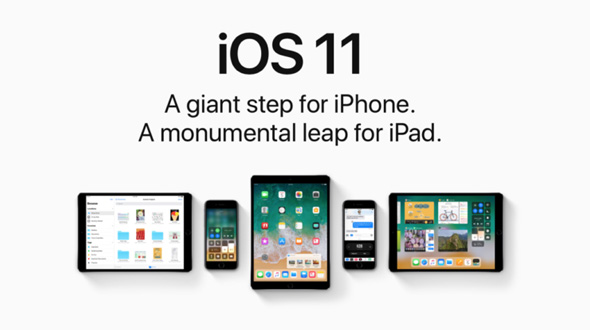
Download iOS 11


Hey dear brother, I have been patient a lot. You think that you slow down a little, start in the name of God, then read this guide, and without hasten to start the upgrade process

In the following lines we will provide you with a complete guide to update to this version As you were used to from us before And every year, so that it is considered as a basic reference for you and aide in making the steps of the update process come to an end.
Contents of the guide:

  • Devices this update applies to.
  • What's new in iOS 11
  • Essential notes before updating.
  • Basic steps before updating.
  • Automatic update steps.
  • Manual update steps.
  • Questions and answers.
  • After the update.


Devices that the update applies to:
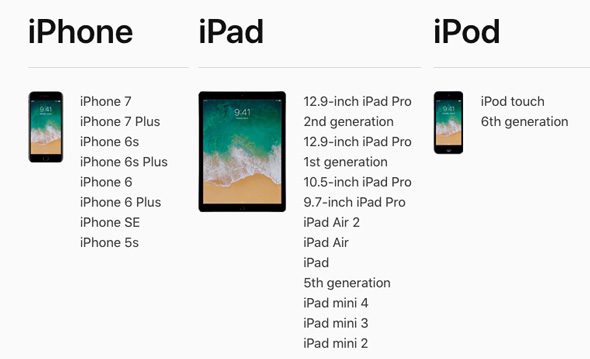
iOS 11

Please follow us on the Sync page Twitter and on FB


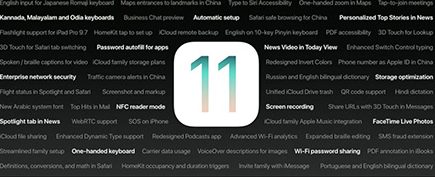
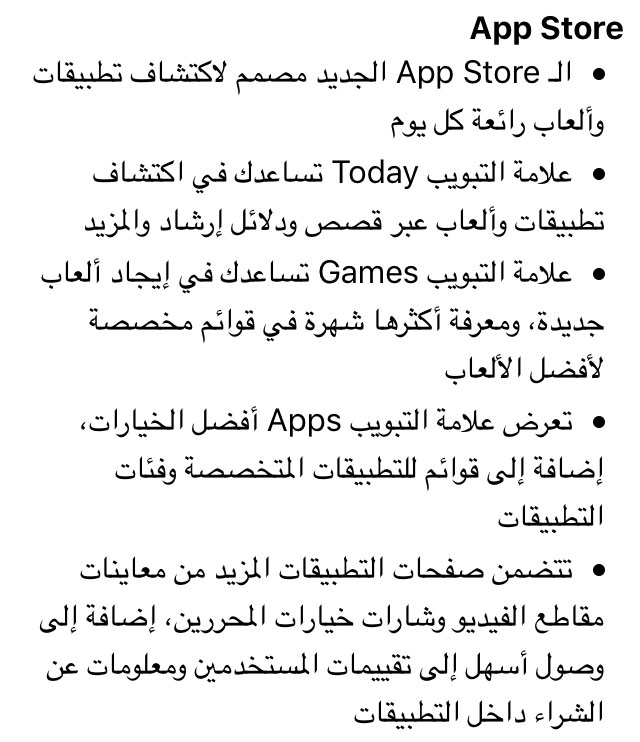
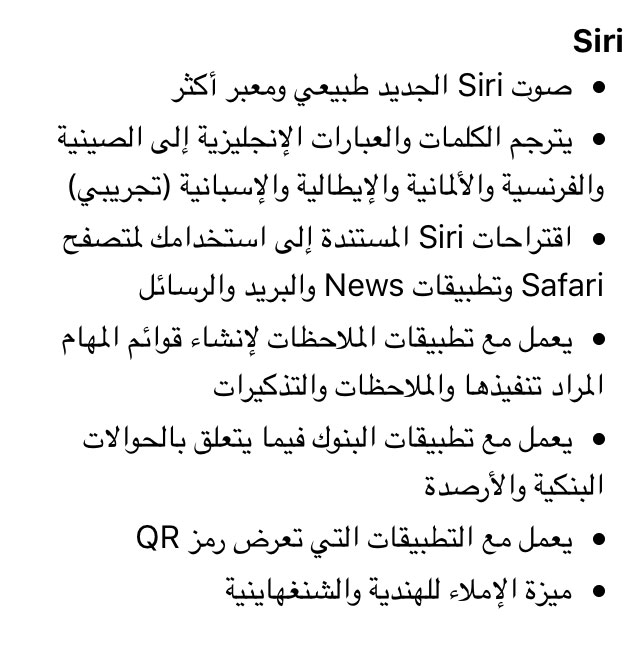
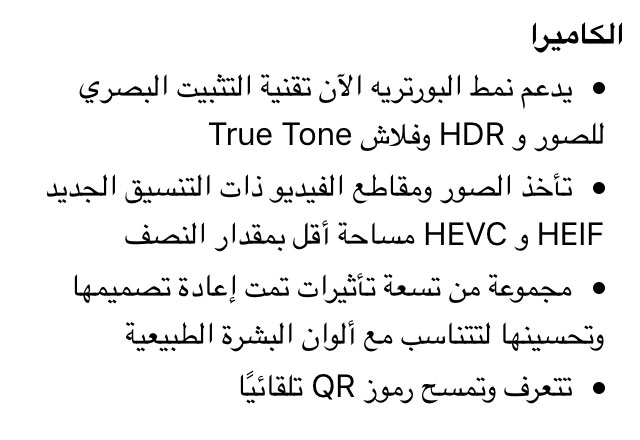
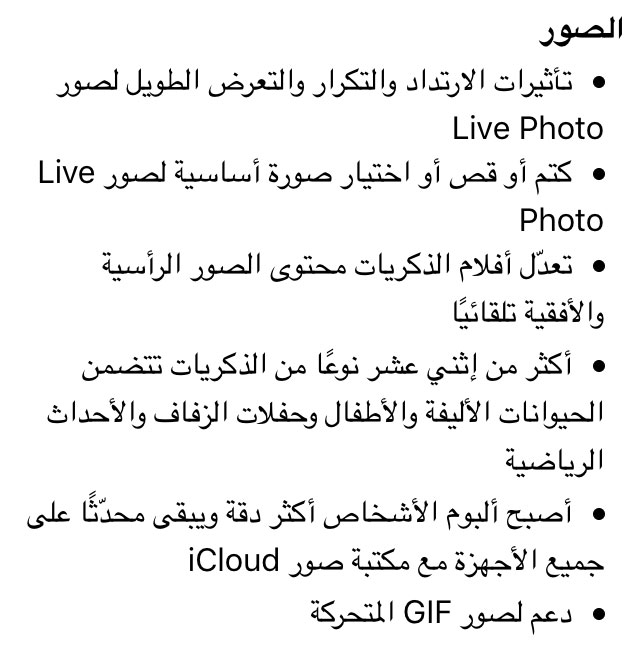
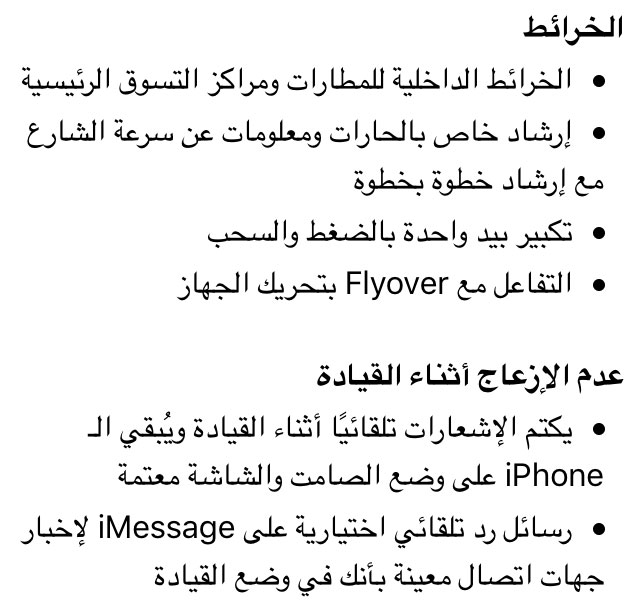
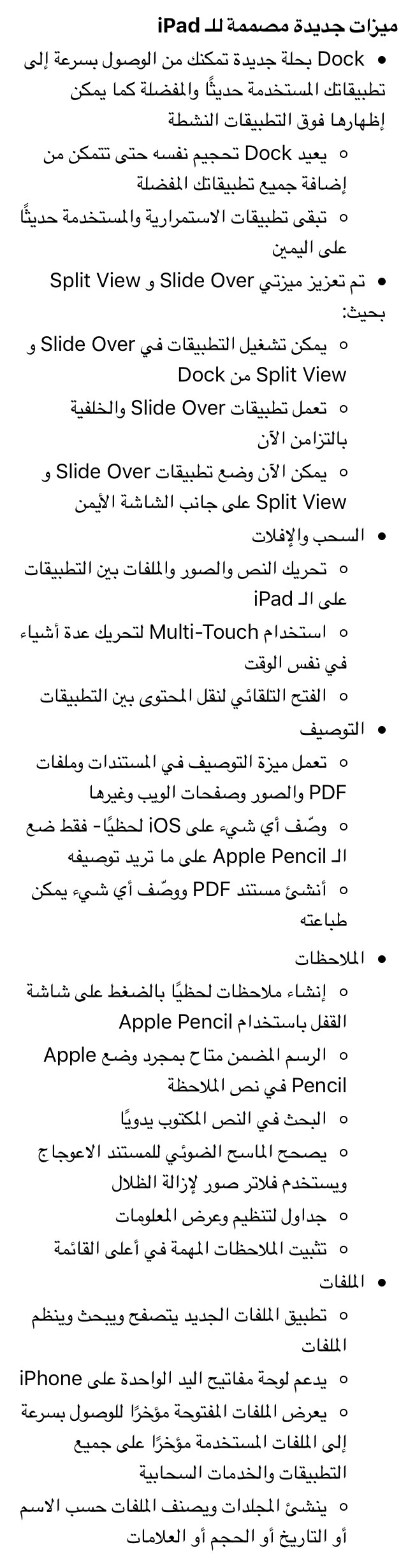
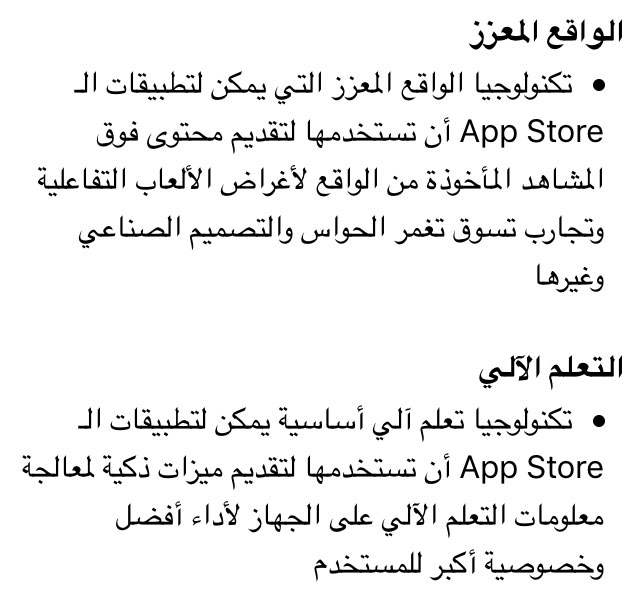
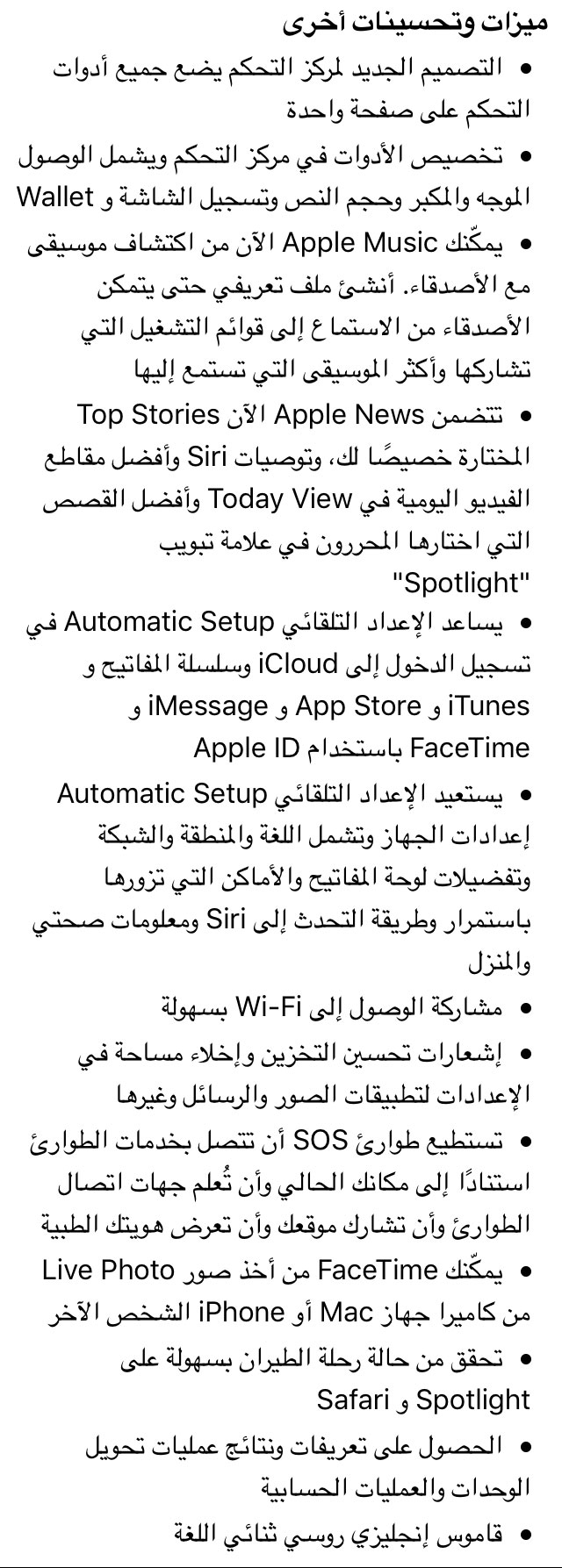
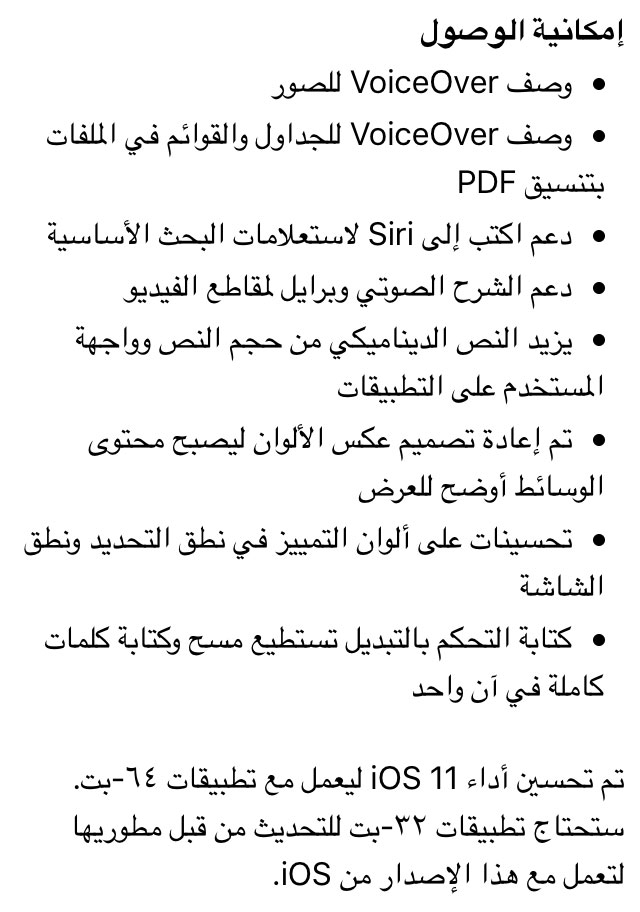
What's new in iOS 11


Basic notes before updating:

  • Check out our article on pre-update preparations via this link.
  • Download the latest version of iTunes (released hours ago) 12.7 from the Apple website via this link.
itunes-logo


Update directly from the device

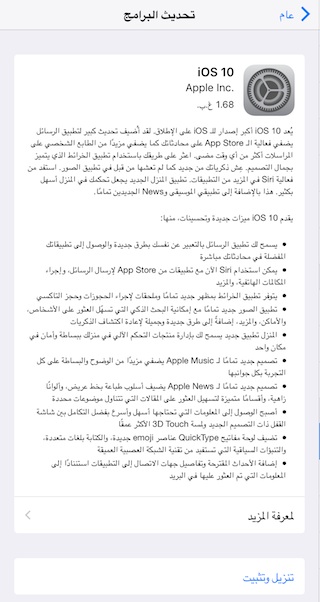
Open Settings, then General, then Software Update, and it appears to you that there is a new update, such as the following image, just click on Download and Install (It requires a free space in your device of at least 1.68 GB in the case of the iPad Air and increases with the device being newer, especially the iPad).
ios-10-01

All you have to do is press "Download and Install" as you always do for any update.

If you have a jailbreak, you will not be able to use this method, and you must have Restore


Update via iTunes:

The difference between Restore and Update:

Before we start the update, we must give an overview of the difference between the Restore and Update processes and their actual impact on the iPhone.

Update: It is the process of updating the device automatically without your interference, as iTunes downloads the update file from the Apple website and updates your device, and it does not result in losing any data (it is assumed that, but a backup copy must be taken as previously mentioned to ensure that no accidental problems occur).

RestoreIt is to download a completely new version as if you bought the phone again, and some prefer it when updating, which is mandatory if you have a jailbreak and want to update

Sometimes the update work may not be suitable for those who have a jailbreak in their device, and they must choose Restore, but in our experiments the update was completed without a problem.


Update steps:

1

 Connect your device to the computer, open iTunes, and hit the Check For Update button - sometimes iTunes knows that Update is present.

2

A message will appear informing you that there is an update for your device, which is iOS 11, so press Download And Update (an error message may appear and the reason for this will be pressure on Apple's servers)

3

A message will appear informing you of the new features that have been added in iOS 11, and you can read it, then click Next

4

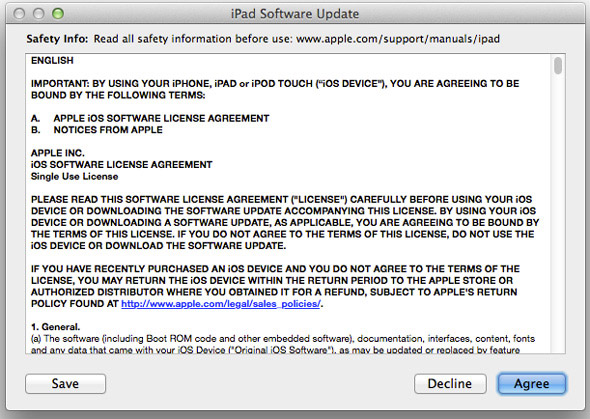
A User Agreement message will appear, Agree accept it
iOS-7-Update-03

5

Now you will start the process of downloading the file and updating your device, but you should note that the download and update process will take some time.

After the update, you may be asked to enter the password for the cloud "Phone Finder". If you do not remember it, please wait and do not update your device


Quick tip:

After the update is completed, browse your device and go to the features and make sure that they are set correctly, specifically the properties of email and calendar accounts, by applying the settings and then contacts (previously it was contacts, contacts, calendar  Mail, Contacts, Calendars) And make sure that all of your accounts are there. And if you find anything missing, restore from the backup you took, as we mentioned in an article Pre-update.


Manual update:

This method is preferred by some and it suits everyone, especially those who currently have a jailbreak, but it will delete all the contents of the device so A backup copy is required So that you can recover what was erased.

You can do a manual update by downloading the update file through the following links, depending on the type of your device, as shown:

* The update is large in size, and it is possible that your connection will be disconnected before downloading it all, so use a download manager application. We will update the article in the next hours to add the links.

You can download the system file from here

Then, after the download is complete, connect your device to the computer, then go to iTunes and press the Restore button with the Options button on the Mac or the Restore button with the Shift for Windows and the keyboard. (Make sure that the file extension is IPSW, if not, just change the extension manually to IPSW) A window will appear for you to choose the downloaded file and then start the update process for iPhone.


FAQs:

Will i lose the jailbreak if i update?

  • Yes, if you want to maintain the jailbreak, do not update your device until it is jailbroken.

Will it wipe all my programs and device contents if I OTA or iTunes update?

  • No, you have to review the explanation again, there is a difference between Update and Restore, and in the end if you have a backup you can restore everything.

ITunes gives me an error when trying to update, what do I do?

  • Make sure you have the latest version of the iTunes program, and use the manual method to update.

I'm sure I have the latest version of iTunes, but there is still an error, what should I do?

  • You can not wait and try again later there may be pressure on the Apple website, and you can put your device in the DFU and try.

I can't upgrade I tried everything and iTunes still gives me errors, please do I want a solution?

  • Search Google for the error number and see what the problem is, and it is best to try to upgrade with another computer.

I have iOS 11 beta version, can i upgrade to the final version?

We tried and we couldn't (update did not appear), if you have a way to upgrade despite having GM version installed before tell us.


After the update:

Applying the previous steps will ensure the success of the update, God willing, and it should be noted that the first synchronization process between the iPhone and the device between the end of the update process will take time as the data stored in your device will be transferred to the iPhone, and upon its completion you will notice that even the safari pages on the iPhone previously opened before The update remains the same, and so does the data and other features. Then it can be said that the update process was successful.

NoteThe current jailbreak is not suitable for this version, and we do not know when the new jailbreak will be released and when it is issued, we will announce it on the site for that Do not update your device If you want to jailbreak.
We will continue to update the article and add more news and inquiries, if any


Note that Apple's servers have a lot of pressure, so the download will be very slow, so you can wait hours and then try again


In this article, we will not post duplicate comments as well as those that have questions answered by action, and we will delete comments that are outside the context of updating the device. Please read the article well and if you ask an important question, we will delete it and put its answer in the article so that everyone benefits, so review the article again later.

158 comment

comments user
haron

My iPhone 11G device, I cannot download programs on it. It tells me that I must upgrade to iOS XNUMX.

comments user
waterghazal

May Allah make it good

comments user
I am

Oh my God, iTunes has been displaced from me, and I have not been able to restore it. By God, you are ceasing, who finds him telling me, he has just escaped

comments user
Hussein

When I updated the iPad ,,, the device's charge became draining fast compared to the old version

comments user
ali

There are programs that do not work on the new update, so what is the solution

comments user
Hazem Ali

Peace be upon you, my brother. I have an iPhone 5 without a fingerprint, does it accept the 11 iso update? Please help me

comments user
Hussein Al-Sarhani

Hi
How do I find the system file to update
IPhone 6 device type
My device model number A1586

comments user
Hussein Al-Sarhani

Hi

How do I find the system file to update
Device type iPhone 6
My device model number is A1586

comments user
Dr. Khamis Al Mazrouei

Peace, mercy and blessings of God
Please help, may God reward you with good.
I bought an iPhone XNUMX and chose to download the data from the iCloud account. The download process started, but now more than a day has passed and the phone is still displaying a black screen with the Apple logo in the middle and a cross line near the completion of the data download. Knowing that I use a fast Wi-Fi network. Is this situation right? Does the phone take this long to recover data from iCloud? Please advise me, may Allah reward you

comments user
سامي

Peace, mercy and blessings of God
I downloaded the beta 11 version how do i update to the original ios11

    comments user
    Blog administrator

    We wrote a full article regarding this on iPhone Islam, search for it in the last published articles

comments user
bu Qais

Hi
I updated my device, but nothing changed in terms of volume increase and decrease when I play the video

comments user
YasserGx

It happened and I wish it did not happen
How do I return to the tenth version?

comments user
waterghazal

Thanks a lot for the adequate explanation

comments user
o. hakawati

I want to ask you please, will if I restore my device, I will lose all the apps and have to download them again or not?

comments user
Blog administrator

This is not a problem if you have a synchronized application, click the star button above. You will find an article talking about this and how to activate it (how to customize the control center), and it is assumed that there is a notice received by this article.
Observer, synchronized, is supposed to know everything now

comments user
fatima

Peace be upon you. I updated the device and everything is perfect. The problem did not show me the screen capture as a video. Even for you, I find it with the settings. Please solve the problem.

comments user
Saudi Iraqi

Reset the feature press on the side of the screen

comments user
TERMINATER

After the update the battery runs out quickly

comments user
Hatem

The number pad in the calling application is not transparent as before, and its colors are black and white ... not beautiful at all 😭😭😭

comments user
Hatem

Tilting the keyboard to the left to write with one hand does not work with the Five S, I think it is for iPhone XNUMX and above due to the big screen. The font and keyboard look like a Samsung keyboard still makes me nervous, and I don't think I will get used to it 🤢🤢🤢

comments user
Mohamed Naguib

Frankly, an update is not better than that
Arabic calligraphy is very very beautiful
The best streak I've had so far
Nice icons
And speed in performance

    comments user
    Light • O God, forgive my parents and siblings

    You liked the line, God willing !!

comments user
Anmar. alibeak

Why don't I see the article photos?

comments user
Hatem

The update was successful .. I noticed general changes in the design .. the icons .. the space between the lines in the options .. The name of each menu appears at the top in bold (I did not like it), and frankly, the Arabic font is bad and the iPhone has become like Samsung, which made me very upset 🤢🤢🤢

comments user
Magdy H

How to set the driving style

Because he works for me, and when I drive the car, he doesn't receive calls
When opening the device, you must confirm that you are in a position other than driving

Where can this feature be canceled?

comments user
Khalid Mahran

The update is excellent without any problems. I noticed the smoothness and speed of the device are wonderful. The overall look is very excellent. The streak is not as bad as many people think, and it needs to get used to. The battery I think has improved very slightly. Generally, the update is cool

comments user
ghaith

A bug in the new iOS 11 https://youtu.be/D81Ieoz1moQ

    comments user
    Light • O God, forgive my parents and siblings

    I watched the video
    Do you mean he is stuck with you!

comments user
Ali Hussein Salem Saleh Al-Mirfadi

A failed update with the nearby voice over, including 10 updates, trial versions, and at the end of the day are ruinous.

comments user
Mohammed

Can I have my latest iPhone 5c?

comments user
khshbawi

The update was successful, praise be to God, but the font has changed and is becoming overwhelming

comments user
ayman

Someone has a problem with the battery, I guess you can't bear it

comments user
Jassem

I updated and unfortunately it lasted for 3 hours to install, then the Apple brand appeared, and I cannot use my device now ...
I tried to update again via iTunes but the same problem persists...

My fear is that all the files have been deleted from my device and that the only solution is to restore the device as if it were new ....

comments user
Blog administrator

Reasonable ?? Apple has 11 beta releases for iOS XNUMX and checked out all the problems with it and downloaded how many augmented reality apps are all boring

    comments user
    Light • O God, forgive my parents and siblings

    Embarrassment

comments user
Ayman Saadeh

Greetings, is it possible to return to the old system?

comments user
Ayman Saadeh

There are some programs that do not work on the new system. Is it possible to return to the old system to pull files from these programs and re-download a new update?

comments user
Ashraf Salem

The update has some problems
The collapse of some applications, although they were recently updated, and a partial split screen problem when viewing pictures or videos in WhatsApp if it is in Arabic and if the language is changed to English, WhatsApp will work normally.

comments user
TERMINATER

The volume square did not disappear from the half as they said, rather it remained the same

comments user
Ashraf Al Sadiq bin Musa

In the new update, when you turn Airplane mode off and then turn it off, you find that Wi-Fi and Bluetooth are on
Although they were not activated before that

comments user
ehabjawal

The update has some congratulations and problems in the app store

comments user
Am Anse

God bless you. The update has been updated by the grace of God

comments user
Asaad Al Iraqi

In order to preserve the language of the Qur’an, you should use Arabic alternatives to extraneous words such as restor

comments user
Abdul Salam Club

Praise be to God alone. The update was successful. Thank you and my greetings to iPhone Islam

comments user
Muied abo ayad

Hi
The update is very bad, slow and there are issues with voice over I don't like it

comments user
Ahmad

Does anyone advise me to update my iPhone XNUMX Plus? Or is the update bad for this iPhone and slowing it down? I ask the brothers and sisters who tried to update the same iPhone XNUMX Plus to help me, God bless you.

comments user
Saudi Iraqi

ٱٱ♡‿‿‿‿‿‿‿‿‿♡♡̨̨♡♡♡♡♡♡♡♡‿♡♡‿♡♡♡♡‿‿‿‿‿‿‿‿‿♡‿♡♡‿‿‿♡‿♡♡♡♡♡♡♡‿‿♡♡♡♡♡♡♡‿♡♡♡‿♡♡♡‿♡♡
To solve the problem of closing applications by 3D Touch on the side of the screen are:
1: Settings
2: General
3: accessibility
4: AssistiveTouch Settlement on
5: Customize top level menu
6: 3D Touch auction
And you choose multitasking
It comes with a square screen that contains shortcuts
Click on 3D Touch and the list of open programs opens
And ... Aasssـْ..ْaff, unemployed 🌹🌹

    comments user
    Moustafa

    Dear sir, its longevity is present from the version of iOS XNUMX, but unfortunately the testicle is paralyzed from the side of the screen and this is very bad ... even the iOS XNUMX is bad. The best feature is Live Pictures.

comments user
Youssef's father

I couldn't access my app purchases like before

comments user
Muhannad Abd Rabbo

greetings to you all :
I updated 19/09-2017 / UAE yesterday, iPhone 7 ..
Everything naturally works efficiently
But there is a difference in the network, as the network appears as UAE & KSA TOGETHER
She was previously showing DU

I tried to choose du, but it is not present in the settings ??

Please advise ..

Note that the Saudi network is the first time I see it.

And the phone receives and sends calls normally

    comments user
    Mustafa Vaughn

    It is true, my brother, because of the update of the messaging services, I updated it when the message appeared and the du symbol disappeared, and the same, frankly, appeared to me as a long and annoying sentence.

    comments user
    Umm Abdul-Rahman

    On the occasion of the National Day of the Kingdom of Saudi Arabia, the Emirates always put the slogan together

comments user
Abo Anas

The update has occurred, but there has been poor lighting on iPhone 7 and the screen is dim, please advise me of the solution

    comments user
    Magdy H

    I have the same issue for iPhone XNUMXs +

comments user
sms2

The charging is not sold on the phone after the update, it will not work, and the charging and sound mark does not work. I don’t know where the problem is

comments user
Abo Anas

IPhone Islam. Most of your apps have stopped after updating to XNUMX
Why are you late updating apps even though they are mostly paid? !!

comments user
Mohamed

Hi
If you allow me to do something that I showed every time from the mobile itself, then I download the first version, and after that, install, not all of that copies, and take an area on the mobile phone.

comments user
Murtaza Habib Allah

Restore has been completed successfully
But iCloud Drive application I did not find it among the applications, nor was it found in the Appstore
And he has stored files, is there an answer?

    comments user
    Abu Bahaa

    An alternate file will be located inside it

    comments user
    crcking

    You can view all of your iCloud files now on the file app

comments user
john

Hi
I have not downloaded a version for iOS 11
The version is a little slow, knowing that my iPhone is 6s, but the version lacks speed. Of course, the font for the Arabic keyboard version, I did not find the appropriate word except for the font shape (protruding). We were waiting for the 3D for the control center (WiFi), otherwise it would not have come, except for the option to open the data that is currently present. The App Store had the largest share in the update. Apple also relied on changing the logo for the programs that come with the iPhone when you buy it (calculator, App Store, contact, iTunes, …..).
The password entry panel, it was similar to the old Samsung, almost the same style, I did not like it as an iPhone user.

comments user
Anwar Gharib

Praise be to God, it has been updated, thank God, things are good 👍🏼

comments user
ahmedmoawad

I updated the system on the iPhone 5s very cool and has new features

comments user
Asad

Respected Brother Bin Sami, I noticed something new, which is that Apple improved its maps based on Maps Me, as I subscribed to the aforementioned program and made hundreds of additions and found them themselves appeared on Apple Maps until the errors themselves appeared, and this is a very big improvement for Apple Maps that still do not support Shipping in my country, Iraq, thank you to all of the staff, Yvonne Islam

comments user
Mohamed Abdel Razek

Guys, advise me I have the manual lighting feature, the lighting doesn't only work automatically

comments user
ALOMRANY

After updating the iPhone screen is not responding to touch
If someone has the same problem, he helps us with a solution

    comments user
    Ayman Saadeh

    Have you downloaded it from iTunes?

comments user
Abdul Hakeem

The feature of pressing the right side of the screen to open applications in the background without pressing the home button, which is one of the most important features of 3D Touch, was removed with the update. Please mention it in the negatives of iOS11 🤞

    comments user
    Saudi Iraqi

    ٱٱ♡‿‿‿‿‿‿‿‿‿♡♡̨̨♡♡♡♡♡♡♡♡‿♡♡‿♡♡♡♡‿‿‿‿‿‿‿‿‿♡‿♡♡‿‿‿♡‿♡♡♡♡♡♡♡‿‿♡♡♡♡♡♡♡‿♡♡♡‿♡♡♡‿♡♡
    To solve the problem of closing applications by 3D Touch on the side of the screen are:
    1: Settings
    2: General
    3: accessibility
    4: AssistiveTouch Settlement on
    5: Customize top level menu
    6: 3D Touch auction
    And you choose multitasking
    It comes with a square screen that contains shortcuts
    Click on 3D Touch and the list of open programs opens
    And ... Aasssـْ..ْaff, unemployed 🌹🌹

    comments user
    Majid Saad

    +1

comments user
Mohammed Al-Saqry

I have 3 devices that receive the update which are 5s, 6Plus, 7, can I download the system once and use it for all devices? How?

    comments user
    Blog administrator

    No, every device has its own file

comments user
Light • O God, forgive my parents and siblings

I updated the system on my iPad "I couldn't risk the iPhone"
As a system version of the iPad it is really cool
The iPad finally has a copy that gives it its right
In the past it was said that it was the father of the iPhone, and many times they said an iPhone, but a large size, and this is because its system version is the same as the iPhone version
While now it has advantages that really give it its right and make you feel that it is really a compromise between a phone and a laptop, the iPad with this system 11 has become a monster between the two just as I see it should be like this ... and what a monster! 😍 Apple has really created version 11 dedicated to the iPad. It deserves a lot of praise
The new Arabic calligraphy is provocative but beautiful, I don't know how :)
.
As for updating my iPhone, this depends on you. I mean, I will see if my colleagues got involved after the update or not until I take it from you and not accidentally lose my data.
Thanks to Yvonne Islam, and thanks to my colleagues. Here, I learn from you

    comments user
    Light • O God, forgive my parents and siblings

    I changed my words today
    IPad version 11 requires a manual, or I could not create a new system (this is because it is full of many defects) 😣

comments user
emadelbadry

3D feature is not activated by pressing on the side of the phone, iPhone 6s Plus, anyone has the problem background

    comments user
    طارق

    This feature was removed in iOS 11

comments user
Amr Yousry

Apple laughed at us and said the one who has a gold version will show it the update and it will look like it is normal, thank you

comments user
z_shehr1

My iPhone 5, what did we do when we were old with them?

comments user
emadelbadry

My brother, has the pressure on the side screen been removed from this update to show the open files instead of pressing the Home button twice? Please clarify, I am with iPhone 6s Plus and thank you

    comments user
    طارق

    Really canceled
    God help who was accustomed to it

comments user
z_shehr1

Curse on them, two iPhone 5 devices that support iOS 11 😭 update

comments user
Amer El-Arini

Peace be upon you, God’s mercy
I have apps that I bought from the net to keep the pictures, and now the apps have been deleted from the store, but I have it on my computer, and with the new iTunes 12.7 update, the store has been canceled and synced to the apps, meaning I can no longer download my old apps from the computer. Is there a way? Help us with a solution

    comments user
    Irons

    Peace be upon you, brother. You have to download applications from the Apple Store directly. You will find the applications in your account

comments user
ali saeed

Zain, my dear brother, I need to give back the right to data, otherwise

comments user
Moustafa

I'm still on Beta XNUMX and can't see the update !!! I need to update from iTunes and do not do what ??

comments user
Saudi Iraqi

Lsslٓaٓm‿‿ ؏l ♡ ِ̨ـْيگم‿‿ After the update, I have a problem, which is that the 3D Touch does not open the programs by pressing from the side of the screen. Please help the brothers and thank you very much 🌹🌹

    comments user
    emadelbadry

    The same problem

    comments user
    Saudi Iraqi

    I found a solution

comments user
emy

Peace, mercy and blessings of God be upon you. May God reward you with good for this wonderful article. Inquiry please, I am iPhone i 6s Plus and I am on the latest version of the
Regular Ios is not experimental, not until the bucket. It does not appear to update, so what is the reason? Is the reason why is my iPhone? I don’t update or the reason. I don’t have enough space for the update. I also know the free space I have to delete Apple, what shows me the update and the Internet I have 1 MB so what is better for me in comparison The update is the update in iTunes or the automatic update via the device through the software update. I have an idea of ​​the free space I have 1 GB and I don’t know about 4 or 8 out of ten, as far as I remember. This is the first time I am attending the full update because I have an iPhone with me from the month of 2 to late and I am blind and you know that the iPhone will remain silent when it happens. So, I pray you, necessary answers from you to all my inquiries in order to avoid any problems, I mean, because I am a little scared, I mean, and at the same time I die and happen because of the features. Awesome, which is in the voice. I hope that you can reply to you, very, very, very, very important. Also, a final question. I don’t miss the message. I’m better updating it, and I don’t want to download it myself if it’s happening from the iPhone itself. It is not through iTunes or via the iPhone, you are not allowed to prolong it, and may God reward you with a thousand good. Peace, mercy and blessings of God be upon you.

    comments user
    Mohammed Najima

    Peace, mercy and blessings of God
    Restart the device and you will find the update, God Almighty willing.

comments user
Saud Al-Azmi

I have a serious problem for me in the camera album (pictures). It used to appear in it from the oldest to the latest, but now it has become random. Please if someone has a solution

    comments user
    Mister learns

    Even I hope there is a solution

comments user
Mister learns

I have an iPad and I got the iOS 700 update and I updated the device and after I updated it the device did not work I had to connect it to iTunes and iTunes asked me to restore it and I restored it but the problem now is with the iCloud account it says I have to enter the account that was activated on the device before I updated it and I do not know the account and therefore the device is locked and I went to all the technicians and they say I have to unlock the code and it will cost me XNUMX please I want a solution quickly and thank you.

comments user
appleserver

Is there an alternative program for iTunes to save and transfer your files to your laptop?

    comments user
    Mister learns

    Unfortunately not 😭

    comments user
    Murtaza Habib Allah

    Yes, a lot of programs, but unfortunately the majority are paid and not free

comments user
Fouad Hafez Moussa

A problem happened to me after an update
When running the system, he requested iCloud password, and after placing it, another password request was linked with iCloud. I put in my password more than once and I don’t remember it, so I had to skip this phase and open the device and it worked, but he gave me a notification that this password must be put in the link with iCloud, so how do I get to it

comments user
Khalid Mahran

The update is extremely good. The first thing I feel is very smooth and very fast response

    comments user
    samehhKim

    What type of device is my brother?

comments user
Magdy H

Apple always introduces new
And she criticizes fiercely
And surprised that everyone is walking the same steps as Apple

It is natural that with new updates some problems appear, but Apple is always assured that it supports these problems in order to satisfy its customers, because it takes the price for this in its devices and always respects its customers

comments user
Wzn

Will I be asked after the icloud update, or can I skip this step? Please inform you about the validity of this, as I do not save the password 🙂

    comments user
    Blog administrator

    Yes you will be asked

    comments user
    Light • O God, forgive my parents and siblings

    You can skip the step like it happened to me

    comments user
    Light • O God, forgive my parents and siblings

    Even I do not know the secret code, and I opened the device easily after the update, thank God

comments user
Hosam El-Misri

As for the performance of the device, how can you tell it?
I want advice from whoever happened to the iPad Air One

comments user
Explore

The software update is very slow, and I also noticed bad battery performance after the update.

comments user
Light • O God, forgive my parents and siblings

It arrived with me at 12 pm
To date, the update request is being raised

comments user
Brahim Ben Daoued

By God, I regretted downloading ios 11 because the font of an Arabic language is a good one.

    comments user
    Sadiq Al-Abdi

    By God, the Arabic line has disabled the phone. We want the old line

comments user
Abu Diaa Alraqibat

How do we get augmented reality
Thank you, Quantum

comments user
Khaled Al-Ahmadi

Dear brother
I am writing this message and I hope to find a solution to this dilemma, by God, I am tired and tired of a lot of this problem, which is how to empty the program memory of the stuck files of the iPhone, Flanders has this feature to clean the mobile from programs. Unfortunately, the iPhone, however, you only have to wipe the program and reinstall it again, despite my experience of many programs (ie Clean) and many others. I cannot write them because they are many, and unfortunately some of them no longer work with new updates.

How I wish there was a topic for this problem and God got tired and others got tired of it, the iPhone has ugly things, unfortunately, the company could not fix it? Thank you

    comments user
    Blog administrator

    There is no such thing as stuck files, the iOS does not need these things, if the application is taking an excessive size, then this is a defect of the application. All applications like antivirus that clean the memory and the device are all nothing but programs that do nothing

comments user
Si mr

My teacher, the screen recording does not work for me, it shows the numerical sequence and does not record what is caused

comments user
Bakhit was born

I got apps in the store. Calculate their system like the VR system. They have their own store

comments user
I love iPhone Islam

Hi
It happened, praise be to God, but the screen recording does not work with me, it shows XNUMX and does not record what is the reason, my teacher ?!

comments user
Elkatini

May God bless you, and for your tremendous efforts, the operation was completed successfully. Thank you

comments user
Fahad Al-Sahli

Talk to us and we're done

comments user
Bakhit was born

Augmented reality what I encountered 😂✌️

    comments user
    Light • O God, forgive my parents and siblings

    And
    Look for games that support it or wait for the time until it supports it 😂

    comments user
    Amr Yousry

    😂😂 Turn it down under the bed

    comments user
    Light • O God, forgive my parents and siblings

    😂😂😂

comments user
seraj

I wanted to inquire about the update, I downloaded it, and everything is excellent, but I noticed that it is slow in updating the programs that I download, so what is the reason for this slow

comments user
Mohammad

Thanks 💗

comments user
mo7ammad

Hello
Is there night mode in iOS 11?

comments user
Ibn Mr

Peace be upon you all
After updating to the iOS beta, I found a problem with the WiFi performance as it is always on even though I lock it
The other problem is also related to the WiFi when I turn it on, it does not recognize my router unless I go into the settings and perform the manual connection for it to work.

My sincere thanks and good luck to everyone

comments user
$] [Abdullah [] [$

Peace, mercy and blessings of God
Question
If an update is made from iTunes with the old version, then will there be a problem, and what are the possible causes?

Because iTunes does not accept the update, and a message appears informing me to contact support
There is a problem with this Windows Installer package A program required for this installation to complete could not be run. Contact your support personnel or package vendor

    comments user
    Bakhit was born

    You need to update iTunes to the latest version

comments user
Bakhit was born

I updated it and asked for an Apple ID, and ICloud didn't ask for the screen recorder to record without sound 🙃

    comments user
    Light • O God, forgive my parents and siblings

    Praise be to God I was a little relaxed upon my reading that he did not request iCloud

comments user
Hatem

In the case of updating from the device itself .. Settings .. General update .. Should a backup copy be made ??

comments user
Falcon Palestine

I have an ISO 9.3.3 update. What do you think about the ISO 11 update? Is it better or not? What is the problem with Arabic calligraphy? It is not good. I want advice from experts

comments user
Rakan Al-Zahrani

A message will appear telling you that there is an update for your device, which is iOS 10. Click on Download And Update (an error message may appear, and the reason for this will be the pressure on Apple’s servers)
A message will appear telling you about the new features added in iOS 10. You can read it and then click Next.
Correction: The system is iOs 11

comments user
saud

Font once is ugly like Android font // if they make settings to change font💔💔

comments user
Koreytem

Peace be upon you
There is a problem in the new update that I have watched for a week (I have the GM version) The problem is when the battery percentage reaches below 50%, the iPhone becomes very slow and its performance is very poor, has anyone noticed such a problem? . The system in general suffers from several problems while waiting for the next updates.

comments user
Mahmoud honor

Wonderful offering. I have a way to update from the beta.

comments user
Mahmoud Talib

Peace be upon you. Thank you. IPhone. Islam for the effort, and I have a simple inquiry. The last iOS on it is 10.2.1 and no update appeared after that. In fact, I forgot any information about its number. Is it XNUMX or XNUMX almost? And does he have a new update after that? Thank you

    comments user
    Blog administrator

    It is definitely 4 and does not support the update to iOS 11

comments user
Murtad Naaman

Why does he not come to Yami, knowing that he is up to date on the demo

comments user
Ahmad

The update has been successfully completed and is being tested, but there is a problem with the Bluetooth icon in the control center, where the icon must be closed from the settings

    comments user
    Jehad

    Tried and no problem turning off bluetooth from control center.

comments user
mohamed tawfik

The update was completed successfully without any problems, the performance is excellent and the look is great

comments user
Amir Atef Taha

You did not mention something inconvenient about the latest version of iTunes (it was mentioned by most technical websites), which is that it is no longer possible to synchronize applications and ringtones through the program, but through the software store, which is very annoying, especially for those who have more than one device and want to download the application update once for Via iTunes and then sync it to more than one device ,,,

    comments user
    Mansour Nabil

    This is a fact, my brother, that forced me to downgrade to iTunes (12.6.3.25) and sync my apps with it.
    But I updated from inside the device and did not try iTunes to avoid the problems ...

comments user
Majid

Peace be upon you. The iPhone does not find the update for ios 11 even though it has a gold trial update. Please help you. How do I find this final update

    comments user
    Blog administrator

    The golden update is the final update, there is no difference between them

comments user
Ahmed Ali

The main reason preventing me from updating is the ugly Arabic font and its slow performance compared to iOS 10.3.3

comments user
majdy

Please Help
The ios11 update is not showing up on the iPhone, knowing that my device has the Gold trial version

comments user
Salah Al-Anezi

ios11 and ace 10

comments user
eid

The update has been updated, God willing, the device is fast, and I have not noticed any slow down while waiting to test the battery

comments user
ali saeed

Thank you, dear brother, for the efforts of God, may God protect you, dear
But a simple inquiry, the update came up hours ago, and I heard that on the day I updated the phone, I would have to be the keeper of the iCloud and password.
Please answer and thank brother وي

    comments user
    Blog administrator

    Yes, before updating, you must have an iCloud account and password, and even without updating it is essential that you save the password for your account.

comments user
Light • O God, forgive my parents and siblings

I am afraid of a system update because my iPad refused to accept my iLoud account passcode
From yesterday he says unrecognizable
And I heard a message saying that any device that does not recognize the iCloud passcode will stop working immediately upon the system update

    comments user
    Blog administrator

    It is recommended to talk to Apple customer service before updating

    comments user
    Light • O God, forgive my parents and siblings

    I called them
    I found the automatic response waiting for me, then hung up on me 🙂
    The first time Apple settled it ☺️

    comments user
    yousef mohamed

    Contact them via APPLESUPPORT

    comments user
    Light • O God, forgive my parents and siblings

    I downloaded the update and requested the pincode, but I pressed Skip
    Of course, the problem still exists, which is the system’s refusal to verify. God willing, I will do what you suggested to me :)

    comments user
    ali

    Please respond regarding programs that do not work for me, a program with pictures

Leave a response

We are not responsible for any misuse of the information mentioned above. IPhone Islam is neither affiliated nor represented by Apple. IPhone, Apple and any other product name, service names or logos referenced herein are trademarks or registered trademarks of Apple Computer.

العربية简体中文NederlandsEnglishFilipinoFrançaisDeutschΕλληνικάहिन्दीBahasa IndonesiaItaliano日本語한국어كوردی‎فارسیPolskiPortuguêsРусскийEspañolTürkçeУкраїнськаاردوTiếng Việt