How to control the images on the Apple Watch and their size and number?

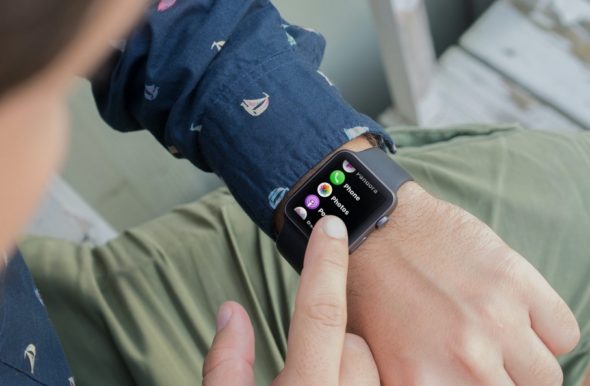
If you don't know, your Apple Watch can store up to 500 photos! But not because it is able to do so, you must necessarily fill them with pictures for and without reason, so you should not forget that these images consume their storage space, and for this we share with you in this article the method of controlling the maximum number of images that are stored on the Apple Watch along with some varied things related to file management On the watch .. let's go?
How to control the images on the Apple Watch and their size and number?


Control the maximum images on the Apple Watch

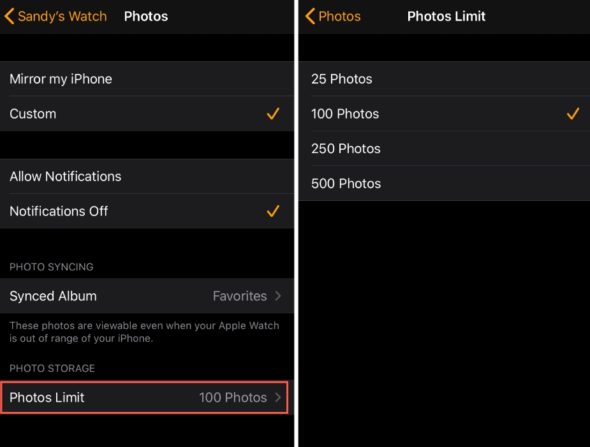
You can simply specify the number of images that you want to store on the watch's memory by following the following steps:

1- Open the Watch app on your iPhone
2- Go to My Watch / My Watch, and then to Photos / Photos
3- Now, head to the Photos Limit option
4- Here you can choose between 25, 100, 250 or 500 .. Perhaps 100 is the ideal choice.

Knowing how many photos are actually stored in the watch

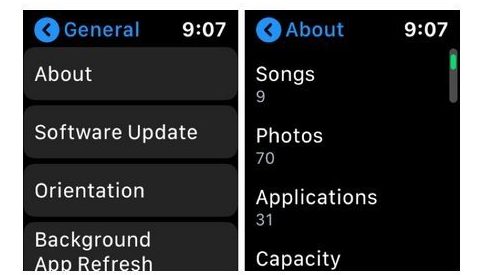
You can simply know the number of pictures on your watch, either through the watch itself or through the iPhone, and if you prefer the watch, all you have to do is go to Settings and then General Settings and finally go to About or about the watch, as in the following picture This option will not only help you to find out the number of pictures but also the number of songs and applications!
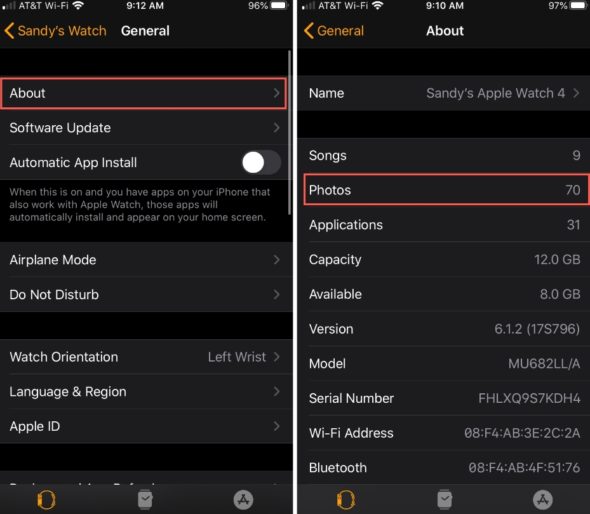
But if you want to view the same data through your iPhone, go to the Watch app again and then My Watch / My Watch as well, and here you will go to General and then About as we did on the watch:

How to determine the storage space taken up by photos on the Apple Watch

In order to actually determine what is the ideal number of photos to store on your watch or to manage the storage space on the watch in general, you will have to know the space that your photos occupy in the first place! Go to the clock settings and then the general settings again, but here we will go to the Usage settings, and as you can expect, the space for your photos is the Photos & Camera application area:
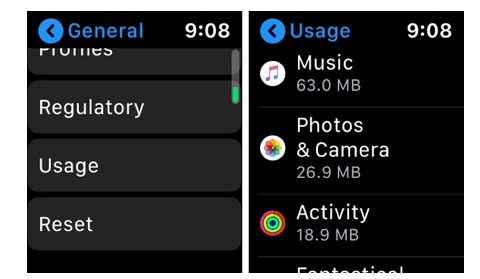
But if you want to do the same task on the iPhone, you go to the Watch app and then My Watch / My Watch, followed by the General settings and then the Usage settings as well:

Do you store photos on your Apple Watch? What is the number of pictures that you put as a maximum? Share your experience with us.

Source:

iDB

16 comment

comments user
adil

Thank you for this nice topic

comments user
Appointment

Thank you for this nice topic

comments user
Appointment

Thank you for this nice topic

comments user
Abdullah Alfaifi

I hope Sync App will come back

A follower of you from XNUMX and the Secretariat synchronized with the best Arab project that I have passed through on smartphones

As the brothers mentioned before me, we hope to diversify sources of income and reduce the value of the subscription so that the number of subscribers increases and losses are avoided

comments user
adil

Thank you for this nice topic

comments user
ipower_man

I suggest putting a fixed account number in every new article to donate and help you in the return of a synchronized application .. and everyone will participate, God willing, even with one dollar.

comments user
Semo Sun

Lovely
We wish more information about the Apple Watch

comments user
Ali

Join my voice with everyone who wants to re-sync

comments user
hamza MU

Thanks to the brothers for the support
I hope our voice reaches and comes back synchronized

comments user
Ozama __x

I hope to bring back the Zaman program, separate from iPhone Islam, and talk from scratch with the latest iOS 13 technologies, and the notifications are working

comments user
Happy

Most of us know that Zaman lacks support for the cost of operating, but it is assumed that appropriate solutions are sought to solve the support problem and not waive a giant program such as Synchronize with this ease.

I have become avoiding entering this application because it has become outdated in my opinion. Please change the subscription policy, diversify sources of income, or open the important donation door.

comments user
Killer silent AR8

It is not you who make a mistake in writing at the end of the article, it is written as a more extreme and what is meant is as a maximum. We love synchrony and we do not want to be mistaken.

comments user
Abu Ali Ahmed

Very powerful watch last generation

comments user
Saeed Muhammad Saeed

And God has a synchronization program before it was better than this miserable update

comments user
Osama's father

We thank you for the valuable information

comments user
hamza MU

Thanks and we hope for a synchronized return as soon as possible

Leave a response

We are not responsible for any misuse of the information mentioned above. IPhone Islam is neither affiliated nor represented by Apple. IPhone, Apple and any other product name, service names or logos referenced herein are trademarks or registered trademarks of Apple Computer.

العربية简体中文NederlandsEnglishFilipinoFrançaisDeutschΕλληνικάहिन्दीBahasa IndonesiaItaliano日本語한국어كوردی‎فارسیPolskiPortuguêsРусскийEspañolTürkçeУкраїнськаاردوTiếng Việt