How to use iCloud in Windows

The iCloud service is one of the best features and services provided by Apple, and it provides you with a synchronization of all your data across all your devices linked to one account, and for those who own a Mac, the iCloud service is now integrated into the system to achieve the maximum benefit from it where you can use the flow of images and synchronize names and locations with the system And if your personal computer is running the Windows operating system - which is the vast majority - there is an application provided by Apple to take advantage of the iCloud in Windows and get all the benefits without the need for a Mac.
You can take advantage of the benefits of the cloud through the iCloud Control Panel application, which Apple provided and updated last month for version 2.0, through which you can synchronize “contacts, calendar, bookmarks in the browser” between your Windows computer and your iOS device. And that is through the following steps:

Download the application through this link And install it in simple steps as you install any application on Windows (the application works only with Windows 7 and Vista).

Launch the app and log in with your iCloud account that you use for your iOS devices, and the app will start downloading the data.

The application interface is easy and you can choose which data you want to transfer to the device.
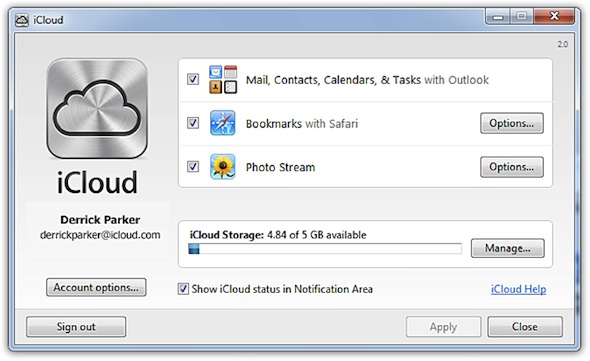
After the data transfer is completed, you will have a file for “PhotoStream” in Pictures on your device, and if you put any image in it, you will find it appear on your devices and vice versa as well as the shared folders appear in it by sharing the photo stream that we talked about In a previous article.
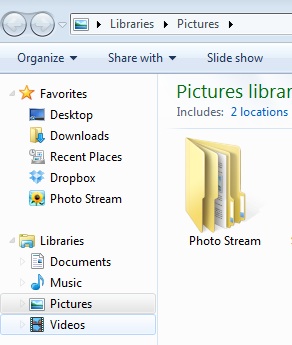
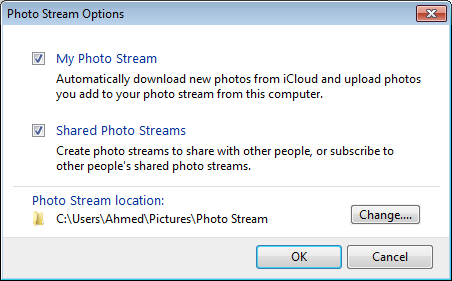
You can change the location of the photos sync easily through the control interface by pressing the options button next to PhotoStream in the image in step 3, then choose the location where you want to transfer the image file.
Note that when the application is running, you will notice the presence of the cloud sign in the taskbar at the bottom:

The application has all the capabilities that you can get if you connect an iOS device with a Mac device, as it matches the bookmarks and favorites list in the browser as well as saves contacts from your mobile device to the application, as well as e-mail. Just make sure that the account name you use with the app is the same as the account registered on your iOS device.

The following should be noted:

  1. The application works with Windows 7 and Vista only.
  2. To sync calendar, contacts, and mail an OutLook 2007 or later is required.
  3. Bookmarks can be synchronized with the official browser "Internet Explorer" and also with the famous Apple browser "Safari" as well.
Are you syncing your account in the cloud with your Windows machine?

86 comment

comments user
Omar AL-Dolaimi

Peace, mercy and blessings of God be upon you, dear brothers. A possible way is to transfer files from the computer to the iPhone and vice versa. Thank you.

comments user
atheer

Peace and mercy of God be upon you. I have iPhone 6 lock I have any cloud, and I cannot open it, knowing that I did not activate the iCloud. I entered the email wrongly, and the verification was underway, and the iCloud was not opened when I finished the device. Matching please help me please

comments user
hamza

I restarted my iPhone 4 and I didn’t know that there was iCloud service and I want to activate the iPhone. Is there a solution?

comments user
dessert rose

First thing, peace be upon you. The second thing, Lord, in which someone is awake. I flattened the steps and changed the location of the file so that it does not get confused with my brother’s pictures, but I have a problem that the storage ratio does not walk and does not move or even appears in me. The ratio is 5.00 out of 5 gigabytes of course and the type of laptop windows 7 home premium and working time, please help before I dont mess with me

And God makes it the balance of your good deeds. Thank you

comments user
Sultan

ICloud is a good app

comments user
No No

Failed update, nothing new in it

comments user
SilverCamel

Very good service ..
And thank you, Yvonne Islam, for the explanation and explanation

comments user
Sara. a

Hi
Do I do these steps without connecting my device to the laptop via a wire?
I mean, just do I carry iCloud on my laptop (not Apple) and record my right ID that synchronizes with the data to its father from my Apple device?

comments user
3ashq wahm

Thank you, Yvonne Islam
But I would like to correct information, which is that the iCloud service is not integrated with all Apple devices unless it is recent
If you have an old version of your Mac, you should purchase the new update, which is IOS Lion 10.8
After purchasing the new version, I will face a problem in transferring the images, and it should die for you to the Iphoto application, and even with the quality, the images will be saved automatically in the same application.
Because from my experience, I see that the iCloud service on Windows is better ...

comments user
Majid

Peace be upon you

Dear friends, I have a problem with the cloud, which is that I have an Apple ID account that I share with a group of brothers, cousins, and friends from two years ago before the existence of the iCloud service.

The important thing is that the number of devices is XNUMX devices, between iPhone, iPad and iPod

If I sync the photos and activate any of the XNUMX devices that use the Apple ID account, will the synced photos appear to him? ???

comments user
Hany

As for any cloud, I have a problem, which is that I sold my iPhone, and it has an iCloud activation on it.

comments user
Abu Mish'al

God whites your face on the day whitening the face

comments user
Abdulaziz Saud

A simple note, the application works on Windows XNUMX environment naturally and smoothly (my personal experience)

comments user
iman

Why isn't the file transfer process simpler ?? !! In other words, why do not they download a program of solidarity between all devices of all kinds and with all means of transport, Bluetooth, WiFi and others !!!

comments user
Sonar

Peace be upon you
I have a question, if you allow me :)
I have several Apple devices that I work with from my own account
And after I updated my mobile to iOS 6
My private messages are now being transferred to other devices
As well as the applications in other devices are downloaded automatically on my mobile
Can I stop this feature
Note that I deleted my account in iCloud from all devices, and there was no change
There was no way to stop the messages from flowing
Only after I stopped i message service
In my other devices
Is there another solution than to stop this service?
At the same time, prevent my messages from appearing on other devices
As well as preventing automatic download of new applications ???
Thanks

comments user
ţ น Ꭱ Ҝ Ꮼ Ì

Thank you for the clarification of what is useful, my dear brother, the owner of the iPhone. The old people forgot something called a virus, but there are recent ones that you can try for camel devices. Safety is very important for all users and regarding the issue of the flow of images, I do not expect there are viruses or defects in the service. I also mentioned how a virus is transmitted in its pictures and then how it is transmitted to camel servers without being discovered, but there is a flaw and one only I do not know whether I only have or have it ready for you Berry I could not share his pictures with him. Please his comments, and I thank you very much for your efforts.

comments user
Yousef

Good site and I'm participating in it

comments user
Abdul aziz's mother

Dear brothers
Please help me
I downloaded the iCloud program and canceled it
I was surprised by the names repeated I have on the list twice and more
And the rest of the names disappeared
And also in the WhatsApp program
This annoyed me
Please help me because I lost the exciting of the names as well
The numbers overlapped under one name
I mean, it has no limits

Please help me
I want to cancel the program and take back my list names

Thank you very much and grateful

comments user
Ahmed

God, people are strange
You are still talking about the iPhone
Despite the release of the super device, the Galaxy Note 2

comments user
reconcile

Peace, mercy and blessings of God be upon you. Honestly, I have had iCloud for almost two years, but I am having difficulties synchronizing from the computer to the iPhone or vice versa. Thank you as long as we saved.

comments user
Abu Sulaiman

From Windows Skydrive, and from Apple iCloud, in this case Apple is the one imitating others, so the market and customer service are the ones that impose catching up with whoever is in the lead (Windows in this case), this does not mean that Apple is not in the lead, but it is the services provided and the company’s interest in providing the service, and another example is what happened recently between Apple and Google in the maps service, no one denies that Google Maps is the best (hard work), in the end it is a group of services and the customer demands the best in everything and this is his right, but the interests of companies unite or conflict, (Apple is trying to reinvent the wheel in its maps system, and it will eventually reach its goal, so what is the customer’s fault today)
Sorry for taking long, and Happy New Year all
(Whoever holds the forelock of knowledge, rules the world)

comments user
Zeyad

Peace be upon you, I have a question

I have been using this program for some time now and have moved my favorite sites, but from the Internet Explorer to the Safari browser on the iPhone ,,,
The problem is that I have formatted the two computers, and now I want to retrieve the favorites from the iPhone to my device. I tried more than once but it refused

Is there any solution ??

comments user
Zeyad

Peace be upon you, I have a question

I have been using this program for some time now and have moved my favorite sites, but from the Internet Explorer to the Safari browser on the iPhone ,,,
The problem is that I have formatted the two computers, and now I want to retrieve the favorites from the iPhone to my device. I tried more than once but it refused

Is there any solution ??

Thank you

comments user
Abu Faisal Al-Hawazni

By God, I have had it installed on the device for a while, but it only transfers photos. I want it to transfer videos and names. Is this possible?

comments user
Hassin

Thank you iPhone Islam for the great articles

comments user
Abdullah Al Lafi

Thank you iPhone Islam

Thanks Apple

But the service does not interest me as a regular user

comments user
Forever

Thank you Yvonne Aslam
And thanks to the brothers who commented on the subject, and most of them were correct in their opinion
Especially in displaying the advantages and hiding the disadvantages, if the mentioned program is open to more than one contact, it will be easy to see the pictures of some, and this is a serious defect in the program.

comments user
Renad Al-Juhani

Thank you for the article which helped me a lot

comments user
Fawaz

I did what you mentioned, but it didn’t say anything and I get a message that it doesn’t work, and I didn’t download the program that you mentioned linking to.

comments user
Abomoaaz

Please pay attention to publishing all the details of any program that is placed in the basket as I cannot deal with any program except through a detailed explanation so that we get the maximum benefit from the program

comments user
Mohammed

Notes are not copied in iCloud
Can you explain the transcription in iCloud
Because the names are copied with me in I-Claude
Just notes no
Please advise

comments user
Abdul Hakim Thabet Ahmed

Is it possible to answer my question regarding the validity of the information that?
Its impact on my comment that it is possible to steal personal information from the cloud program so that we are aware of what we are doing when using the cloud program
Suddenly all my data disappeared from the Note on the iPhone, so I imagined that I could return it from the iCloud because it is updated daily, but unfortunately no one of my data is also present and this caused important data to be lost !!

comments user
Nasser Al-Othman

Why is the link still on my device and why is Google Earth not downloading to my device?

comments user
Salma confident in God

Your Eid is blessed and all your days are blessed ^ _ ^ May God reward you for your efforts to communicate information

comments user
Hamood

Frankly, Avon Islam site is amazing and very useful
Thank

comments user
Al-Hashemi

Thank you iPhone Islam for this article, and may God reward you with good

comments user
MS-2013

Yes, I have been doing this for a long time

comments user
the emperor

Every day Apple reveals us with wonderful technology and without them
((Evon Islam)) We cannot get it easily ,, give the fingers

comments user
Hani

Don't forget that you can see some things through http://www.icloud.com Without the need to download the program, it is safe for anyone who does not have Win 7 and has Win XP. I hope that iPhone Islam will explain the subject.

comments user
Abu Ruaa

Question outside the text, please: -
Why can't I browse previous posts on Yvonne Islam that were published more than two months ago ??
I like to see what was written on Yvonne Islam since its blessed inception, is this possible?
Thank you ..

    comments user
    Yahya Al-Shehri

    Same for me
    I cannot browse old topics

    comments user
    Bafqih

    You cannot read the previous articles .. All you have to do is select (the site map) and you will find tabs with the titles of the articles. For example, the first blog post written by Professor Tariq Mansour at the following link:

    See here

comments user
Khaled hated it

Thank you Yvonne Islam for the beautiful articles and Happy New Year

comments user
HUSA

I settled a backup and bought a £ 14 GB copy
With this, the message appears that says you have no space

comments user
Ismail

Excellent service, which I accidentally tried when I opened Apple Software Update
By the way, it is running on Windows 8 trial version

comments user
Forwards

Thank you iPhone Islam for the great articles ,,
I also thank Apple for all the masterpieces presented in the programs.

comments user
Sun

God bless you
Question
If I decide to buy a new device, how do I transfer my data with pictures, names and notes?
Whether it is iPhone XNUMX or Galaxy XNUMX

    comments user
    MS-2013

    If your current phone is iPhone, and you buy iPhone XNUMX, you should not settle for the old backup and restore the new back-up right, and congratulations to you or via icloud

comments user
Alvivi

good thing

comments user
Ahmed Rajeh

Very important warning:
When you connect to the cloud in the Windows system, there will be a hole in your hacker system
Oh God, Oh God, I witness reached

comments user
Abdallah

Thank you. Honestly, a good and important topic

comments user
sim

I don't need that

comments user
wsh-tabi

Please note something important, which is when a new service is offered or absent from the user, please explain the defects of the program as it is described and its advantages .. so that the user is aware. Because we know that streaming images is a problem if someone sees it or if the device is infected with a virus. In order for advantages are required, but there must be disadvantages, and be careful

    comments user
    Muhammad Muqidah

    I agree with you in this regard, iPhone Islam presents the most important features and does not bring up the defects until after they become famous and spread on all sites and forums... until I started to feel bored with this news that is biased towards one party, which is Apple. I hope that the defect and additions are diagnosed to know its advantages and disadvantages. How beautiful is moderation and not bias, and the best things are in the middle. Thank you.

    comments user
    Moh kazzaz

    Habib Had a site with the support of Apple News and BAS
    And every news is taken after making sure of its authenticity
    There is no need for an endoscopy
    And if you are more, create your own news site
    Let Samsung and Android benefit you

    comments user
    wsh-tabi

    My brother, I mean by my comment, are there defects or not in the service? Follow what you read without knowing what he wrote and why .. in two dimensions, who brought my Samsung phone .. I am an Apple user since XNUMX, and I do not wait for a debate on me according to your words, in order to be satisfied with the products of Apple .. I hope The information has arrived

    comments user
    Muhammad Muqidah

    What I mean is to diagnose any news and know it with all its features and defects. I am not talking about this feature only, but I am talking in general, as there is no perfect thing, perfection belongs to God alone. If Apple had no defects, the updates would not have appeared (good guy)… And then why the fanaticism and unnecessary talk from you… I have the right to criticize and say my opinion, do not impose your opinion and fanaticism on us… As for your mention of Samsung and Android, you brought up their names…

    comments user
    Loai

    The service is very wonderful, I have used it for a long time, my brother, it is not biased towards the name of the site iPhone Islam, which is specialized in iPhone and Apple, and I do not think that there are defects in this feature, and thanks

    comments user
    Monjed saleh

    Because iPhone Islam does not spread any rumors
    For this reason, I am not sure that any news from other websites will be correct, except when I see the news on Islam's iPhone

    And thank you iPhone Islam
    You are the place to trust ❤☺

    comments user
    Bender

    The cloud has no flaws
    You consider the image streaming service a defect, what others consider a defect
    Especially since it was originally closed by Apple
    And you yourself open it

    In my opinion if you opened the right option to stream images
    And something happened to you that God does not appreciate and consider it a shame from Apple, so I see that you are XNUMX% wrong

    Apple intoxicating it automatically and you open it
    You bear the result

comments user
Abdullah Al Owais

I thank Apple
For all that it offers

comments user
rezk

Peace be upon you. My question is that I only have an iPhone and I have an account in the iCloud, but the problem is that iCloud does not save all the pictures. It is according to my information that it saves only the last XNUMX days and returns to you. From the pictures, while I have had pictures XNUMX and XNUMX months ago, they are very important, so what do I do to preserve them. May God help you and thank you for your cooperation.

    comments user
    obad100

    Transfer the images continuously to your device by selecting the image and choosing to save it to the images application and it will be saved on your device, God willing. As for old photos, try to turn off the photo streaming feature and then re-enable it again.

comments user
Anwar

Thank you, all of you are beautiful

comments user
He praised

I hope they download the app for Android devices

comments user
Bandar Al-Maliki

Very cool
I wish they would sync up with the office library between Windows and the iOS system if the Office application came down to it.

comments user
Apple lover

Peace be upon you, as usual, wonderful Apple

comments user
Nasser

Excellent service and I use it. Thank you Yvonne Aslam

comments user
Hussain

thank you
I used it a long time ago, but you explained it more

comments user
Technical Muslim

Thank you Islam _ iPhone

Very valuable information

comments user
Jinan

Thanks
Yvonne Islam, the wonderful application.

comments user
Abu Fares

thank you
And we are waiting for your new ones

comments user
Abdulaziz Muhammad Al-Farag

Okay
But if, for example, Windows has a lot of turquoise 👾👾👾
Will the virus hit it from my iCloud data ??
May Allah reward you

    comments user
     AbuTaReQ 

    As far as I know, Windows viruses become normal files in the Apple system, that is, there is no effect or damage from them and they become inactive, but as soon as they return to their Windows environment, they are activated again.
    And God knows best

    comments user
    ⚡AHMAD-X

    Very great service, thank you iPhone Islam. God willing, we will see Galaxy Islam. Because I want to switch to the Galaxy. Since it is cheap and its services are great. And it is developing very much ❤

comments user
Abdali

A wonderful service and an explanation, and it is not strange from you

comments user
Badr

Is SkyDrive an icloud alternative?

    comments user
    Haval

    My dear brother, iCloud, it is similar to the Sky Driver iCloud that the owners of all kinds of Apple devices benefit from. As for Sky Driver, it is an extension with Email Hotmail.

    comments user
    faisal

    My brother Badr how are you
    It does not compare with Microsoft's SkyDare service and Hotmail mail, SkyDrive, I have used it even before its name was SkyDrive, and before you even know mobiles with all the cloud synchronization systems, it was the only one that synchronizes everything on your mobile with the Windows Mobile system.
    Sky Drive service in which you are free to control what you store, and the cloud office service in it is very wonderful, and you and a person or several people share a file with the office, and you can display anything on Sky Drive to the public, or to some friends, or whoever you choose to view it in your Hotmail, your elderly mail, or Windows Live, regardless of your email address SkyDrive extension.
    Also, the storage volume for Sky Drive is 7 gigabytes, and if I followed their offer before a period of time, they would give us 25 gigabytes for free, and this size will remain for me for life.
    I tried the Windows iCloud service and the synchronization method is rudimentary compared to SkyDrive, and iCloud has no special page in it like your email. When you enter your Hotmail, you go to the SkyDrive option and control it on your way, and copy MATBI even without SkyDrive, only through the browser, and the option to copy by iCloud is not The SkyDrive uniform, you choose if you want one file, its pictures alone, or one number, or, mention it by e-mail, all of the pictures download what you can allocate.
    Also serving your devices with SkyDrive gives you every laptop registered on the e-mail and also the phone with the Windows Phone system, and how much the size of the laptop and the capacity of the copied from it, such as what is happening with me for my laptop at home as well as my work computer and Windows phone, and my brother's laptop, and as soon as any of these devices connects I announce my account This computer is connected, do you want to enter it and see what is browsing, for example, and also control the device about it, such as remote assistance in the way, or enter and transfer a file to it like what happens with me constantly. From the office files for my work permanently I edit it on my work computer while I am at home while they print it, or I share with them and make it fair to them.
    It is enough that it is linked to Hotmail mail, and there are also advantages, but I am satisfied with these features.
    Hotmail Mail
    MSN Hotmail
    SkyDrive Hotmail
    They are all linked together
    Isn't this enough for you to know the difference, and do not forget the Skype and Facebook association with them as well? What is more than such.

    =========
    And God does not underestimate the iCloud, but you asked for the difference between them, and you liked to explain it to you and the brothers

    comments user
    eyePhone

    May God reward you with the best explanation
    The time has come for users to realize the power of Windows XNUMX.
    The giant woke up from its slumber.

    comments user
     AbuTaReQ 

    Skydrive is Microsoft's cloud service and has nothing to do with Apple's iCloud devices.
    This solution is here for anyone who wants to use iCloud from Windows.
    I hope you knew the difference, my brother
    And thank you very much, Yvon Aslam, for introducing and explaining this important program
    God pleases you and strengthens you 🌹

comments user
Lover

Thank you Yvonne Islam, and Happy New Year
I used it today and I liked the way
We are waiting for your new ones

comments user
Mohammed Saleh Al-Zahrani

Wonderful service
And a privileged site Thank you very much for what you offer

comments user
Anas

Thank you iPhone Islam for the great articles

comments user
Omar AL LeHaiBi

Awwah Yvonne is always Islam
You are in the foreground ,,,
My request to you
If you download an explanation of the font color change on the iPhone
But it will be apparent to people that I only have me
For example, if I want to write a tweet on Twitter, it will be if the line is visible to everyone ,,,, I hope you understand 😭😭
Thank you all ,,,, 🌹

comments user
iMustafa

I have Windows 8 and it's running normally - ,, -

Leave a response

We are not responsible for any misuse of the information mentioned above. IPhone Islam is neither affiliated nor represented by Apple. IPhone, Apple and any other product name, service names or logos referenced herein are trademarks or registered trademarks of Apple Computer.

العربية简体中文NederlandsEnglishFilipinoFrançaisDeutschΕλληνικάहिन्दीBahasa IndonesiaItaliano日本語한국어كوردی‎فارسیPolskiPortuguêsРусскийEspañolTürkçeУкраїнськаاردوTiếng Việt