The basics of dealing with iTunes [2]: Navigating between libraries

There are many features that we do not discover in Apple products until after use, as well as the company's applications have features that are not announced and discovered by users, and we continue in this article the series of basics of dealing with iTunes, in which we provide basic information about the application used by millions and overlook many Among its advantages, although it is a tool for communication between iOS devices and personal computers, and in this article we review how to move between libraries "Library".
A large number of users face a problem in the interference of their own applications, audio files, recordings, etc. with others who use the same iTunes at home, the solution to this problem is that each person has his own library so he can organize his own audio files, applications and settings, and each person has his own library. Use it without interfering with others.

Establishing libraries and moving between them:

To create your own library, press the "Shift" button on the keyboard if you are using your Windows computer, or the "Option", "Alt" button on the Mac system, then press the iTunes icon Without letting go of the button. Then a new window will open in front of you with three options (Quit, Choose library, Create library) as follows:
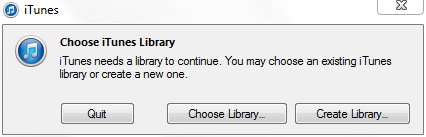
To create a private library, choose "Create library". The default iTunes window will open, which does not contain any applications or files, so connect your device and start transferring your applications in the way previously explained in The first part of the article.

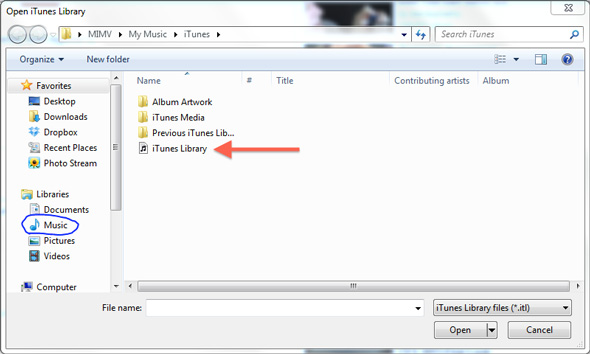
Repeat the same previous steps and create a special library for each user in your home, and you can move between them by opening the application in the previous way, then choosing "Choose library" and going to the place where your device stores the audio and it is in Windows "Music". You will find in front of you the libraries that you created and you can name each library with the name Its own device to prevent conflicts or forgetting numbers for libraries:
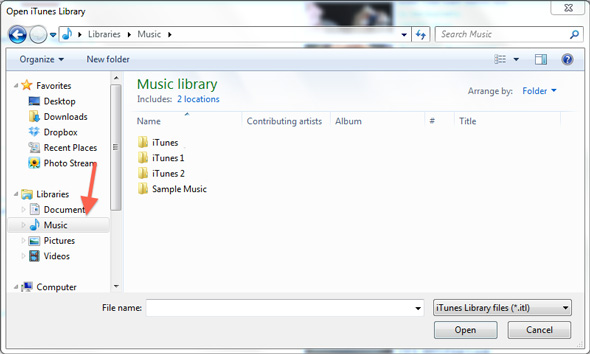
Select your library and from its folder choose the file named “iTunes library”.
After now, every device in your home will have its own office in which to place whatever applications and files he wants, and he is not afraid to transfer to other devices.
Is more than one person syncing his device to your computer? Do you suffer from overlapping files? Share your experience with us

100 comment

comments user
Faisal

A thousand thanks for the useful information regarding the establishment of libraries and the movement between them:
I did not understand the exact method, click on the iTunes external icon, nor how do I hope to find an explanation for it. Thank you

comments user
Ryan the bus

My dear brothers, Islam iPhone
Thank you for your wonderful efforts

I think what has been explained in this topic differs in the new iTunes version due to the change of the graphical interface of the program
Can you clarify the method again in the new iTunes in case it differed from the old version or not?

comments user
samo

A very, very important question: How can I download iPhone programs for a number of devices without having to enter an ID or password? For example, sometimes one of my friends wants a specific program from me, and when I download it on his device, he asks me for an ID or password. What is the solution?
I hear that there are cracked programs and games via VShare. I don’t know exactly. I want a solution, please, and an answer to these questions and a full explanation????

comments user
Abu Abdul Aziz

Thank you God for this adequate explanation

comments user
M. Ashraf Yar

Thank you for the article, but I did not find the first part of the article. Would you please teach me how to transfer audio files from the computer to the iPhone?

comments user
Eyad

Peace be upon you ..
My device is Windows 7, and I don't know how to create my own library.

Where do I find the icon that I click with the "Shift" button ??

This is the step I did not know!

comments user
Muhammad Jarash

Thank you for the valuable information
After creating the library, I was not able to transfer the pictures to the computer even though I returned to the iTunes library
Please Help
Gratefully

comments user
Abo Saeed

Thank you for this valuable information

A new library worked to stop transferring pictures to the computer even after returning to the iTunes library
Please help
With thanks

comments user
Emad

If possible, with pictures, to open a folder, I tried as you explained, to get a window with Shift and click on iTunes

comments user
Omar

What is this iTunes icon ?? Where does it mean ??? Because I don’t know how to deliver it

comments user
Fouad

Frankly, I have a problem, my wife and I work on synchronizing our phones on the same Mac. The problem is that the names stored in my device and her device are clustered in the two devices, meaning that they are valid in my two numbers and her friends ’numbers and vice versa, is there a solution?

comments user
AbdulWahab

First of all, greetings and thanks to you. We would like to know how to transfer the application from the iPhone to the computer and vice versa.

comments user
AbdulWahab

First of all, greetings and thanks to you. We would like to know how to transfer the application from the iPhone to the computer and vice versa. Greetings to you and our wishes for continued progress.

comments user
Norah

A thousand thousand thanks, really important and very useful information
God bless you and may God reward you a thousand good

comments user
ALSHIMMARY

This information is very useful before I searched for it. I found it in one of the forums and it was lost on me ...

But I completely dispensed with iTunes after using the iTools program, which is small in size, very fast without syncing, and makes the iPhone memory easy to control as if it were the memory of a Nokia device ... I advise everyone to try the iTools program

Thank you for this valuable information

comments user
Ahmed

The best game

comments user
Wafa

That is, that which is his father from Zumaan
A thousand doubts, so much for you, mmmm ...

comments user
Lebanon

Thank you, the problem has ended

comments user
Anas

Your software does not support the iPhone XNUMX screen:
You are the people of progress !!

comments user
Sam

Lovely

comments user
Abdallah

It is rare to comment, but this time it deserves a comment
Information is useful and may Allah reward you

comments user
h12

Beautiful and gives you wellness ... Laev

comments user
Khaled Al-Hinai

I have two accounts in the Father Store

The programs that the Omani constitution appears to me, but the American software does not appear even though it is on the iPhone

comments user
Ahmed

Excellent what you're doing, an excellent hint of more brilliance

comments user
asem

Brothers on iPhone Islam, I thank you for your continuous efforts in transmitting the latest news to us,
I have a question and please answer it:
Yesterday I read a news story in a newspaper that Apple has reduced the demand for screens and some internal parts related to the iPhone 5 due to the lack of demand for it.
If this news is true, then what is the truth about the fictional numbers we hear about iPhone 5 sales? Either from your site or other sites.

Greetings

    comments user
    Amr Abdel Rahman

    Welcome, brother Assem! The news is true. To clarify, I will give you an example: If a man had a trade in which he would sell for fifty million, then he would sell for thirty. Either way is he still winning? And in imaginary numbers?
    The bottom line is that Apple is still winning, and in high numbers, but small in relation to what it is supposed to achieve. Additionally, this is based on sales forecasts for the upcoming periods, not the current ones. For the time being, what meets his need has been produced. As for future demands - which are expected to decrease - they are what are being manufactured for now.

    We thank you for sharing.

    comments user
    asem

    I thank my brother Amr for the quick response, because I am an Apple fan and a fan of following your site constantly, and because I trust you and your credibility in conveying the news. I asked the question on your site and I apologize because the question is not related to the topic at hand, and I hope that you will not disappoint me and the fans of this giant.

comments user
❔❕❓❗❔❕❓❗❔❕❓❗

Yvonne Islam
I want you to teach me how
Remove my general information from the information of another device

    comments user
    Bin Sami (Editor)

    Excuse me brother, I did not understand your question correctly

comments user
thunder

Grateful God bless you

comments user
Hadrami

Thank you Yvonne Islam for the clarification - a question, please, how many iPhones or iPads can be synced this way ??
Greetings to all

    comments user
    Bin Sami (Editor)

    There is no maximum number of devices.

comments user
ابراهيم

Wonderful information Burkum.

comments user
MHD

Thank you very much

comments user
MHD

A million people really give you wellness. Many of us need it, thanks from the depths

comments user
Essam

I suggest the lessons of iTunes from iPhone Islam issued in the form of a book with pictures to benefit from them more, as well as making a series of small booklets for explanations of the iPhone on the site, and opening the door to training is acceptable as a three-day course in which the iPhone is explained will be acceptable for a large segment Of people.

comments user
Abu Hoor

Gorgeous beautiful
Receive you heroes.
You are enough ... this is our love for you

comments user
Amr

شكرا لكم

comments user
Abu Matar

Thank you, iPhone Islam for this topic
Praise be to God a thousand good

comments user
Adel

Very old method
Thank you

comments user
Hamza GSM

Thank you, iPhone Islam for the continuous statements, but I have a problem with setting up applications, although I have activated this service and this error always appears during the swindling process. Please respond quickly with full thanks to all the people of iPhone Islam

comments user
aburenad 💫

The way most of us were ignorant of it
A thousand thanks to you for the beautiful explanation.

comments user
Yousuf

God bless you

I need it a lot this way, thank you

comments user
Abuelwaleed

thanks for the information

comments user
IA7med

May Allah reward you for your efforts and for the wonderful explanation

comments user
Abu Ahmad

Beautiful explanation

comments user
Come on!

I thank those in charge of Islam iPhone
With all the programs or information they had on him, or on his way
Responses with all heart and love
You have me and everyone who benefits from Yvonne Islam supplication
Good luck

comments user
Mahdi

I have iTunes XNUMX and I still don't know how to transfer apps from iPhone to iTunes

comments user
Chlyh

Thank you very much, Yvonne Islam

comments user
Perseverance

Great idea, may God bless your efforts

comments user
Ali

Always creative Yvonne Islam Thank you very much. You save time and trouble, may God bless you

comments user
Salman

I have a problem with the iTunes program that automatically downloads the programs that were downloaded to the iPhone and was deleted before the process of syncing with iTunes
Is there a way to stop the automatic downloading process of iTunes?

    comments user
    Salman

    Whenever I open iTunes, it downloads, does it have anything to do with the cloud, and what is the solution to stop automatic downloading?

    comments user
    Bender

    In the same settings in iTunes, turn off automatic downloading of the purchased programs

comments user
Abu Omar

Unfortunately, App Tunes is one of the most popular programs in the world and it is difficult to use. I am a professional in one mistake, delete everything !!!

comments user
Ahmed Hassan

May Allah reward you

comments user
Abu Nader Al-Ghamdi

The efforts you thank for after thanking God Almighty for this blessing, praise be to God

comments user
Abdallah

Hi
Please, please, from Yvonne Islam, a solution method
The names disappear from my device because there are more than one user
Useri is used if the names are deleted from Andu
Also be removed from me

    comments user
    Azo

    I recommend MCBackup
    Its a wonderful experience for such cases

comments user
Zeero

May God reward you with the best action I suffer from this problem

comments user
Bender

From the time of her sweet explanations

comments user
Abdullah al-Maliki

I can only say that God reward you with the best reward
My brothers Islam iPhone for your great efforts
God made it in the balance of your good deeds on the Day of Resurrection

comments user
Ali Al Qarani

My private photos were copied on my friend's iPhone, and when I wanted to delete them, I could not ... The erase option does not appear
Someone has information to benefit me.

comments user
Fayez

thanks a lot

comments user
abuabdalrahman

May Allah reward you
And thanks for the useful information

comments user
Goodwill

A thousand thanks to you ..

comments user
Qais Faris

Yes, I have more than one person who uses my private computer, and unfortunately my private pictures are transferred to my sister or brother
But this method is new

comments user
Hassan Al Hijazi

Many thanks

comments user
Hany

Question: After I did this method, and I wanted to see a smooth future, do I need to enter the same way or the device will recognize its library immediately?
I also thank you for this information. I think I rarely challenge anyone who has not suffered from file jitter in iTunes

comments user
zezeo

Thank you, and I have a question: When does Apple respect Arab users and localize the iTunes program?
I hope that there will be a special topic for the Arabization requests and the method of sending to Apple so that all iPhone Islam lovers can contact the company, perhaps it will feel for the Arab user. Thank you.

comments user
Hadeel

I have a second problem
It is that I have an iPad and iPhone device with the same account, the same laptop and iTunes, and the problem is that when the device is connected to iTunes, it syncs the applications and gives me the applications to the iPhone to the iPad and vice versa, and this is something I hate
Is there a way to sync it without interfering with each other?
Please help me

comments user
Khaled's father

Thank you, really important and new information for me, but I have another problem, which is that when I connect the iPhone, all the programs are downloaded to me on the second iPhone, noting that the computers are different, but the accounts are shared, so you help me very much, I tired the problem and I could not find a solution to it

comments user
Abu Raghad

You are always the best .. iPhone

comments user
Zozjed

Thank you very much, iPhone Islam for the valuable information. I already had the same problem, and so far when I want to download an application on my device, the download is done in all devices.

comments user
Ali Al-Warqali

Very valuable information. Thank you, Yvonne Islam. We expect more from you about iTunes.

comments user
Searching for the truth

I hope you respond to me, Yvonne Islam
In the application of owners of Timo my little sister won all the stars and wants the gift how to get it
Please reply and thank you

comments user
Fofo

Wonderful information I knew before
But sometimes when opening a specific library
Only my account appears
The files get mixed up and I have to register the account
The second solution to this problem

comments user
Stomping saad y

God bless you p wonderful explanation

comments user
Hisham Alaoui

Many thanks

comments user
Trane

Thank you, my brothers on Islam's iPhone, for the useful information. I had this problem and its sweetness, thanks to you. Thank you very much.

comments user
black wolf

Thank you, Yvonne Islam

comments user
Aila programmer

Thank you for the statement. I swear by God, I am the programmer of the family, the overlap of programs and the back-up. Thank you again for this statement.

comments user
Mohamed Yassen

Sweet
Valuable information
Thank you

comments user
Aisha Abdulaziz Al-Kandari

May Allah reward you.
Actually, a problem we suffered from and the solution came in its due time

comments user
Abu Hana

May God reward you a thousand good, and God hated me to connect my device to iTunes, except because of the overlapping of files, and the problem is that I used to sometimes delete the files for those who connected a second device. I repeat my thanks, but
Would you please download a detailed explanation of how to deal fully with the iTunes, such as wiping all programs and reconnecting the device?

    comments user
    Jewelry

    I agree with you, we lack a lot to understand the secrets of iTunes and how to deal with it in the simplest things. And many thanks to the Encyclopedia of Arabs, Yvonne Islam.

comments user
Wisam

nice thank you

comments user
Ahmed

Thank you, iPhone, Islam, for the useful information

comments user
Ahmed Maraka

Hi
The topic is wonderful, I tried to enter, the result. Facebook and Twitter.
I need to share via e-mail
Please reply

comments user
Forwards

thanks for the information

comments user
Salem

There is no button but I pressed it and I'm still trying MacBook Pro
The Alt button is present, but the option. I do not have a button with this name. Thank you, Yvonne Islam

    comments user
    Nashwan

    I also don't see an option button

    comments user
    Bo Jassim

    The option button was the old device (the white MacBook)

    Then his name is Alt

    The same button that we press if we want to choose a store software and a computer when creating a Backup or Restore

comments user
Ihab Al-Ghamry

This is a nice program and thanks

comments user
Bou Adnan

Hi
Thank you for this valuable information, and I needed it very much. I used to create a new account for each user on the computer to avoid interference between users.

comments user
Nasser

A thousand thanks to Yvonne Islam, I have really been waiting for this lesson for a long time ...

comments user
Abdul Karim Abdel Fattah

Very beautiful

comments user
Salem

A thousand thousand thanks to you, but I have a mac and I pressed the alt button, and nothing came to me. I suffer from this matter a lot. Please help me so that the task is completed successfully for me at home. More than four devices are for children, and I do not want to have it transferred to them Thank you

comments user
Zen

Really excellent, important and new information for me, thank you Yvon Aslam

comments user
Abdallah

In the new iTunes, I don't know where to get my apps or programs that you downloaded on iTunes

I want someone to tell me from where do I get my programs in iTunes?

Leave a response

We are not responsible for any misuse of the information mentioned above. IPhone Islam is neither affiliated nor represented by Apple. IPhone, Apple and any other product name, service names or logos referenced herein are trademarks or registered trademarks of Apple Computer.

العربية简体中文NederlandsEnglishFilipinoFrançaisDeutschΕλληνικάहिन्दीBahasa IndonesiaItaliano日本語한국어كوردی‎فارسیPolskiPortuguêsРусскийEspañolTürkçeУкраїнськаاردوTiếng Việt