Applications are the soul of any smart operating system, without which the smartphone does not become "smart" and Apple is famous for the strength of its software store in terms of average quality as well as its high control over applications, so it is difficult for the user to face a problem that prevents him from downloading applications from the store. In this article, we review some of the new problems that came to us from you and how to solve them.
I cannot download any application from the store
Explain the problem: Sometimes some people encounter a problem which is that they cannot download any application from the store; He clicks on the "GET" download button, then waits for seconds and does not find the application starts downloading and no message appears. And make sure that the Internet is working and that there is space on the device.
The solutionMostly, the problem is due to a very simple reason, which is the incorrect timing of the device. Apple's servers when it feels that the device that is trying to download an application has an inaccurate timing, feels a security risk and thus prevents the download process. All you have to do is review our previous special article in the right way To set device timing.
My account is not working for security reason
Explain the problemThe official Apple website explains the problem and that it occurs because the system feels a threat to your account resulting from repeatedly trying to log in with wrong passwords or multiple times, as it shows you a message that reads one of the following:
- "This Apple ID has been disabled for security reasons."
- "You can't sign in because your account was disabled for security reasons"
- "This Apple ID has been locked for security reasons."
The solution: Illustrates Apple website That you must enter the site iforgot.apple.com Then change your password and you will find your account works again without problems.
My account is not working due to lack of data
Explain the problemA message to the user sometimes appears stating that you cannot download or purchase an app because its payment information is a problem. The message looks like this
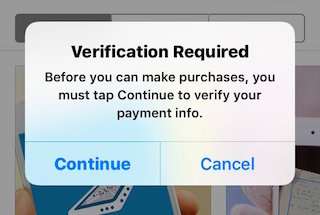
The solutionYou must click on the Continue button, and then your account information will appear for you. You must complete the data and also make sure that the payment option that you have chosen is None if you are using a US account (you cannot use a non-US credit card in a US account). Then click Save and you will find your account is working again.
No content in the software store
Explain the problem: After opening the store I did not find anything, it does not show any applications or links. My internet is working fine.
The solution: Touch successively on any icon in the bar at the bottom 10 times, and the store will self-activate and this is expected to fix your problem. You can also try turning off the phone and restarting it, whether conventional or violent, by long pressing the screen and power button together.


305 comment