IOS is characterized by being one of the most stable systems with the least problems and crashes. Therefore, the user is not accustomed to the device being “heated up” and stopped working, or some features stopped, and many users do not know what they should do to solve this problem. In this article, we will try to compile the most common malfunctions, and tell you ways to solve them.
The device "hangs" on the lock screen and does not respond, or inside an application?
If the device stops working and hangs, that is, it does not respond to pressing the screen button or the power button. The solution is to force restart the work by long pressing the power and screen buttons together, you will find the screen turns off and the apple appears.
The X app was working and suddenly every time you open it, it crashes, open it again, it crashes, so what is the solution?
Sometimes this matter may be caused by some process that occurs inside the application, try closing the application completely from multitasking and wait for seconds and open it again, if it does not solve the problem, try to close the device and open it again, if it does not solve the problem also, delete the application and download it again from the store It will work without problems.
The notifications sound disappeared, the ringing sound, the Wi-Fi disconnected and returned, the Internet in my device is slow and my friends around me have the same device and the same network and they have no problem, so what is the solution?
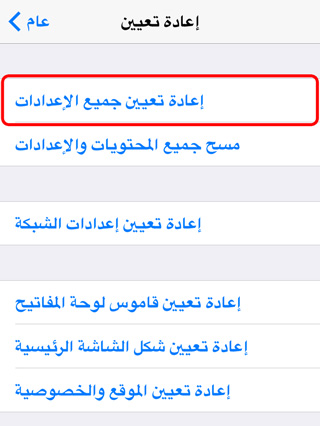
The solution is to reset all device settings by going to Settings> General> Reset and select Reset all settings Here, the device will reset everything in the settings to return to its factory condition and no application or any content will be deleted, only the settings return to the original state, and then you must log in to the Wi-Fi network, set a password, and adjust the rest of the settings as you like.
My device has become very slow, and there are problems in all applications, the device turns off suddenly, there is constant lagging and interruption in performance. I made a backup and then restore the problem and the problem did not end. What is the solution?
Your problem may be in the system or a malfunction in the device itself, but it is mostly in the system. The solution is to make a clean restore of your device and not return from the backup copy, as the cause of the problem may be saved in the backup copy. When you do a restore, the device returns as new, so you return from the backup copy and the problem will be brought back to your device. So do a restore Without returning from back up Manually download your applications again and the problem will be solved.
If you do a restore and your device becomes completely new and surprised by the problems that exist even though the device is completely new and does not have any applications or anything, then this means that the problem is in the hardware itself, and here the solution is to go to the authorized Apple dealer in your country.
Other problems:
- Names disappear from your device? See this link.
- You have a problem with your Apple account? See this link.
- Have you subscribed to a magazine or newspaper, and a monthly amount is deducted, and you do not know how to stop it? See this link.
- Do you have a US account and pay more than the written price? Solution in this link.
- If you have any other problem, you can review the "Problems and Solutions" section on the Islam iPhone website via this link


371 comment